looks like you are using the widget which is very responsive and normally used in sidebars
so perhaps get the shortcode and paste it into a text editor instead- that way it will or should show the full eventon calendar as advertised
if that doesn’t work please provide wp-admin access and we will go in and sort itout

the line break is screenshotted attached
Hello,
This code from wp-gdpr-compliance plugin also affects EventON.
Please add this code to /plugins/eventON/assets/lib/settings/settings.css:
#ajdeEVC_arrange_box p span { display: inline-block !important; }
Please note that you’ll have to add this code again after you updated EventON.
Please let us know when the clone of the site is ready.
Please go to wp-admin > Events > All Subscribers > select them all > Move to Trash: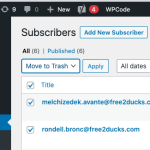
Please, Where do I put this code? I can’t find the .csv file
Please put the code to functions.php of the theme. But even better you can use PHPCode Snippets or similar plugin to add a custom PHP code.
PL4 row has only these orders that are completed:
B1-B2: https://arsmagna.live/wp-admin/post.php?post=97336&action=edit
B3-B4: https://arsmagna.live/wp-admin/post.php?post=103136&action=edit
B5-B8: https://arsmagna.live/wp-admin/post.php?post=104240&action=edit
B9-B10: https://arsmagna.live/wp-admin/post.php?post=105254&action=edit
MARIA TERESA ALVAREZ ADIEGO tried to order all of the above as well, but order were canceled. For example B9-B10: https://arsmagna.live/wp-admin/post.php?post=104278&action=edit
I’am just trying to find two orders for the same seat that are both completed.
Hello,
Unfortunately, the only option at the moment is to go to Edit Event > Tickets > check View Attendees and/or Sales Insight.
We are glad your issue is resolved, if you have any further questions or concerns please create a new ticket. If you have a moment, we would greatly appreciate if you could kindly leave us a review at myeventon/my-account!. Cheers!