Please try also adding
.ajde_evcal_calendar.boxy .eventon_list_event.hasbgimg, .ajde_evcal_calendar.boxy.boxstyle1 .evo_boxtop, .ajde_evcal_calendar.boxy.boxstyle2 .evo_boxtop { background-color: transparent !important; }
Replies for tickets on suppota
Please try also adding
.ajde_evcal_calendar.boxy .eventon_list_event.hasbgimg, .ajde_evcal_calendar.boxy.boxstyle1 .evo_boxtop, .ajde_evcal_calendar.boxy.boxstyle2 .evo_boxtop { background-color: transparent !important; }
That worked perfectly. Thank you
Hello, and thank you for this. Now I have a blue border at the top and bottom of the image. How can I remove it? It is particularly large in the mobile version. Thank you very much for your efforts. br Andi
Hi there. So why are the events not showing up on the calendar still?
Here is a possible workaround…
If I Clone an Event… and then I also clone a Woocommerce Product/Ticket…. would I be able to assign the event to the WC Product?? I tried to do that, but I keep getting the message….
Assign Different WC Product
You do not have any items saved! Please add new!
Connor do let us know which domain we can use for ftp and if its SFTP or FTP.
Hi, I can see my three add ons:
RSVP Events, RSVP Events Waitlist, Reminders but I can’t find the main download for Eventon to cancel that as well? Is it possible that you have a reseller that I need to contact? Thank you for your help!
We are investigating this issue at the moment my friend. Will get an update out as soon as we can!
We will be sure to include this code change in the next version and also run more tests on this before next release.
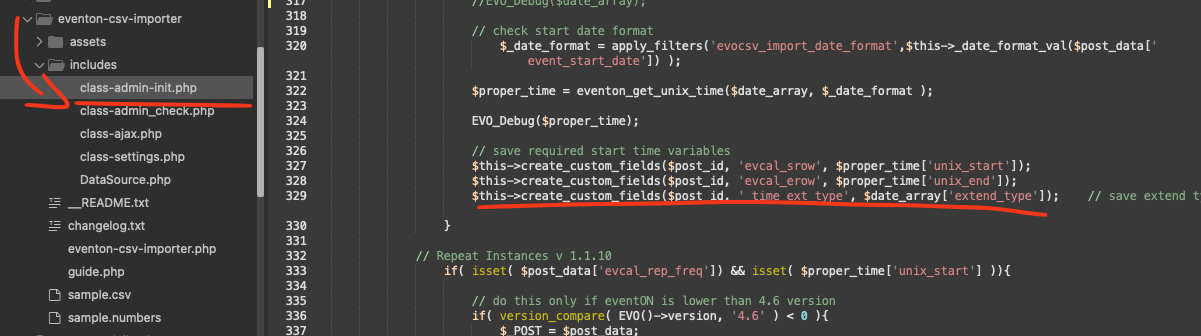
Kindly add this patch fix to your CSV importer addon and that will fix the extended type value not saving
code: $this->create_custom_fields($post_id, ’_time_ext_type’, $date_array[’extend_type’]);