You are right. Unfortunately, you could add users in Incognito mode, but since only logged-in users can RSVP, there is no way of adding users.
You can test Invitees add-on here:
https://dev.myeventon.com/wp-admin/post.php?post=200358&action=edit
I think that the add-on should work in your case. Users receive invitations and then go to the event to RSVP.
Please go to wp-admin > Settings > General > Time Format > change it to 24H format.
Please also add filter_type=”select” to the shortcode. Works here:
https://www.theatrelulu.com/test-2/
Ok I see that now in the footer of the page.
However, my problem is on the list view on top of the page. The apply filter button is not displayed.
I’m using the following shortcode :
[add_eventon_list number_of_months=”6″ evc_open=”yes” show_limit=”yes” hide_empty_months=”yes” show_year=”yes” hide_mult_occur=”yes” exp_jumper=”yes”]
Thanks
I did it but no changes on https://canardsbastogne.be/stg_a7a5f/?event_organizer=club-canard
Same when I click on Organizer on any event card (this open a lightbox view)
p.s.
also, if I indeed use my own account to book other attendees, it cannot be done because I can only add one user (one email address) and the system correctly offer me just the option to change RSVP and not create a new one.
Maybe the Invite add on can avoid this? Is it testable anywhere like other addons?
Thanks
Thanks it should work now.
Another question.
Is there any Possibility to change the clock to 24 hours as we have it in Germany. Without am and pm but 13.00 o´clock for example?
Hi Ashan, i dont have this values in my “language” area and not in loco translate. So please let me know where to translate!
Hello,
but to do that (not booking with my logged in user) I must remove the option to forse rsvps to logged in users only, right?
otherwise I am booking with my own name and data…
or I can just change the populated data with different infos? I am going to try this but please let me know, thank you.
Cp
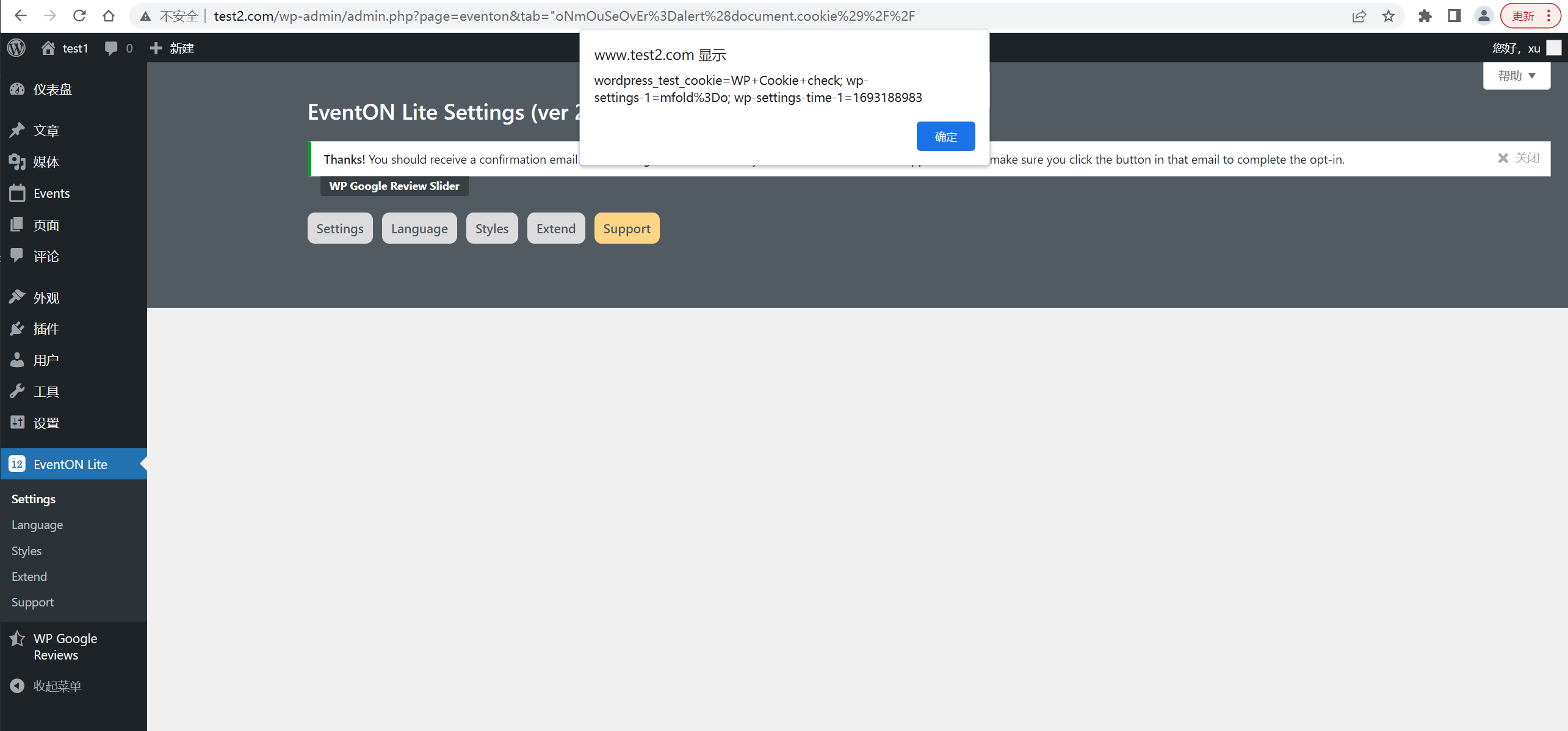
I found that changing the tab value to “oNmOuSeOvEr=prompt(1)//” would trigger the xss building bug.
The Proof of Concept of this vulnerability can be found on here: https://github.com/xsn1210/vul/blob/main/xss%5BEventON%5D%20.md
It is suggested to start from the following aspects:
- Filter special characters
<script>,<img>,<iframe> and other tags that trigger js; oNmOuSeOvEr,onerror, onclick, onmouseover and other onxxx tag attributes or set the whitelist of tag event attributes
- Special characters HTML escape
‘, “, <, >, l, :, &, #
- Limit the input length
You should be aware that other researchers may independently discover this vulnerability and announce it prematurely. You should also note that this vulnerability may be exploited in the wild already. For these reasons, we encourage you to release a fix as soon as possible to help protect your customers.
As a courtesy we ask that you notify us as soon as you release a fix to your customers. Please let me know if you have any questions.
I appreciate your prompt response