Yes, standard theme no plugins but the eventon enabled.
Archives: Replies
Replies for tickets on suppota
Reply to: tickets(326618)
Okay thanks.
I still dont understand the idea behind it. the variation add on also shows – “sold out” – so why not add the “remaining tickets”, too.
I guess I will have to wait if or till other users question this lack of functionality.
thanks
Reply to: tickets(326879)
Hi,I am a WordPress security researcher. I’m reaching out regarding a security issue in version 2.1.7 of your product EventON. I just tested on the version 2.2 of the plugin and it appears that it is still vulnerable. And I just tested on the latest version 2.2.1 of the plugin and it appears that it is still vulnerable.
I found that the security issue still exists, although it is stated in your new development version “FIXED: XSS vulnerability with virtual event link field.
FIXED: XSS vulnerability eventon settigns custom login link field”
2.2
The 2023-9-11
FIXED: XSS vulnerability with virtual event link field
FIXED: XSS vulnerability eventon settigns custom login link field
But the security issue still exists and is not well fixed.
I found that changing the tab value to “oNmOuSeOvEr=prompt(1)//” would trigger the xss building bug.
Change the value of tab to “oNmOuSeOvEr=prompt(1)//, and send the modified url. /wp-admin/admin.php?page=eventon&tab=”oNmOuSeOvEr=prompt(1)//
Or change the value of the argument tab to “oNmOuSeOvEr=alert(document.cookie)// and send the modified url. /wp-admin/admin.php? page=eventon&tab=”oNmOuSeOvEr=alert(document.cookie)//
A pop-up window will appear on the web page, and an alarm box showing 1 will pop up, triggering XSS, indicating that there is cross-site vulnerability, recording the vulnerability, and stopping the test.
The Proof of Concept of this vulnerability can be found on here: https://github.com/xsn1210/vul/blob/main/xss%5BEventON%5D%20.md
It is suggested to start from the following aspects:
- Filter special characters
<script>,<img>,<iframe> and other tags that trigger js; oNmOuSeOvEr,onerror, onclick, onmouseover and other onxxx tag attributes or set the whitelist of tag event attributes
- Special characters HTML escape
‘, “, <, >, l, :, &, #
- Limit the input length
For XSS cross-site vulnerabilities, the following fixes can be used:
- Overall repair method: Verify all input data to effectively detect attacks; Encode all output data appropriately to prevent any scripts that have been successfully injected from running on the browser side. The details are as follows:
1) Input validation: Before a piece of data is accepted as displayable or stored, a standard input validation mechanism is used to verify the length, type, syntax, and business rules of all input data.
2) Output coding: Before data output, ensure that the data submitted by the user has been correctly encoded as entity. It is recommended that all characters be encoded instead of limited to a certain subset.
3) Specify the encoding of the output explicitly: do not allow an attacker to choose the encoding for your user (such as ISO 8859-1 or UTF 8).
4) Note the limitations of the blacklist verification method: just finding or replacing some characters (such as “<” “>” or keywords similar to “script”) can easily be bypassed by XSS variant attacks.
5) Beware of normalization errors: Before validating input, it must be decoded and normalized to conform to the application’s current internal representation. Make sure the application does not decode the same input twice. Filter the data submitted by the client. It is recommended to filter out special characters such as double quotation marks (“) and Angle brackets (<, >), or convert special characters contained in the data submitted by the client to entity form, such as “double quotation marks (“) into entity form”. , < corresponding entity form is < , < corresponding entity form is > The following are common characters to filter:
[1] | (vertical bar symbol)
[2] & (ampersand)
[3]. (semicolon)
[4] $(Dollar sign)
[5] % (percentage symbol)
[6] @ (at symbol)
[7] ‘(single quotes)
[8] “(quotes)
[9] ‘ (backslash escape single quotes)
[10] ” (backslash escape quotes)
[11] <> (Angle brackets)
[12] () (brackets)
[13] + (plus sign)
[14] CR (Carriage return, ASCII 0x0d)
[15] LF (Line feed, ASCII 0x0a)
[16], (comma)
[17] (backslash)
- Escape key characters in the request return page;
[1] “(double quotes) :”
[2] ‘(single quotes) : &apos
[3] Ampersand (& symbol) : ampersand
[4] < (left Angle bracket) : <
[5] > (right Angle bracket) : >
You are advised to mark the cookie as httpOnly and disable the TRACE method on the condition that the application is not affected.
- Suggestion: XSS filter for website system written in PHP language:
<? php
/ * *
* @Remove XSS (cross-site scripting attack) function
* @par $val string argument, which may contain malicious script code such as <script language=”javascript”>alert(“hello world”); </script>
* @return Indicates the processed string
* @Recoded By Androidyue
* * /
function RemoveXSS($val) {
// remove all non-printable characters. CR(0a) and LF(0b) and TAB(9) are allowed
// this prevents some character re-spacing such as <javascript>
// note that you have to handle splits with n, r, and t later since they *are* allowed in some inputs
$val = preg_replace(‘/([x00-x08,x0b-x0c,x0e-x19])/’, ”, $val);
// straight replacements, the user should never need these since they’re normal characters
// this prevents like <IMG SRC=@avascript:alert(‘XSS’)>
$search = ‘abcdefghijklmnopqrstuvwxyz’;
$search .= ‘ABCDEFGHIJKLMNOPQRSTUVWXYZ’;
$search .= ‘1234567890! @ # $% ^ & * () ‘;
$search .= ‘~`”; 😕 + / = {} [] – _ | ‘ ‘;
for ($i = 0; $i < strlen($search); $i++) {
//; ? matches the ; , which is optional
// 0{0,7} matches any padded zeros, which are optional and go up to 8 chars
// @ @ search for the hex values
$val = preg_replace (‘/(& # [xX] 0 {0, 8} ‘. The dechex (word ($search ($I))). ‘; ?). /i’, $search[$i], $val); // with a ;
// @@0 {0,7} matches ‘0’ zero to seven times
$val = preg_replace (‘/(& # 0 {0, 8} ‘. The word ($search [$I]). ‘; ?). /’, $search[$i], $val); // with a ;
}
// now the only remaining whitespace attacks are t, n, and r
$ra1 = Array(‘javascript’, ‘vbscript’, ‘expression’, ‘applet’, ‘meta’, ‘xml’, ‘blink’, ‘link’, ‘style’, ‘script’, ’embed’, ‘object’, ‘iframe’, ‘frame’, ‘frameset’, ‘ilayer’, ‘layer’, ‘bgsound’, ‘title’, ‘base’);
$ra2 = Array(‘onabort’, ‘onactivate’, ‘onafterprint’, ‘onafterupdate’, ‘onbeforeactivate’, ‘onbeforecopy’, ‘onbeforecut’, ‘onbeforedeactivate’, ‘onbeforeeditfocus’, ‘onbeforepaste’, ‘onbeforeprint’, ‘onbeforeunload’, ‘onbeforeupdate’, ‘onblur’, ‘onbounce’, ‘oncellchange’, ‘onchange’, ‘onclick’, ‘oncontextmenu’, ‘oncontrolselect’, ‘oncopy’, ‘oncut’, ‘ondataavailable’, ‘ondatasetchanged’, ‘ondatasetcomplete’, ‘ondblclick’, ‘ondeactivate’, ‘ondrag’, ‘ondragend’, ‘ondragenter’, ‘ondragleave’, ‘ondragover’, ‘ondragstart’, ‘ondrop’, ‘onerror’, ‘onerrorupdate’, ‘onfilterchange’, ‘onfinish’, ‘onfocus’, ‘onfocusin’, ‘onfocusout’, ‘onhelp’, ‘onkeydown’, ‘onkeypress’, ‘onkeyup’, ‘onlayoutcomplete’, ‘onload’, ‘onlosecapture’, ‘onmousedown’, ‘onmouseenter’, ‘onmouseleave’, ‘onmousemove’, ‘onmouseout’, ‘onmouseover’, ‘onmouseup’, ‘onmousewheel’, ‘onmove’, ‘onmoveend’, ‘onmovestart’, ‘onpaste’, ‘onpropertychange’, ‘onreadystatechange’, ‘onreset’, ‘onresize’, ‘onresizeend’, ‘onresizestart’, ‘onrowenter’, ‘onrowexit’, ‘onrowsdelete’, ‘onrowsinserted’, ‘onscroll’, ‘onselect’, ‘onselectionchange’, ‘onselectstart’, ‘onstart’, ‘onstop’, ‘onsubmit’, ‘onunload’);
$ra = array_merge($ra1, $ra2);
$found = true; // keep replacing as long as the previous round replaced something
while ($found == true) {
$val_before = $val;
for ($i = 0; $i < sizeof($ra); $i++) {
$pattern = ‘/’;
for ($j = 0; $j < strlen($ra[$i]); $j++) {
if ($j > 0) {
$pattern .= ‘(‘;
$pattern.= ‘(&#[xX]0{0,8}([9ab]);) ‘;
$pattern .= ‘|’;
$pattern.= ‘|(�{0,8}([9|10|13]);) ‘;
$pattern .= ‘)*’;
}
$pattern .= $ra[$i][$j];
}
$pattern .= ‘/i’;
$replacement = substr($ra[$i], 0, 2).'<x>’.substr($ra[$i], 2); // add in <> to nerf the tag
$val = preg_replace($pattern, $replacement, $val); // filter out the hex tags
if ($val_before == $val) {
// no replacements were made, so exit the loop
$found = false;
}
}
}
return $val;
}
// Test the effect
//echo RemoveXSS(“<script language=’javascript’>alert(‘hello world’); </script>”) ;
? >
You should be aware that other researchers may independently discover this vulnerability and announce it prematurely. You should also note that this vulnerability may be exploited in the wild already. For these reasons, we encourage you to release a fix as soon as possible to help protect your customers.
As a courtesy we ask that you notify us as soon as you release a fix to your customers. Please let me know if you have any questions.
I appreciate your prompt response,
Thank you
Reply to: tickets(326879)
I’m reaching out regarding a security issue in version 2.1.7 of your product EventON. I just tested on the version 2.2 of the plugin and it appears that it is still vulnerable.And I just tested on the latest version 2.2.1 of the plugin and it appears that it is still vulnerable.I found that the security issue still exists, although it is stated in your new development version “FIXED: XSS vulnerability with virtual event link field.FIXED: XSS vulnerability eventon settigns custom login link field”But the security issue still exists and is not well fixed.I found that changing the tab value to “oNmOuSeOvEr=prompt(1)//” would trigger the xss building bug.
Change the value of tab to “oNmOuSeOvEr=prompt(1)//, and send the modified url. /wp-admin/admin.php?page=eventon&tab=”oNmOuSeOvEr=prompt(1)//. A pop-up window will appear on the web page, and an alarm box showing 1 will pop up, triggering XSS, indicating that there is cross-site vulnerability, recording the vulnerability, and stopping the test.The Proof of Concept of this vulnerability can be found on here: https://github.com/xsn1210/vul/blob/main/xss%5BEventON%5D%20.md
It is suggested to start from the following aspects:
1. Filter special characters
<script>,<img>,<iframe> and other tags that trigger js; oNmOuSeOvEr,onerror, onclick, onmouseover and other onxxx tag attributes or set the whitelist of tag event attributes
2. Special characters HTML escape
‘, “, <, >, l, :, &, #
3. Limit the input length
You are advised to mark the cookie as httpOnly and disable the TRACE method on the condition that the application is not affected.
You should be aware that other researchers may independently discover this vulnerability and announce it prematurely. You should also note that this vulnerability may be exploited in the wild already. For these reasons, we encourage you to release a fix as soon as possible to help protect your customers.
Reply to: tickets(326871)
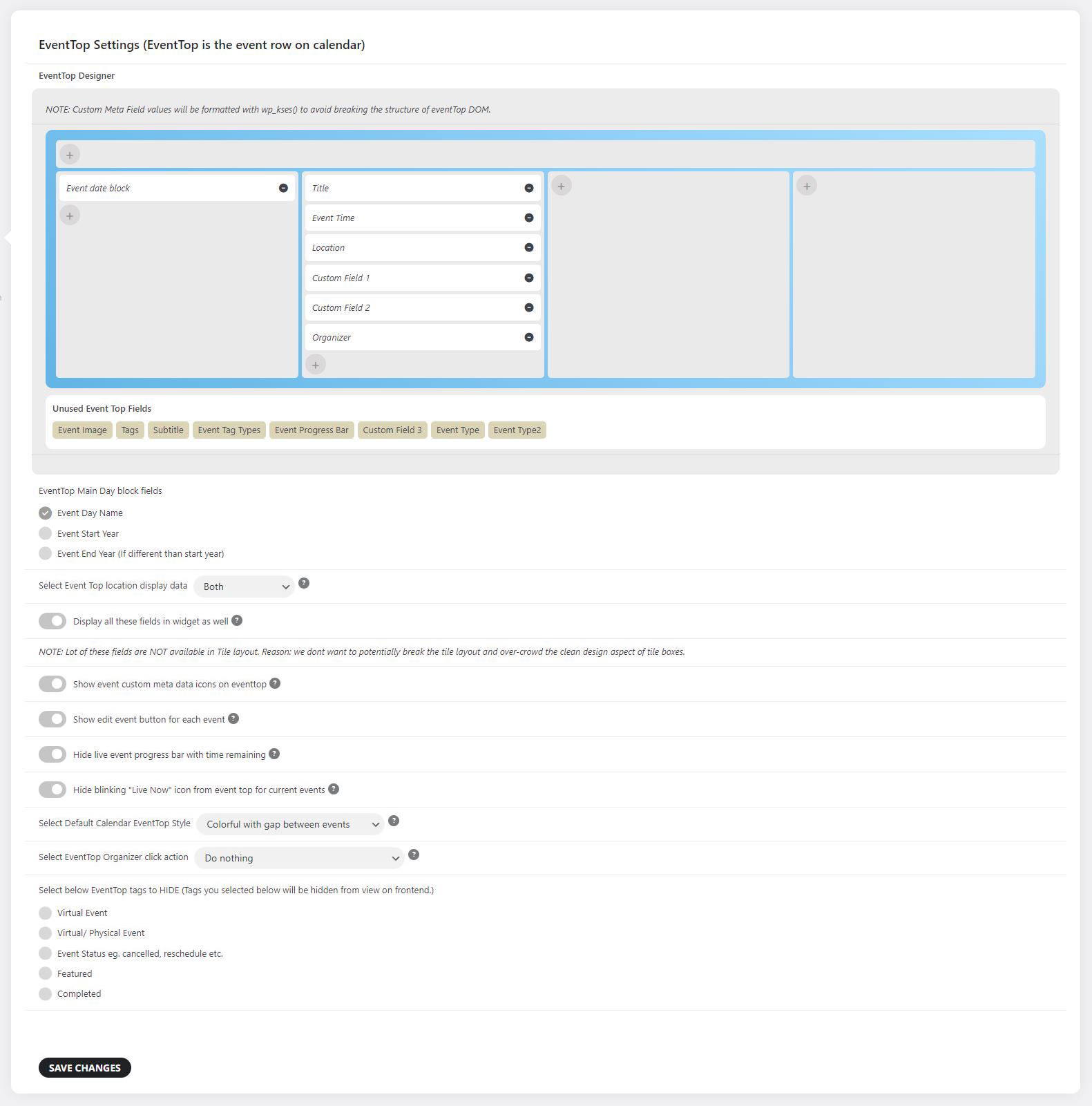
Reply to: tickets(326871)
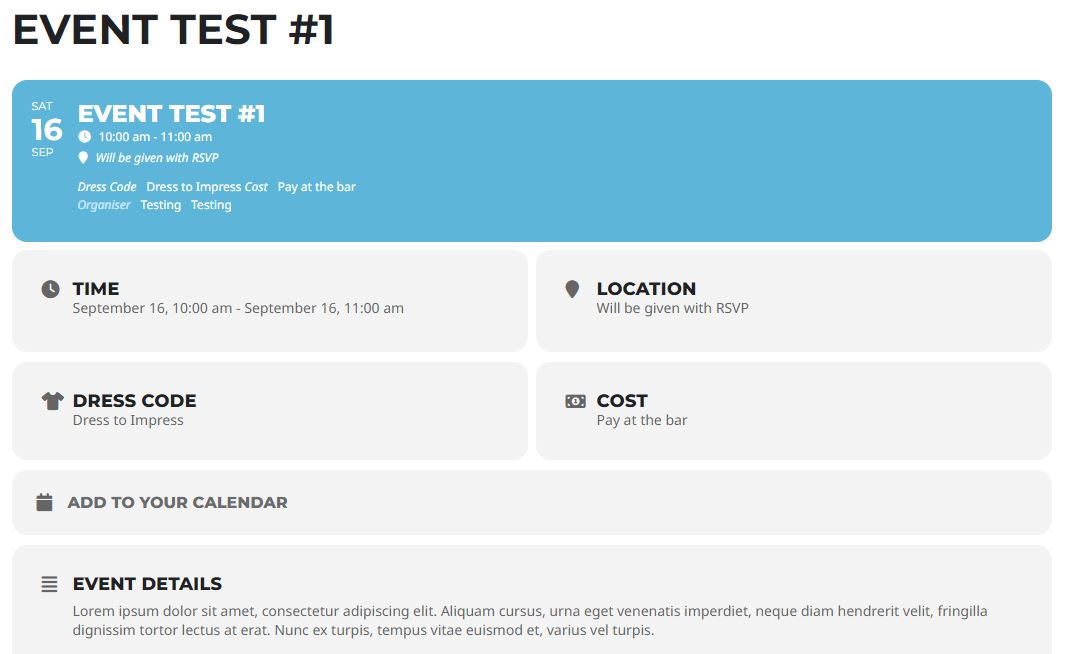
Reply to: tickets(326871)
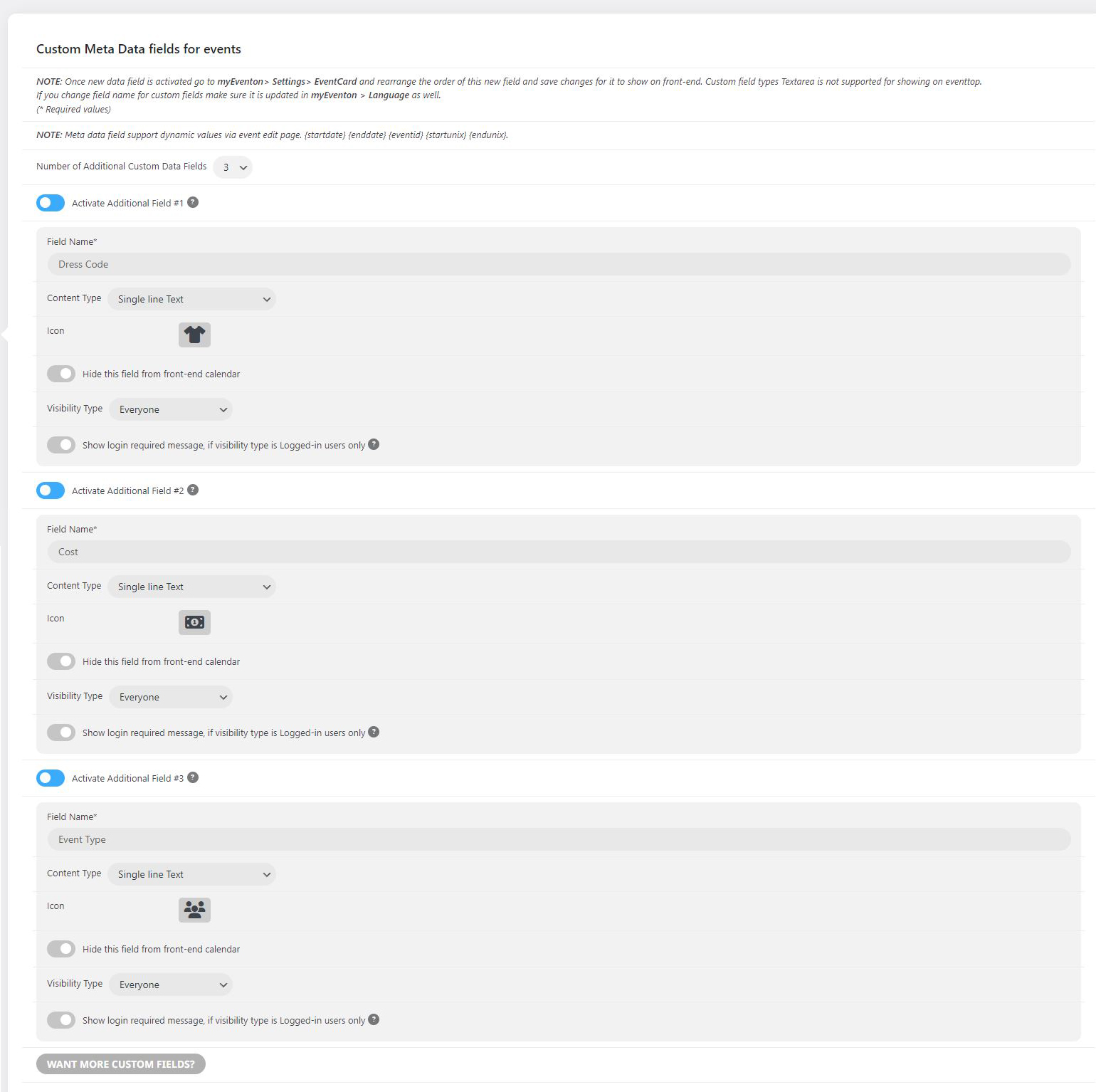
Reply to: tickets(326766)
Your version is still 4.3.5. Please take a look at our test site:
https://dev2.myeventon.com/?page_id=51236
Reply to: tickets(326618)
When you enable variations in events, Ticket Variations & Options add-on’s functionality is what your users see and use.
And the product page doesn’t show anything about the remaining tickets functionality, I am afraid:
https://www.myeventon.com/addons/ticket-variations-options/
Reply to: tickets(326717)
On our test server it takes less than 2 seconds per each event: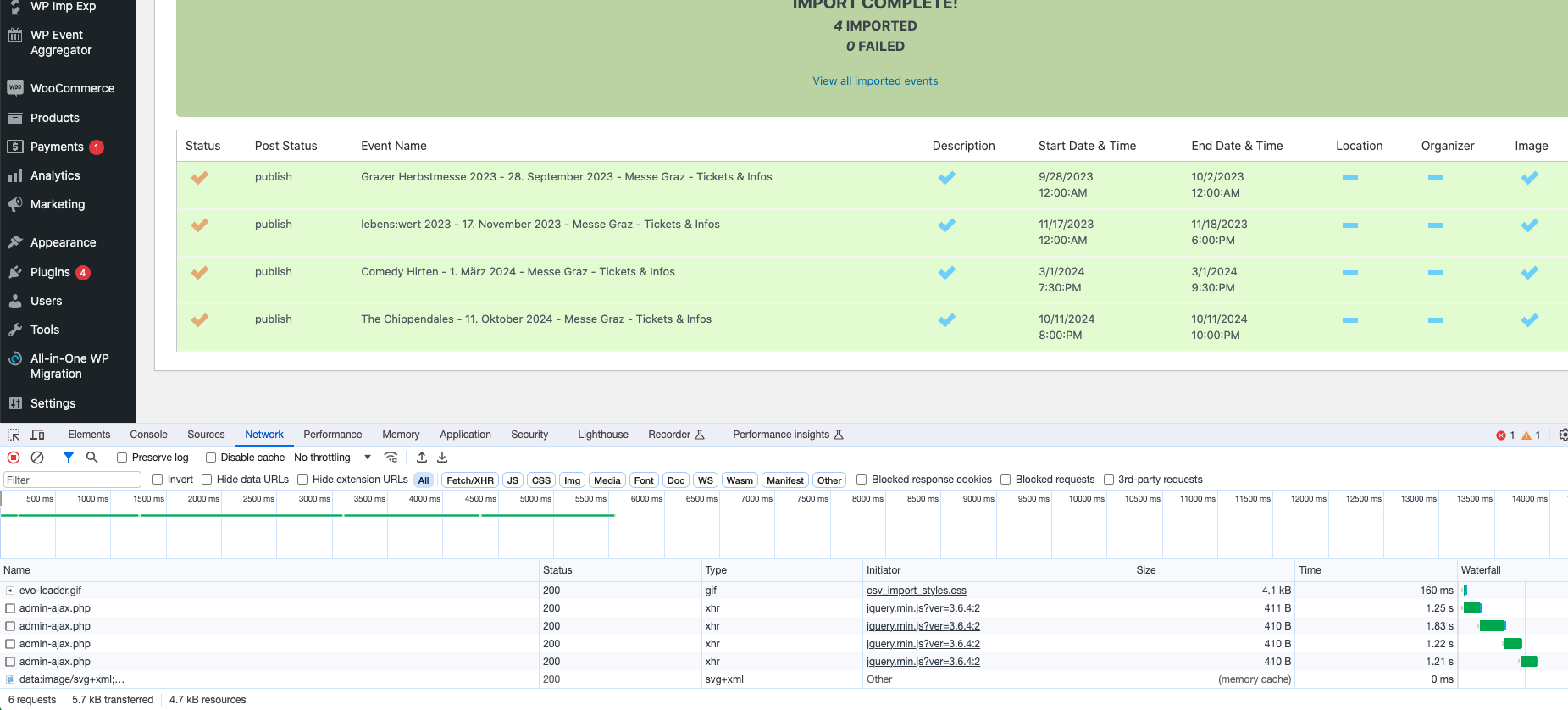
Could you send us the full .csv file with 50 events?