Hello,
We are sorry for this. Please go to EventON Settings and save them.
Also go to EventON > EventTop > arrange fields the way they were.
Replies for tickets on suppota
Hello,
We are sorry for this. Please go to EventON Settings and save them.
Also go to EventON > EventTop > arrange fields the way they were.
Should work now. Please check and let me know.
Hello,
We are sorry for this. Please go to EventON Settings and save them.
Also go to EventON > EventTop > arrange fields the way they were.
Please also send us wp-admin access to your site as a private message for us to further assist your situation.
Hello,
Could you update EventON to 4.5 and try again?
To update eventon to latest version: If you are unable to do autoupdate, you can go to codecanyon your account > download and get the latest eventon version as zip file. Then you can go to your website > make sure “Delete eventon settings & data when EventON is uninstalled” is Deslected from eventon settings, delete old eventon, install new one and activate. This link will further explain the process it. Also you can follow us on twitter to get real-time announcements on updates!
After updating please go to EventON and make sure to save settings.
Should work now. Please check and let me know.
Hello,
We are sorry for this. Please go to EventON Settings and save them.
Also go to EventON > EventTop > arrange fields the way they were.
Hello,
Are you referring to this part:
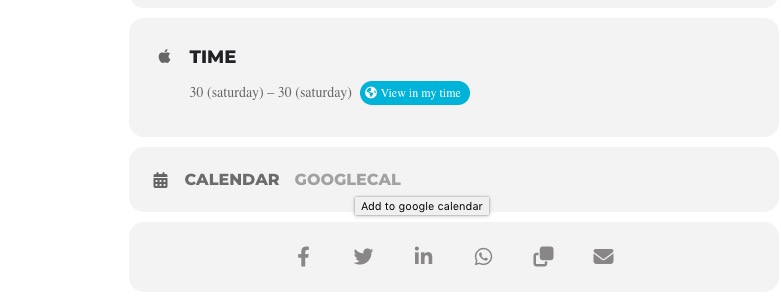 If so please go to EventON > EventCard Design > remove Add to Calendar section.
Could you try these versions:
https://helpdeskx.s3.amazonaws.com/wp-content/uploads/2023/01/19140230/eventON4.2.2.zip
https://helpdeskx.s3.amazonaws.com/wp-content/uploads/2023/06/01042208/eventON-4.0.1.zip
https://helpdeskx.s3.amazonaws.com/wp-content/uploads/2022/09/13030304/eventON-3.1.7.zip
Please start with 3.1.7.
Ok should work now. Please check and let me know.