Hello,
Please add this CSS code to EventON > Styles (If you don’t see any change, EventON > Scripts & Styling > turn off Write dynamic styles to header > save settings > turn on Write dynamic styles to header):
.ajde_evcal_calendar strong img { display: inline-block !important; }
The 4.0.1 worked, thanks… I do have one more issue I’ve been trying to resolve.
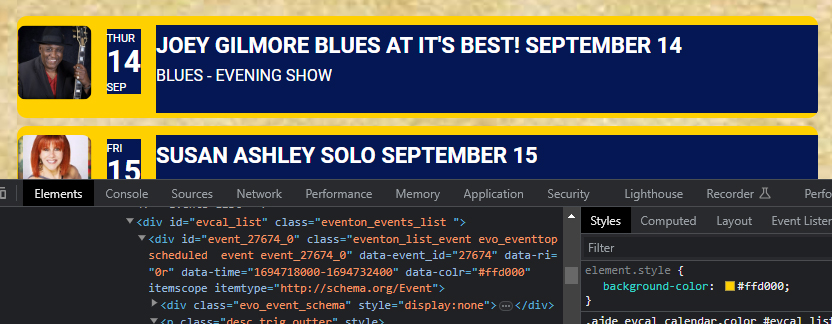
element style location? trying to find where to change color for #ffd000 to #051754, custom css doesnt work.
please advise, screenshot supplied
Hello,
We are sorry for this. Please go to EventON Settings and save them.
Also go to EventON > EventTop > arrange fields the way they were.
Unfortunately, this is fully related to the theme and it’s styling + scripts. Could you contact the theme developer and ask about this issue?
Hello,
Please update EventON to 4.5. But now after you updated it go to EventON and save them. This will fix the issue.
After please send us wp-admin access to your site as a private message for us to further assist your situation.
Hello,
Is this correct Order ID:
#173570
RSVP Events Invitees – Single Site
Thank you for your messages, I am going to assign this ticket to Ashan and he will be able to take it from here and find you a solution. Please allow some time for him to get back to you, we greatly appreciate your patience and thank you for being a eventon customer! Also please disable any IP blocking on your site if there are any.
Which version did you update from?
Google requires you to put your card number from quite a while ago. So in order to fix this issue:
Geocoding Service: You must enable Billing on the Google Cloud Project at https://console.cloud.google.com/project/_/billing/enable Learn more at https://developers.google.com/maps/gmp-get-started
please follow the info in the error.
About the original issue. We are working on figuring it out why this issue has happened and how to fix this in the next version.
Should work now. Please check and let me know.
Hello,
We are sorry for this. Please go to EventON Settings and save them.
Also go to EventON > EventTop > arrange fields the way they were.