The best in your case is to downgrade EventON.
Archives: Replies
Replies for tickets on suppota
Reply to: tickets(324986)
Tickets add-on.
Reply to: tickets(324987)
Also please tell me why TICKET SECTION TITLE Doesn’t change to what it is configured for?
Please go to EventON > Language > ADDON: Event Tickets > Ticket section title.
Reply to: tickets(324987)
Ashan,
Login info:
Not sure how but I was able to recreate this on dev2:
https://dev2.myeventon.com/events/seats-7/
It puts 999 even so it supposed to be 11:
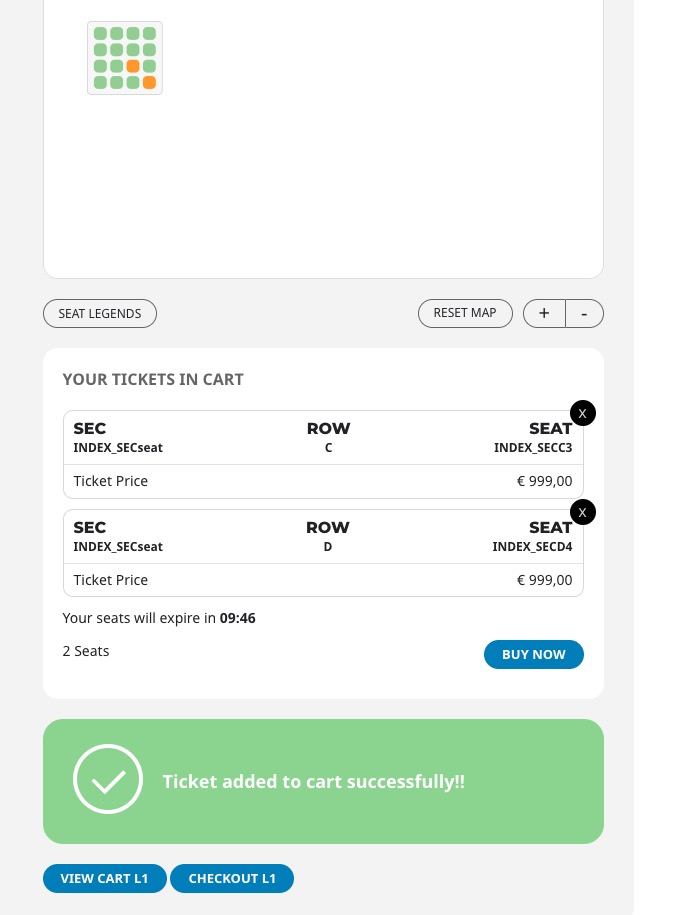
I edited Ticket Price (general and for the seat) by adding .00 (999.00 and 11.00) and then removing it.
Reply to: tickets(324987)
Thank you for your messages, I am going to assign this ticket to Ashan and he will be able to take it from here and find you a solution. Please allow some time for him to get back to you, we greatly appreciate your patience and thank you for being a eventon customer! Also please disable any IP blocking on your site if there are any.
Reply to: tickets(324987)
last thing for now. I spent nearly $600 on Event On and plugins for this site. RSVP doesn’t do what I expected – I was hoping to RSVP specific seats and notify the buyer. I don’t see the PDFer working right or the QR codes working right yet. Your documentation is light or hidden. Some of your YouTube videos (e,g. Tickets) are 8 years old. You need to update your YouTube videos and documentation. It is incredibly frustrating to not have good documentation and be left to just figure it out!
Also, please hide the credentials I sent you earlier if they are not marked private.
Reply to: tickets(324987)
Also this has been tested with 2023 – default theme. We have disabled Elementor when we did this and with the Hello theme – this is not a theme issue. WooCommerce Core is forcing the product price and when you try to make a variable product it kills the seating map.
Reply to: tickets(324987)
Also please tell me why TICKET SECTION TITLE Doesn’t change to what it is configured for?
Reply to: tickets(324986)
Ok, it looks like the subscription for the addons is currently on hold. Some of the addons are not used. Which are necessary to regain Event Main Details block?
Reply to: tickets(324987)
We are halfway through a workaround to get this launched with multiple maps. You can see what we are doing:
https://tailgateexperience.tsu.edu/wp-admin
uid: eventonashanjay
pwd: 6dwq85FQ2Gh&0&F34YnTcX#n
Here is a duplicated event that you can see what is going on: https://tailgateexperience.tsu.edu/events/tiger-tailgating-experience-zones-c-f-10×10-test/
I am pursuing the workaround