Second, It is not possible to download the ics calendar file from the eventcard on the event page, IF the event is a private (not public event).
See the link to a private event: https://b-sure.eu/events/ambassadorsevent/
Replies for tickets on suppota
Second, It is not possible to download the ics calendar file from the eventcard on the event page, IF the event is a private (not public event).
See the link to a private event: https://b-sure.eu/events/ambassadorsevent/
login: support_eventon
email: ict@b-sure.eu
password : Il)ezXGq@mFTQ3&uGUp21foP
pay attention= 10 days without 2FA!!!!
Hello, We did.
Could you please check the ics export file as attached? in the text strange symbols + the text is interrupted (link of event page is correctly mentioned, but I would prefer if the whole event description would be exported in the ics file)
Here you go,
Link: https://conferenziaworld.com/wp-login.php
Username: eventon
Password: i11gsRH@%fq#5j4)sXf)RVob
To temporary solve the problem I have made so the tile send to a singel event so our costumer can buy tickets. I hope you can find the error in the Ajax loading so we can use full calendar and get full functionality again.
You find the problem with Ajax lodin on this page: https://www.bristol.se/testing/
But the one click add to cart don’t work at all.
/wp-admin
ıd: mehmetbalaban
pass: YediAgency7*
Hello,
Please check the other ticket. I replied there.
Here’s the issue.
Your Event Type ID is 22:
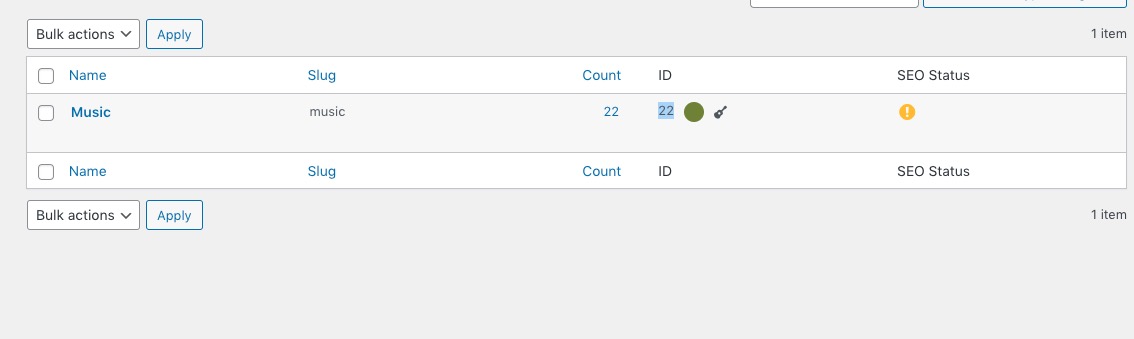
But in the file it says 1070:
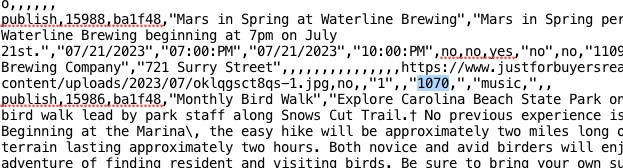
Please open it and replace “1070,” with “22,”. Any text editor app should have the automatic replace function.
Seems to be working: Please send us wp-admin access to your site as a private message for us to further assist your situation.
Hello,
If you want to be able to edit the main /events page with Elementor, you need to follow this:
PROTIP: If the /events page does not work due to theme/plugin conflicts, create a new page, call it “Events Directory” Insert eventon shortcode and use that as your main events page which will have a URL ending like /events-directory. This would be a perfect solution if you have conflicts with /events slug.
The issue is that your main page will have /events-directory URL, while Single Event Pages will have /events.
Please also note that you cannot edit Single Event Page no matter what slug you use. The only way is to follow
https://docs.myeventon.com/documentations/customize-single-events-page/
The main /events page can also be customized with
https://docs.myeventon.com/documentations/how-to-customize-events-archive-page/