Thank you very much for the clarification and suggestion.
so I don’t need the booking add on right now…(by the way it appears the demo on the site is not working properly).
I try the solution and eventually will add the weekly view add on.
thank you
cristiano
Hello,
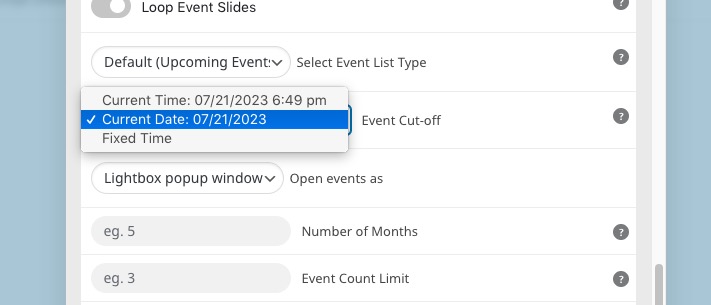
Try selecting “Current Date: Event Cut-off”:
Also make sure that EventON > Time Settings > Default Event Timezone is the same as wp-admin > Settings > Timezone.
okay, just what does that mean? 🙂 and why version 4.3.5 works on the current theme and 4.4.3 on the current theme doesn’t? 🙂
in all previous versions this search engine worked properly. Only since 4.4.0 has it stopped…
here are my credentials
website: www.benita-yoga.com/wp-admin
log: benita
pass: QPT4y4zz!jxhV@3tYS1$IPmX
thank you
shamack
Hello,
Thank you for your messages, I am going to assign this ticket to Ashan and he will be able to take it from here and find you a solution. Please allow some time for him to get back to you, we greatly appreciate your patience and thank you for being a eventon customer!
Please send us wp-admin access to your site as a private message for us to further assist your situation. We will fix this ASAP.
You could go to EventON > Single Events > enable Restrict single event pages to logged-in users only. Now only logged-in users can see events.
The same with calendars. Add members_only=”yes” to shortcodes to restrict access.
But without RSVP add-on (for free registration):
https://www.myeventon.com/addons/rsvp-events/
Users cannot actually register and you cannot gather any statistics (for example, how many people have already registered) and so on.
Try on https://dev.myeventon.com/wp-admin/
The issue:
Geocoding Service: This API project is not authorized to use this API. For more information on authentication and Google Maps JavaScript API services please see: https://developers.google.com/maps/documentation/javascript/get-api-key
Please try this solution:
https://stackoverflow.com/a/32998566
My hosting team says this is resolved now for you to try again. Thanks.
No, registration is free. We just need to be able to restrict the url of the booking link to registered users. Or even better restrict access using our Paid Membership Plugin option.
We have a subscription. If the user is active on this subscription he can book, otherwise he cannot. Thanks