works like a charm
Archives: Replies
Replies for tickets on suppota
Reply to: tickets(320979)

Hi here’s a screenshot of how I see it (android)
Reply to: tickets(320730)

I just realized that part of the problem is that EventON won’t activate.
Here is the error I’m seeing:
Plugin could not be activated because it triggered a fatal error.
Reply to: tickets(319781)
Ah I see what you mean. Unfortunately Bruce it does not support that behavior at the moment. I will have to get this coded.
Might take a bit of time, because the code is a little but complicated. 🙂
Reply to: tickets(320554)
Seems to be working fine on our new beta version 4.4.3
Please let me know my question above.
Reply to: tickets(320935)
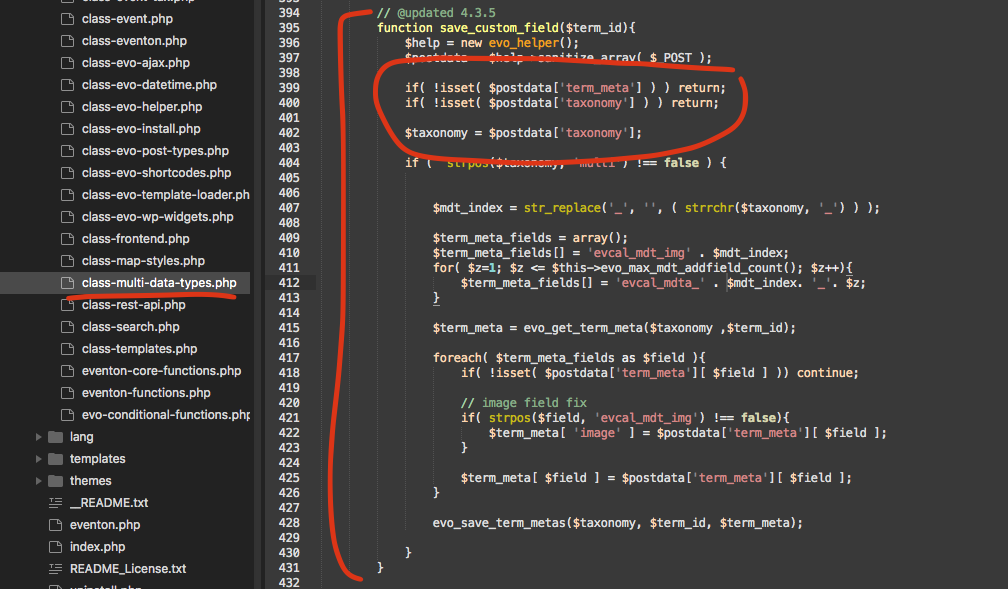
here is the new code. mostly the taxonomy value change from tax should solve the issue.
Reply to: tickets(305129)
Hello
I’ve had the “event date block” added in the 2nd line and 2nd position.
you can see on this page.
https://xzib.com/e/art-basel-miami-beach
the event top used to show both beginning and end date.
Reply to: tickets(321033)
Hello,
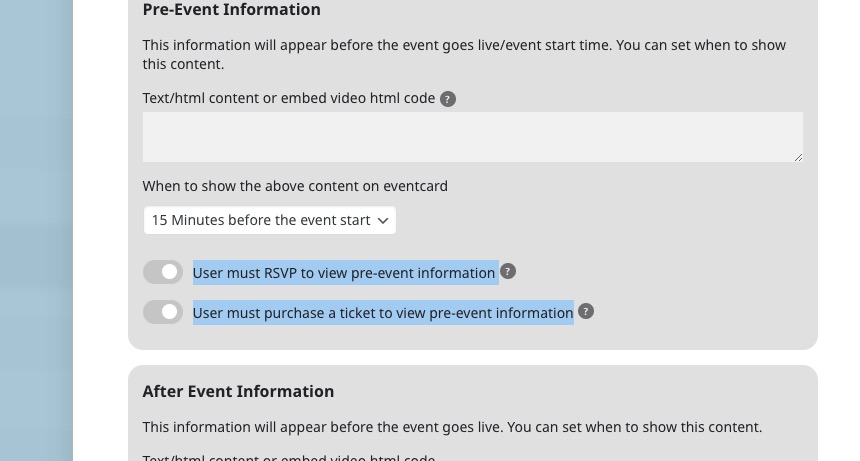
You can show the virtual info only after RSVP or purchasing a ticket:
RSVP add-on is for free events.
You can enable RSVP in each individual event.
Registering to events isn’t available by default, only with RSVP add-on.
Tickets and RSVP add-ons aren’t working with each other.
Try on https://dev.myeventon.com/wp-admin/
Reply to: tickets(320330)
We are glad your issue is resolved, if you have any further questions or concerns please create a new ticket. If you have a moment, we would greatly appreciate if you could kindly leave us a review at codecanyon! from your account > downloads. Cheers!
Reply to: tickets(320734)
Perfect! If you have any further questions or concerns please create a new ticket.