Hello
I’ve had the “event date block” added in the 2nd line and 2nd position.
you can see on this page.
https://xzib.com/e/art-basel-miami-beach
the event top used to show both beginning and end date.
Replies for tickets on suppota
Hello
I’ve had the “event date block” added in the 2nd line and 2nd position.
you can see on this page.
https://xzib.com/e/art-basel-miami-beach
the event top used to show both beginning and end date.
Hello,
You can show the virtual info only after RSVP or purchasing a ticket:
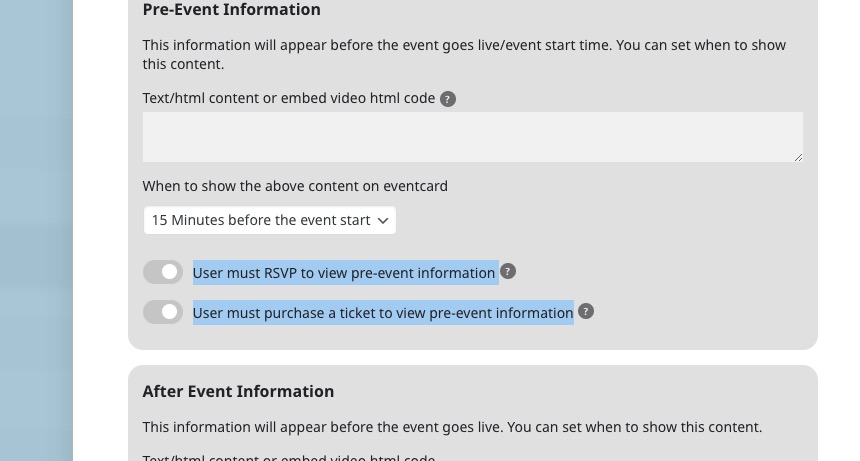
RSVP add-on is for free events.
You can enable RSVP in each individual event.
Registering to events isn’t available by default, only with RSVP add-on.
Tickets and RSVP add-ons aren’t working with each other.
Try on https://dev.myeventon.com/wp-admin/
We are glad your issue is resolved, if you have any further questions or concerns please create a new ticket. If you have a moment, we would greatly appreciate if you could kindly leave us a review at codecanyon! from your account > downloads. Cheers!
Perfect! If you have any further questions or concerns please create a new ticket.
Thank you for your response. I have contacted Image Map PRO and they can’t solve the problem. The code I need is from eventon not image map pro. I need the code to enter the variations of woocommerce products that appear in the eventon event. If you notice, the old code is from eventon.
I don’t understand Code Canyons policy as Image Map Pro is also theirs. So no one can solve the problem for me?
I’ve solved it, the problem was due to a wrong configuration in CloudFront (there were old cookies).
Nevermind. I disabled the plugin and reactivated it and it fixed everything.
I deactivated the User Role Editor plugin and it still doesn’t work. The same error persists and not all options for events appear on the event editing page.
If you access https://13.49.93.169/wp-admin, the error does not reproduce, it only happens when you log in with the domain onevent.ro https://www.onevent.ro/wp-admin. The difference is that if you log in directly with the IP, it doesn’t go through CloudFront.
I don’t have the default WordPress theme. But I’m certain the issue is not originating from there.
I suspect it doesn’t work if the WordPress site name is with onevent.ro. I can’t figure out where the problem is. Something changed with the permissions. What permissions should be on the onevent folders?
Hi, this fixed the width, but nothing else.
The font sizes are not correct, the spacing is off and the logo is not sized properly.
Hi Ashan –
I guess 4 months later on the reply is technically better than nothing but not what most would call a timely response.
No matter, even using your proposal above, there’d be no way to distinguish hours for an even on each day. They’d have to all be the same and that’s not feasible for every multi-day event.