And site:
https://www.leaderscontact.com/lclogin.php
Replies for tickets on suppota
And site:
https://www.leaderscontact.com/lclogin.php
WP
User: Support
PWD: supportmenow
Server
User: support
PWD: the same as up
“PHPMailer is disabled on our servers for security reasons, you can use the more secure SMTP instead.”
This is how I got a response from the hosting company. Can’t we provide sending with SMTP?
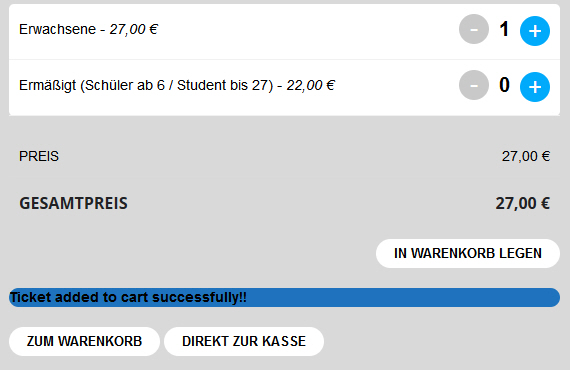
Here the picture of Firefox
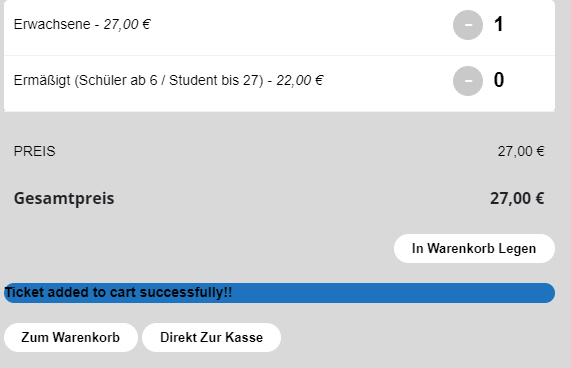
Hello, after Updating eventon to 4.4.2, Tickets to 2.2, Seats to 1.2 and Variations and Options to 1.1, something looks wrong:
1. Translation ist missing for: “Ticket added to cart successfully”
2. The Button “+” is not the right colour (in our Website “BLUE”) in OPERA – see pictures (all looks good in firefox, IE and Chrome): See Pictures
Please send us wp-admin access to your site as a private message for us to further assist your situation.
you can use custom meta data to create a new field in myeventon>>>>settings>>>>custom meta data
activate one- call it details- choose an icon
from the drop down make it editor
then in myeventon>>>setings>>>event card design you will need to add and position that right next to the default details
now you will have a new field at the base of your edit event page to add the event details which will show when it has content but not show when it doesn’t
the username and password didn’t work for me but if you have trouble setting it up- please post as a private message the updated login and I can do it for you
perhaps try this plugin
https://wordpress.org/plugins/hide-categories-products-woocommerce/
so you would choose the tickets category to hide and that way they shouldn’t be able to navigate to the product page- and can only buy from the event page “in theory” we have not tested it
I just tested this plugin
https://wordpress.org/plugins/wp-downgrade/?
to downgrade our dev site to your version and eventon seemed to run still
so best create a staging site if possible to update eventon and see if it works, or failing that option backup your site first then update eventon- test it all out- if it doesn’t work then go back to your backup and at that point let us know
You should be able to view the website now.
Second issue. Previously, when even tickets were sold out. It would display in the single event page sold out, but it would also show on the Actually Calendar List beside or below the title. Why does it no longer do that? How do we get that back?