Hi Tara,
Please take a look at our changelog below
https://docs.myeventon.com/documentations/au-changelog/
Replies for tickets on suppota
Hi Tara,
Please take a look at our changelog below
https://docs.myeventon.com/documentations/au-changelog/
Please make my last response private as it is currently visible to everyone since I didn’t mark it as private.
hello, down below the credential to access
define(‘DB_NAME’, ‘inaffiq163’);
/** MySQL database username */
define(‘DB_USER’, ‘inaffiq163’);
/** MySQL database password */
define(‘DB_PASSWORD’, ‘Octopus10’);
/** MySQL hostname */
define(‘DB_HOST’, ‘inaffiq163.mysql.db:3306’);
Hi Larry,
The password you have provided does not seem to work. Please check if it’s working on your end.
I know my limitations, I stop at .css, can I ask you to do that?
Here is a link for you to login:
https://businessrehab.theownerconsultant.com/wp-admin
Login: Eventon
PW: 8QyhJbCA%isalh**q^H3LTfv
You have admin privilages.
Let me know if you need anything else.
Thank you so much!
I was able to import the file on your server by changing event_id:
https://devtwo.attractionsontario.ca/wp-admin/post.php?post=34063&action=edit
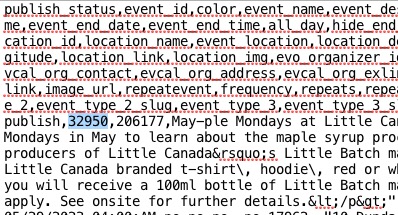
It seems there is another piece of content with the same id, so CSV Import throws an error and stops importing.
We are glad your issue is resolved, if you have any further questions or concerns please create a new ticket.
If you have a moment, we would greatly appreciate if you could kindly leave us a review at codecanyon! from your account > downloads. Cheers!
Hello,
Thank you for your great suggestion, at the moment it is not supported. However please create a new ticket and select Feature Request as category so others can vote on your idea and get it moved into development faster.
Hello,
Thank you for your messages, I am going to assign this ticket to Ashan and he will be able to take it from here and find you a solution. Please allow some time for him to get back to you, we greatly appreciate your patience and thank you for being a eventon customer!
We are very sorry for the delay. There is a new version of Action User available 2.4.1. Could you update, then go to EventON > Action User > Paid Submissions > even if it is enabled, still save Settings?
To update eventon addons: You can download latest eventon addons from myeventon > my account. Then you can go to your website, deactivate old addon and install new one and activate then delete the old addon. This link will further explain the process. Also you can follow us on twitter to get real-time announcements on updates!