Hello,
Please go to EventON > EventTop > arrange fields similar to this
 After go to EventON > Appearance > EventTop Styles > change Event Title font color. If you don’t see any change, EventON > Scripts & Styling > turn off Write dynamic styles to header > save settings > turn on Write dynamic styles to header.
Hello,
1. Please follow this guide:
https://docs.myeventon.com/documentations/single-events-page-not-working-404-error/
2. Please follow these guides:
https://docs.myeventon.com/documentations/confused-event-type-categories/
https://docs.myeventon.com/documentations/how-to-use-event-types-to-do-more/
Location Address is empty:
[screenshot removed]
Could you make sure it contains an address?
Hello,
Could you re-send the screenshot? I don’t see it.
Hello Jack Bacigalupo,
Please take a look at your ticket.
Hello,
Could you apply this patch:
https://helpdeskx.s3.amazonaws.com/wp-content/uploads/2023/04/21121551/Screen-Shot-2023-04-21-at-12.15.26-PM.png
We can do this for you if you share FTP access as a private message.
Hi whats the latest plse?
Past Events have stopped showing on this page:
https://necanews.org/neca-past-events/
Thanks, Artem! We had the “display:none” as a backup solution if we couldn’t find a common ground.
https://jasonh296.sg-host.com/wp-admin
apps@dotedison.com
2022!dotedison#1
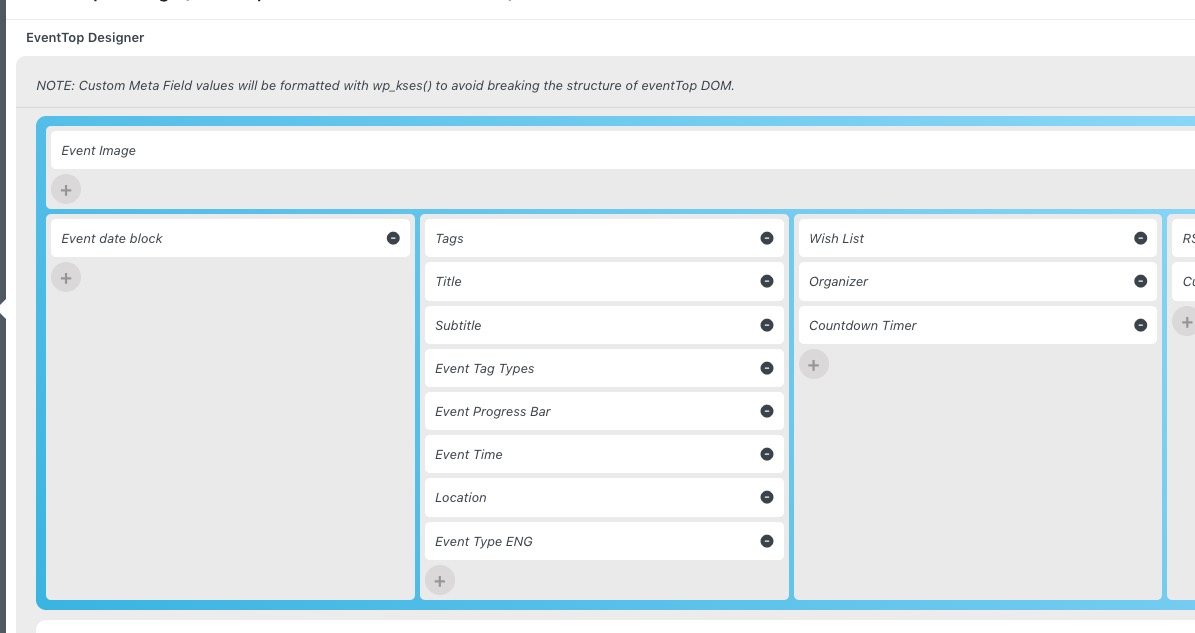 After go to EventON > Appearance > EventTop Styles > change Event Title font color. If you don’t see any change, EventON > Scripts & Styling > turn off Write dynamic styles to header > save settings > turn on Write dynamic styles to header.