When I activate the EventON and ActionUser plugin, it breaks the website – particularly the /events/ page. I’m not able to change the design of the page or anything. I’m not even able to load the Elementor editor.
Archives: Replies
Replies for tickets on suppota
Reply to: tickets(314057)
One more detail, this is a multi-site, and the E ventOn Calendar is only active on the nevadacity.innerpath.org sub-site (https://nevadacity.innerpath.org/wp-admin/admin.php?page=eventon)
Reply to: tickets(314006)
yes and yes
yes the email gets sent and the qr is in the email
Reply to: tickets(314052)
you need to be using events list shortcode- and not the main calendar shortcode
change [add_eventon to [add_eventon_list
and also remove show_et_ft_img=”yes as the image is shown via tile controls
Reply to: tickets(313931)
Added the code right where the code is: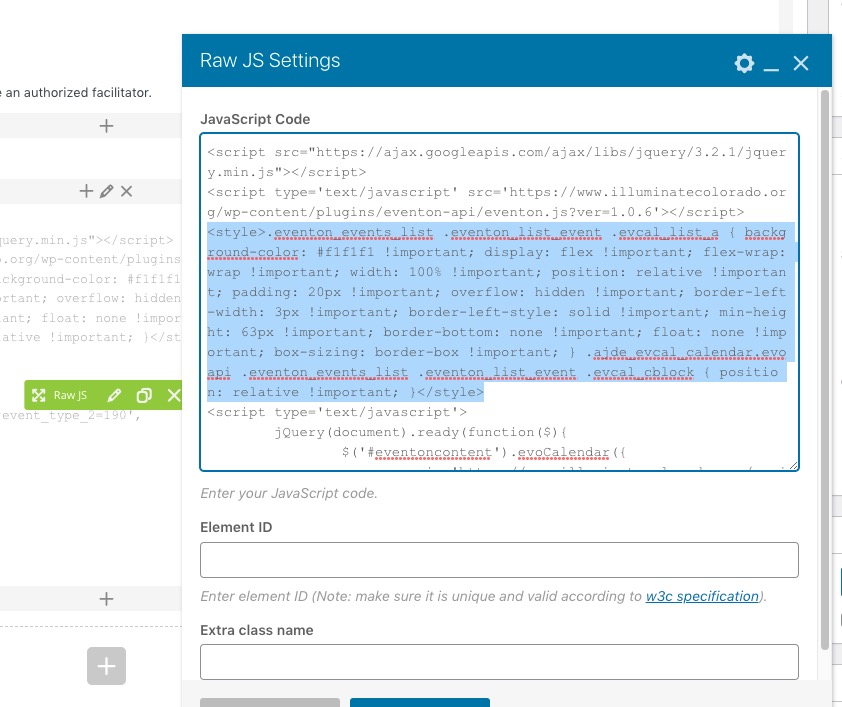
It also needed !important:
.eventon_events_list .eventon_list_event .evcal_list_a { background-color: #f1f1f1 !important; display: flex !important; flex-wrap: wrap !important; width: 100% !important; position: relative !important; padding: 20px !important; overflow: hidden !important; border-left-width: 3px !important; border-left-style: solid !important; min-height: 63px !important; border-bottom: none !important; float: none !important; box-sizing: border-box !important; } .ajde_evcal_calendar.evoapi .eventon_events_list .eventon_list_event .evcal_cblock { position: relative !important; }
Seems to be working now. Please check and let me know.
Reply to: tickets(314033)
Hello,
Thank you for your great suggestion, at the moment it is not supported. However please create a new ticket and select Feature Request as category so others can vote on your idea and get it moved into development faster.
Reply to: tickets(313994)
Hello,
Please create a separate page for each button, where you need to put a shortcode with filtered results according to this guide:
https://docs.myeventon.com/documentations/confused-event-type-categories/
Reply to: tickets(314011)
Hello,
Our test site doesn’t have Google Map API, since it can be easily changed/removed when wp-admin access is available to anybody.
Please take a look at how Event Map works on our test server:
https://dev2.myeventon.com/test-29/
And also on our demo server:
https://addons.myeventon.com/events-map/
Please note that you can just refund your purchase during first 30 days.
More info:
https://docs.myeventon.com/documentations/terms-and-conditions-and-refund-policy/
So usually customers buy an add-on, test it out on their WP environment and if it works, keep using it.
YOU ALSO NEED TO ADD A LOT MORE EVENTS, WITH PHOTOS, AND VIDEOS, ETC.
Could you elaborate? Are you referring to dev site or demo site?
Reply to: tickets(313864)
Perfect! If you have any further questions or concerns please create a new ticket.
Reply to: tickets(313858)
Perfect! If you have any further questions or concerns please create a new ticket.