We are glad your issue is resolved, if you have any further questions or concerns please create a new ticket.
If you have a moment, we would greatly appreciate if you could kindly leave us a review at EventON WordPress Page OR Codecanyon. Your review helps us a lot in continuing EventON improvements!
Hello,
Try manually clearing your browser cache.
Please send us wp-admin access to your site from “Access Info” box on right side menu, to further assist your situation.
Hello MVCC Digital Team,
Try manually clearing your browser cache.
Could you create a new ticket with included login info? We are going to check/apply the fix.
Perfect! Please wait for the update that will be available shortly.
Please add this CSS code to EventON > Styles (If you don’t see any change, EventON > Scripts & Styling > turn off Write dynamic styles to header > save settings > turn on Write dynamic styles to header).
You can also add this code to wp-admin > Appearance > Customize > Additional CSS.
.ajde_evcal_calendar.color #evcal_list .eventon_list_event p a.desc_trig:focus{box-shadow:none!important;}
Please add this CSS code to EventON > Styles (If you don’t see any change, EventON > Scripts & Styling > turn off Write dynamic styles to header > save settings > turn on Write dynamic styles to header).
You can also add this code to wp-admin > Appearance > Customize > Additional CSS.
.ajde_evcal_calendar.color #evcal_list .eventon_list_event p a.desc_trig:focus{box-shadow:none!important;}
Hello Pascal Derathé,
First of try clearing your browser cache manually.
Please create a new ticket with included login info. I am going to check the issue.
Hi Artem
in my eventon 5.0.1 there no “return;” in eventon_script.js

But the cards don’t open neither
Best regards
Pascal
Phew! Thank you for your prompt response.!
Hello,
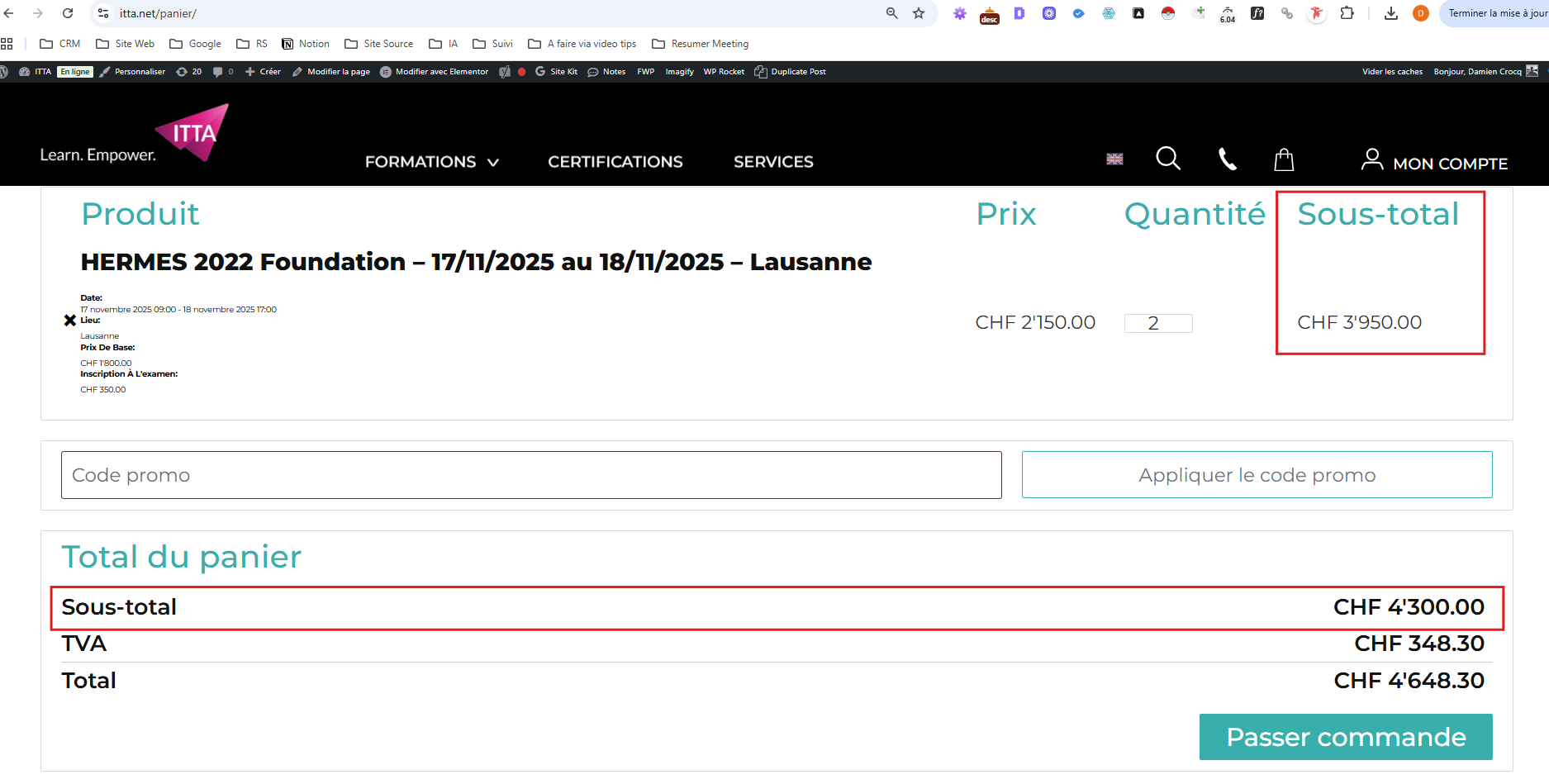
yes, I still need some help. I’ve noticed that when I add a ticket variation option with an additional item that has a price, the amount is correct when I add it to the cart.
However, when I change the product quantity in the cart, the additional item is also multiplied (for example, it becomes 2).
The issue is that the price of the first displayed subtotal is incorrect — it doesn’t take into account the added second additional item.
However, the price of the second subtotal (the cart total) is correct.
How can I fix this issue?
Here’s a screenshot to help illustrate the problem.