Hello,
Since you’ve already purchased eventON from myeventon.com go to My Account > Downloads and get the latest version copy.
Please try and let us know.
Replies for tickets on suppota
Hello,
Since you’ve already purchased eventON from myeventon.com go to My Account > Downloads and get the latest version copy.
Please try and let us know.
Having the same issue with only 0 GMT timezone, tried reinstalling it, no effect. Should I create a new ticket to send you WordPress credentials?
Also, please note that we will be switching to a more user-friendly Event plugin next billing cycle if this is not resolved very soon. It’s been years (please review all my pleas) since I sought support on this issue. Thank you for your professional consideration in this important matter.
RE:
YOU: As for the autoupdate, the next version should update automatically. ME: I have been patiently waiting for this plugin to update in a less archaic fashion, and it’s been 9 months and still no end in site. Can you please update me on when/IF this will ever see the light of day?
[add_eventon_el number_of_months=”4” cal_id=”test 2” hide_past=”no” tiles=”yes” tile_count=”3” tile_height=”500” ux_val=”1” evc_open=”no” tile_style=”1” tile_bg=”1” accord=”no” show_limit=”no” show_exp_evc=”yes” filter_type=”select” event_type=”140” ]
Thanks
Please use billing@keokee.com thanks
Thanks. The update fixed it.
Hello,
There is an issue with SMTP plugin installed and configured on your website:
No se ha podido enviar el correo electrónico «Pedido completado»: SMTP Error: Could not connect to SMTP host. Failed to connect to server.
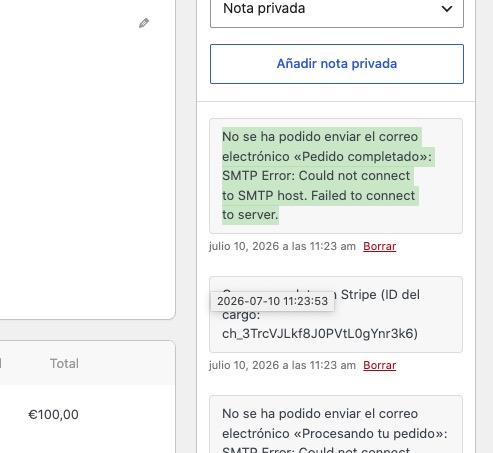
Could you fix the issue?
Hello,
You can download the latest 5.0.12 version from our website. Please follow:
To update eventon to latest version: (If auto update works, please try that from with your website plugins page)
1. If you purchased eventON from codecanyon > Go to EventON Full page and verify your purchase to get a free copy of eventON latest version and move your purchase over to myeventon.com.
2. If you already purchased eventON from myeventon.com go to My Account > Downloads and get the latest version copy.
Once you have the latest version zip file. Then you can go to your website > make sure ”Delete eventon settings & data when EventON is uninstalled” is De-slected from eventon settings, delete old eventon, install new one and activate. This link will further explain the process it. Follow us on X to get real-time announcements on updates!