Thank you very much!
Archives: Replies
Replies for tickets on suppota
Reply to: tickets(311186)
Hello,
Please take a look at this guide:
https://docs.myeventon.com/documentations/show-additional-custom-data-eventcard/
It describes how you can add additional info to Event Card.
All you need to do is to get assigned taxonomies and show them using the guide above:
https://docs.myeventon.com/documentations/taxonomies-eventon/
Reply to: tickets(311162)
Should be this part: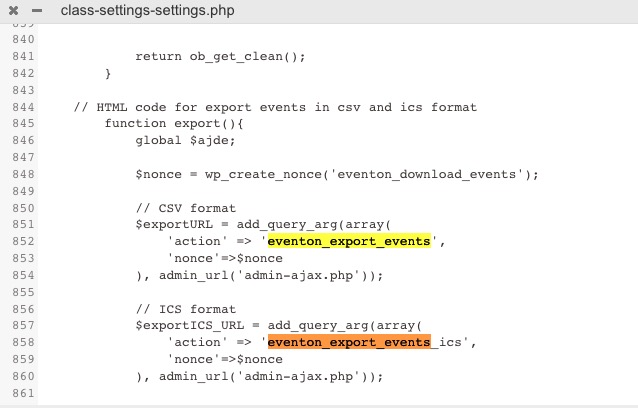
Reply to: tickets(311188)
Hello,
Could you take a look at this part of this guide:
https://docs.myeventon.com/documentations/auto-re-stocking-refunded-cancelled-or-failed-orders/
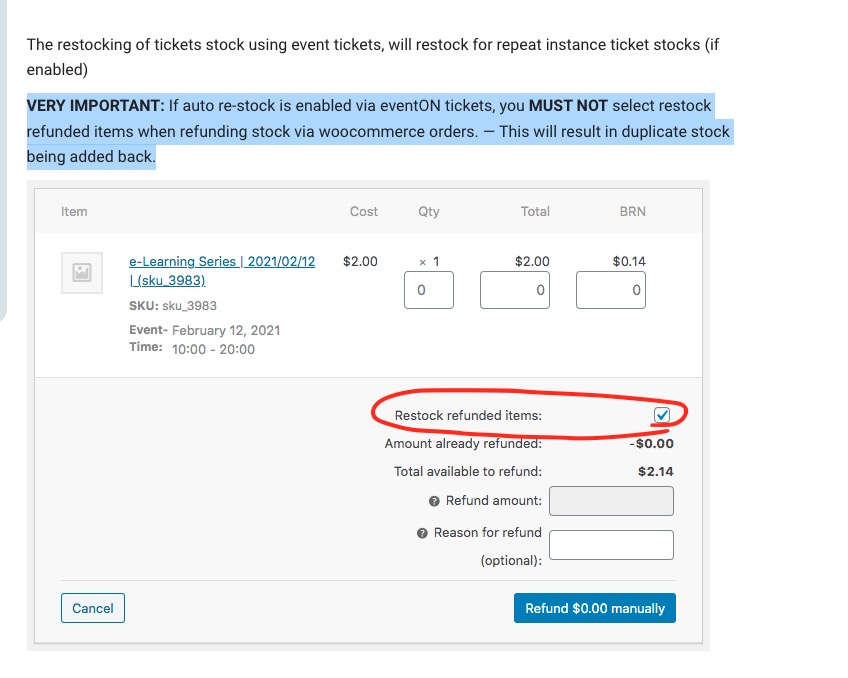 Could you send us a link to an order with the issue?
Reply to: tickets(310635)
Could you update RSS to 1.1.5?
To update eventon addons: You can download latest eventon addons from myeventon > my account. Then you can go to your website, deactivate old addon and install new one and activate then delete the old addon. This link will further explain the process. Also you can follow us on twitter to get real-time announcements on updates!
Reply to: tickets(311190)
Hello,
Enabling EventON > Time Settings > Use UTC offset time globally on calendars solved the issue. Could you check and let me know?
Reply to: tickets(310137)
Perfect! Thank you very much.
Reply to: tickets(311200)
Hello,
WooCommerce handles taxes, so please take a look at
https://woocommerce.com/document/setting-up-taxes-in-woocommerce/
Reply to: tickets(311203)
Hello,
If your plugin can export events as .csv file in the following format, you can use CSV Events Importer https://www.myeventon.com/addons/csv-event-importer/:
 Try on https://dev.myeventon.com/wp-admin/
Reply to: tickets(310137)
I give you 5 stars
😉