I think the correct answer was not given.
I also have the same problem. When I request to generate a new webhook I get the same error as the user above.
What can it depend on? I have expiring events and everything else works correctly.
I need the webhook to link a Google Sheet using make.com (integromat) using this procedure: https://docs.myeventon.com/documentations/how-to-use-webhooks/
Archives: Replies
Replies for tickets on suppota
Reply to: tickets(304841)
Ashan,
Please take a look at
When you update a location it still shows quotes instead of ", so Google shows “Missing ‘,’ or ‘}’ in object declaration.” error:
https://validator.schema.org/#url=https%3A%2F%2Fwww.solarserver.de%3A8443%2Fveranstaltung%2Fpraxisseminar-solare-fernwaerme%2F
Event: https://www.solarserver.de:8443/veranstaltung/praxisseminar-solare-fernwaerme/
But dev2’s the same location address doesn’t show it:
https://validator.schema.org/#url=https%3A%2F%2Fdev2.myeventon.com%2FEvents-Directory%2Fmuhltaler-brauhaus-zum-lowen-xx%2F
Event: https://dev2.myeventon.com/Events-Directory/muhltaler-brauhaus-zum-lowen-xx/
Reply to: tickets(304841)
Thank you for your messages, I am going to assign this ticket to Ashan and he will be able to take it from here and find you a solution. Please allow some time for him to get back to you, we greatly appreciate your patience and thank you for being a eventon customer! Also please disable any IP blocking on your site if there are any.
Reply to: tickets(310053)
Hello,
We are sorry for the delay.
RSVP – User RSVP Manager shows RSVPs to repeating events separately:

Action User – Event Manager basically duplicates the list of events from wp-admin > Events, so it shows one repeating event:
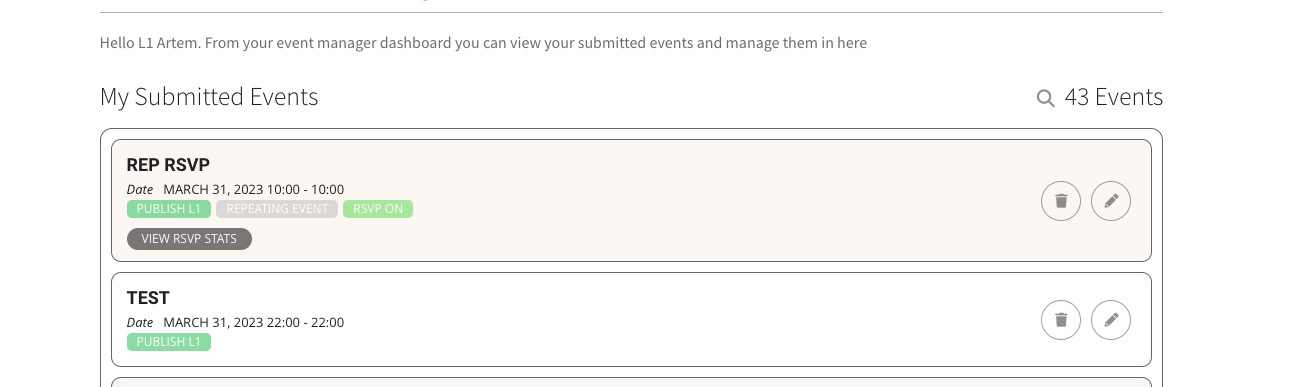
Which Event Manager are you referring to?
Reply to: tickets(310446)
Unfortunately, we don’t provide support for such customizations, since it’s against CodeCanyon’s Support Policy.
Reply to: tickets(310156)
Please go to EventON > EventCard Design > click on the icon to hide “Time”:

Reply to: tickets(310461)
We are glad your issue is resolved, if you have any further questions or concerns please create a new ticket.
If you have a moment, we would greatly appreciate if you could kindly leave us a review at codecanyon! from your account > downloads. Cheers!
Reply to: tickets(310168)
Please add this CSS code to EventON > Styles (If you don’t see any change, EventON > Scripts & Styling > turn off Write dynamic styles to header > save settings > turn on Write dynamic styles to header):
.ajde_evcal_calendar.boxy.boxstyle1 #evcal_list .eventon_list_event .evcal_desc span.evcal_event_title, .ajde_evcal_calendar.boxy.boxstyle1 #evcal_list .eventon_list_event .evcal_desc span.evcal_event_subtitle { overflow-wrap: normal; word-wrap: normal; white-space: normal; }
Reply to: tickets(310497)
Hello,
Add this code to wp-content/plugins/eventON/assets/css/admin/wp_admin.css file:
.evcal_db_uis .evcal_db_ui.evcal_db_ui_0, .evcal_db_uis .evcal_db_ui.evcal_db_ui_1, .evcal_db_uis .evcal_db_ui.evcal_db_ui_2, .evcal_db_uis .evcal_db_ui.evcal_db_ui_3, .evcal_db_uis .evcal_db_ui.evcal_db_ui_4 {display: none !important}
Each line hides an option.
Make sure to manually clear your browser cache.
Reply to: tickets(310498)
Hello,
No issues with this test event:
https://visitcarsonvalley.org/wp-admin/post.php?post=23959&action=edit
Could you send us a link to the one with the issue?