I don’t think that you can create a share button for Instagram:
https://stackoverflow.com/a/30542068
Reordering isn’t possible without customizing the source code of the plugin, I am afraid.
Replies for tickets on suppota
I don’t think that you can create a share button for Instagram:
https://stackoverflow.com/a/30542068
Reordering isn’t possible without customizing the source code of the plugin, I am afraid.
Ah, I have resolved it with this CSS code:
@media all and (max-width: 770px){
.evorow.evcal_evdata_row.evcal_evrow_sm.evo_metarow_tix.hide_remains {
flex-wrap: wrap;
}}
I seem to have had a similar issue previously, but with your seat selection view. You can read my old ticket Ticket #299333.
The solution to fix the display in that ticket was
“
Please try adding this to eventON settings > Styles
.evost_seat_selection.fixed_tt .evost_tooltip{flex-wrap:wrap}
make sure to clear cache.”
I couldn’t do that so Ashan did:
“Ok i was able to go into your site and add that styles and it was able to resolve the issue.”
Unfortunately, our license policy is the same in terms of what’s covered by support:
https://docs.myeventon.com/documentations/terms-and-conditions-and-refund-policy/ > 9. Support > What is NOT covered under support.
I didn’t dismissed your question. It’s just we cannot provide any help when it comes to such complex customization work.
Available documentation on how to customize the plugin can be found here:
https://docs.myeventon.com/documentation/codex/
https://docs.myeventon.com/documentation/code-snippets/
https://docs.myeventon.com/documentation/addons/rsvp-events/
Hello,
Please go to EventON > EventTop > EventTop Designer > put Tags before Title.
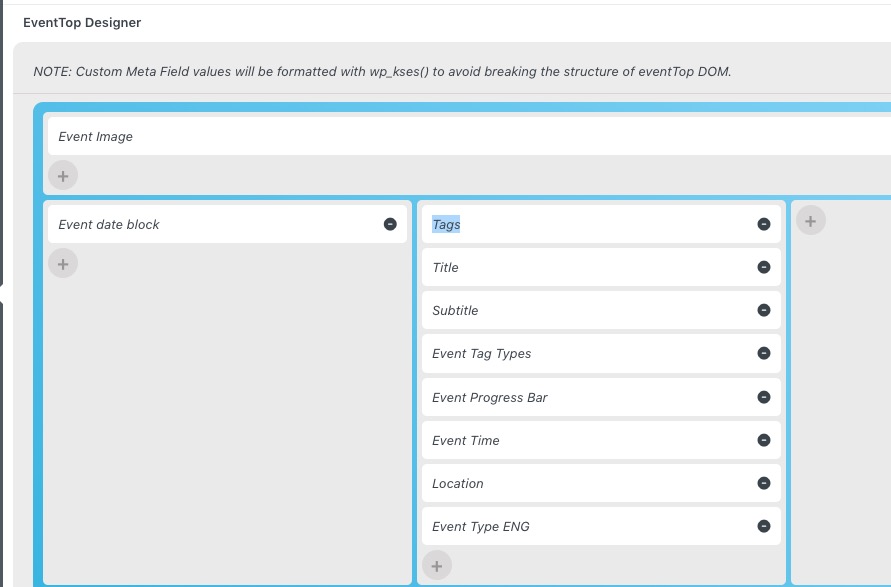
1. Please go to EventON > Language > Event Card > More/Less.
2. Please go to EventON > Single Event > enable Shareable Options.
Hello,
Can we take a look at wp-admin?
Please send us wp-admin access to your site as a private message for us to further assist your situation.
Unfortunately, what you are trying to achieve isn’t supported by EventON. You must add events as individual posts and then create a calendar that shows them.
Hello, please check bilhetesonline.com/wp-admin at this moment is possible
Hello, can I tell you which country you are trying to access the site?