Hi,
Sorry about that, I’ve just bumped up the access, can you please try again?
Replies for tickets on suppota
Hi,
Sorry about that, I’ve just bumped up the access, can you please try again?
password didn’t work for us
However from what I have read
now it might be a repeating event- however as you have set the stop RSVP’s once event starts and you are not using the rsvp for each repeat- thats how it is designed to not allow them to cancel the RSVP or in fact to RSVP once the event starts
but I think we should check over the set up just to be sure because you are right the email address is not found on the repeated events
I just tested an RSVP – but yes I would need to see the backend- and I’ll Ask for Ashan to get his thoughts as well
I have logged in- however it says I am not allowed to edit the event.
could you make this admin so we can edit the event
the shortcode doesn’t handle that- I have added some css which you can tweak by looking over this video below:
and optional if you wanted to get the pop up event top times/location displayed a little different see video below:
Hi,
Thanks for looking into this for us.
I’ve just copied our site across to a staging environment for testing.
Details are as follows:
Frontend: https://jobmancomstg.wpengine.com/support/training/
Backend: https://jobmancomstg.wpengine.com/wp-admin/
Event with the youtube video: https://jobmancomstg.wpengine.com/wp-admin/post.php?post=2397&action=edit
Username: noreply@myeventon.com
Pass: VF331*AVqLk00IHH(hP1Q%Cg
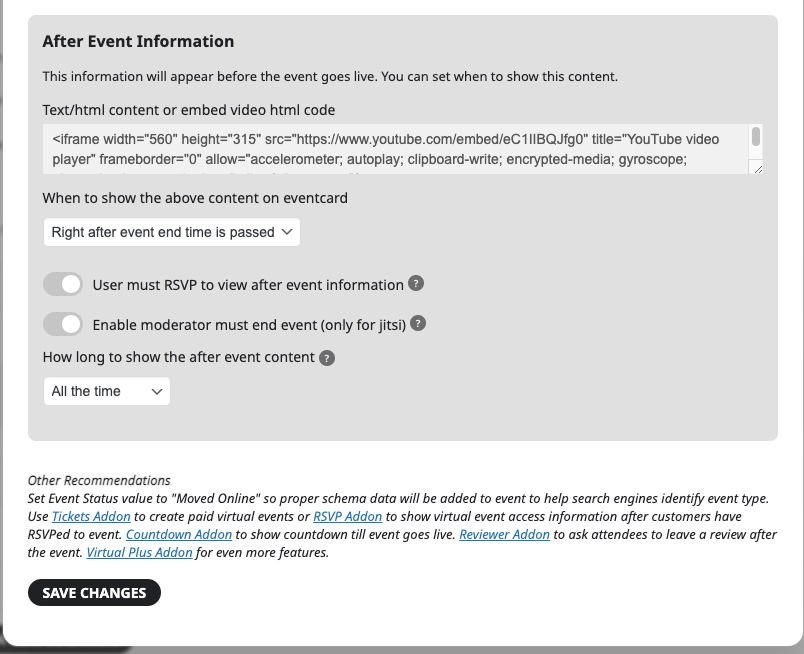
I just can’t get this youtube video to show up.
Also, is there a way to hide the “Register” button for events that have completed?
Thanks,
Ben
Yes, we have repeating events with RSVP and no, cancelling after event would be illogical.
A repeating event has several occurrences/dates, like a course. The client may have been to the first or/and second occurrence(s) but then decide they want to cancel the rest of the repeat event.
The problem only occurs when they are trying to cancel a repeating event where the _start date_ has been completed.
This is a new problem – the solution has worked for us for at least two years, until a couple a weeks ago.
If it’s due to updates not bug, please advice how we can keep similar function in updated system.
Wp-admin access
https://attention-stockholm.se/wp-admin
Username: myeventonsupport
Pw: GiWM0Cd4lmBu9BxRwmI(u60w
Test at our repeat event Samtalsgrupp Barn (Start 230419)
Open links below, go to RSVP form at “Boka plats” and click button “Avbokning”, search for email malin.gard@gmail.com
Link to start date of repeat event, here it works and the email used for booking is found:
https://attention-stockholm.se/events/samtalsgrupp-barn-start-230419/
Link to second date of repeat event, here it does not work and the email is not found:
https://attention-stockholm.se/events/samtalsgrupp-barn-start-230419/var/ri-1.l-L1/
possibly: are you curently using the featured events option?
if not we could create some css to hide times on featured events
and for those events you wish to hide you simply toggle on the featured event option
Yep! Thanks
forgive my ignorance, but Im not sure how this can resolve my situation. Are you suggesting there is a solution I can deploy now?
Please see my image above so you can understand the problem.
IS there a relatively easy way to get the description field to not display on the organizer fields?
to clarify
you have set up repeating events with RSVP
so someone is trying to un-rsvp to an event that has already completed? (not sure why they would do that)
Please send us wp-admin access to your site as a private message for us to further assist your situation.
and the event in question send us a link to that
theres a few things we would like to check: