Still cannot login.
This code changes the background color:
.evore_form_section { background-color: red !important; }
Please add this CSS code to EventON > Styles (If you don’t see any change, EventON > Scripts & Styling > turn off Write dynamic styles to header > save settings > turn on Write dynamic styles to header).
Hi,
Any update on this ticket?
Thanks and regards,
The only solution is to go to EventON > Language > Event Type Categories > change the text.
We are glad your issue is resolved, if you have any further questions or concerns please create a new ticket.
Hello,
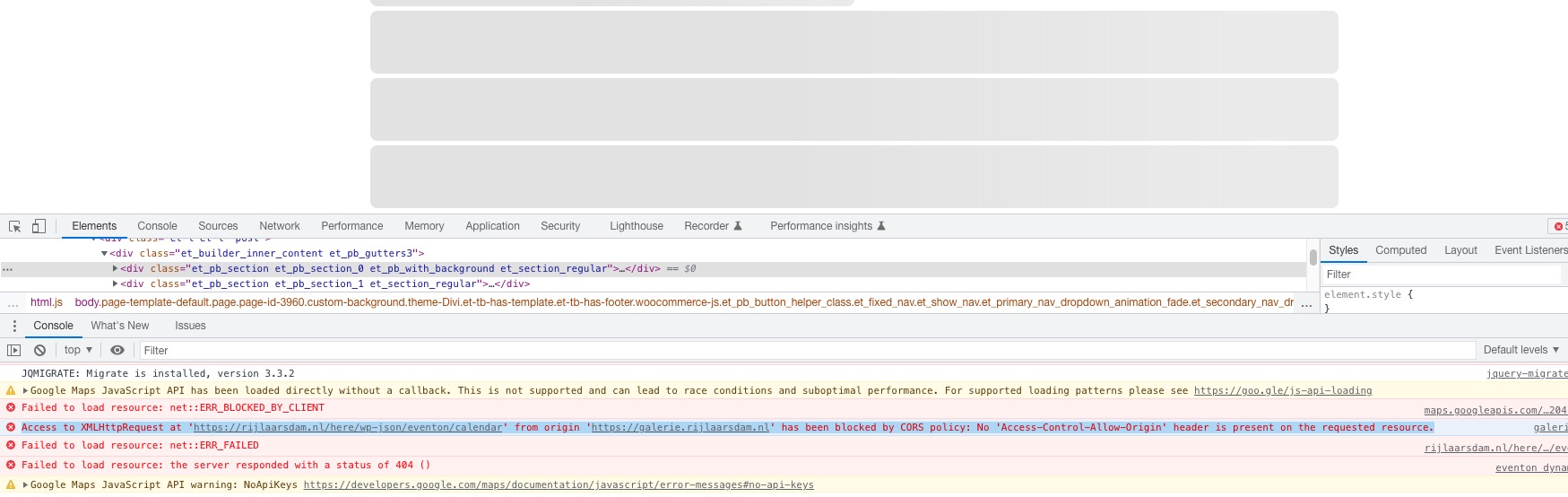
The issue:
Access to XMLHttpRequest at ‘https://rijlaarsdam.nl/here/wp-json/eventon/calendar’ from origin ‘https://galerie.rijlaarsdam.nl’ has been blocked by CORS policy: No ‘Access-Control-Allow-Origin’ header is present on the requested resource.
 Please send us wp-admin access to your site as a private message for us to further assist your situation.
Hello,
Please customize Single Event Page by following:
https://docs.myeventon.com/documentations/customize-single-events-page/
How to work with taxonomies:
https://docs.myeventon.com/documentations/taxonomies-eventon/
Hello,
The only solution is to add them by customizing Single Event Page template:
https://docs.myeventon.com/documentations/customize-single-events-page/
Hello,
It should be working now. Quotes were incorrect:
Hello,
Could you update Event Tickets to 2.1?
To update eventon addons: You can download latest eventon addons from myeventon > my account. Then you can go to your website, deactivate old addon and install new one and activate then delete the old addon. This link will further explain the process. Also you can follow us on twitter to get real-time announcements on updates!
If it doesn’t help, please follow the instructions in this documentation to activate debug in your site to see any PHP errors recorded that can provide insight on to whats going on. Please reply with a link to debug.log file. If you are not able to do this please send us FTP access to your site so we can do this for you.
Hello,
Please add this CSS code to EventON > Styles (If you don’t see any change, EventON > Scripts & Styling > turn off Write dynamic styles to header > save settings > turn on Write dynamic styles to header):
.ajde_evcal_calendar.boxy .eventon_list_event.hasbgimg::after { opacity: .7; } .ajde_evcal_calendar.boxy .eventon_list_event.hasbgimg:hover::after { opacity: .2; }