Hello,
I see that you are using Eventon version 4.3.2, please check whether upgrading to 4.1.3 fixes the issue. I would advise that you try this on a testing site and if it works then do the same on the live site.
Replies for tickets on suppota
Hello,
I see that you are using Eventon version 4.3.2, please check whether upgrading to 4.1.3 fixes the issue. I would advise that you try this on a testing site and if it works then do the same on the live site.
Hi Pascal,
Thank you for your message, I am going to assign this ticket to Ashan and he will be able to take it from here. Please allow some time for him to get back to you, we greatly appreciate your patience and thank you for being a eventon customer!
Duplicate ticket #307515
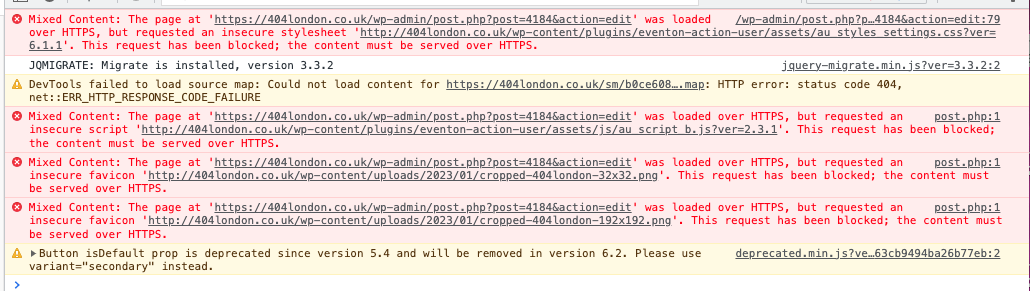
Ok,thx
I suppose this new feature is for new event ?
Because for existing events there is no change.
Hi Lea,
Just to make sure we are on the same page, would you mind giving some more details regarding the issue you are having? Pointing out the area with the issue in the screenshot will also help.
Hi Manuel,
You can use the custom CSS code below:
.ajde_evcal_calendar.boxy.box_2 .eventon_list_event{
width:100%;
}
Please add the custom CSS code to “EventON Settings > Styles” and save changes. If you do not see the new style changes, Go to “EventON Settings > Styles & Scripting > Turn off write styles to header” Click save changes – to write the styles css code direct into page header. You can turn this off once the cache is cleared.
Hi Ryan,
Please take a look at the tutorial below on how you can show various info on the event top
https://docs.myeventon.com/documentations/hook-eventtop/
Hello,
Please use the CSS code below
/*changes the event title font size*/
.ajde_evcal_calendar #evcal_list.eventon_events_list .eventon_list_event p .evoet_cx span.evcal_event_title{font-size:12px;}
/*changes the date font size in the event list*/
.eventon_events_list .eventon_list_event .evoet_cx span.evoet_dayblock span{font-size:20px;}
/*changes the month title font size*/
.ajde_evcal_calendar #evcal_head.calendar_header #evcal_cur{font-size:25px;}
Please add the custom CSS code to “EventON Settings > Styles” and save changes. If you do not see the new style changes, Go to “EventON Settings > Styles & Scripting > Turn off write styles to header” Click save changes – to write the styles css code direct into page header. You can turn this off once the cache is cleared.
Hello,
Thank you for your message, I am going to assign this ticket to Ashan and he will be able to take it from here. Please allow some time for him to get back to you, we greatly appreciate your patience.