Vincent we are almost done with the update to schedule addon hoping to get it out this week!
Archives: Replies
Replies for tickets on suppota
Reply to: tickets(304113)
Thank you for letting us know. We did mover event details to load via ajax to increase page load. And we are able to replicate this issue. Currently doing tests to find a better solution for this and hoping to release an update this week!!
Reply to: tickets(304302)
Refunded both your orders. Let us know if you have other questions 🙂
Reply to: tickets(304752)
2 patch fix files see if you can apply these codes to your site to get this working again. Artem will be able to help if you have trouble.


Reply to: tickets(304271)
code:
wp_enqueue_script(‘evcal_functions’, EVO()->assets_path. ‘js/eventon_functions.js’, array(‘jquery’), EVO()->version ,true );
Reply to: tickets(304271)
here is a patch fix.

Reply to: tickets(304629)
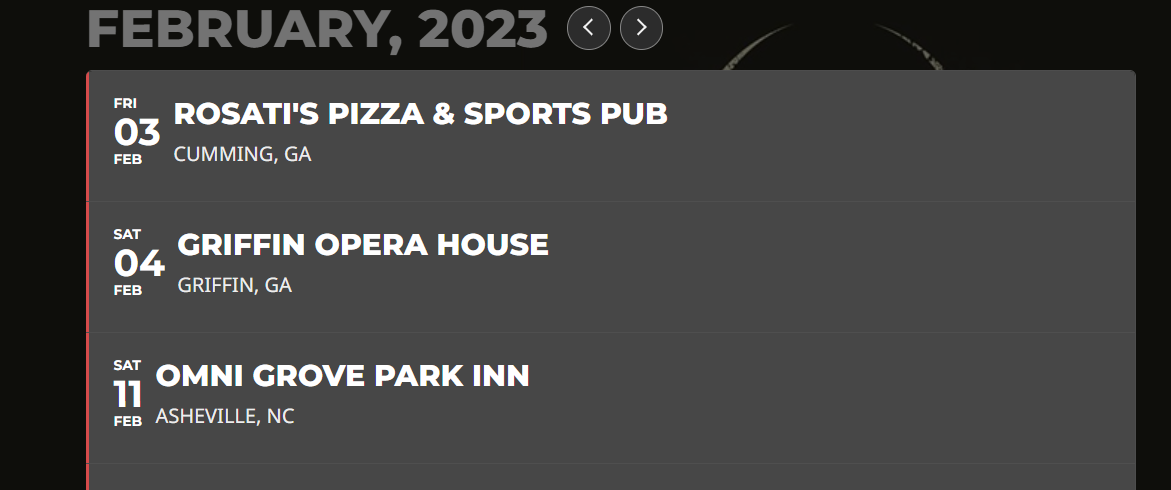
Also…watching the video…I think you may be confused in that I’m talking about the “Grey” layout on the “Tour” page…not the widget itself..
www.thejourneytributeband.com/tour-calendar/
I’ve attached a picture….if you look at our current layout, it’s the “old look” before the newer look and feel came in, and the calendar field is “all red” like the widget….I like the grey color as the dominating color with the “red” bar on the left side as the indicator as to the nature of the event….I put red most of the time…but when they have shows in the same day and there are differences, I’ll make one purple….You saw the 3 colors I have in the backend…Green, Red, Purple….Anyways…(See pic)….
You’ve now shown me ways I can bring color differences to the “newer” calendar stylings so I could start incorporating that and still have the blocks “grey” if I want…and use the featured color elements to bring attention to the nature of the event….Rambling now, but refer to pic with regard to our calendar layout as it is…just for reference to know what I meant by “grey” vs. “red”
Reply to: tickets(304754)
We are going to have hundreds of events in the calendar and it must behave. I cannot imagine having to fiddle with this settings as they currently are so unreliable and unpredictable.
Reply to: tickets(304378)
Hi,
I actually managed to fix it. Some of the addons were not on their latest versions, namely tickets and rsvp so I updated them and the issue seems to have resolved itself. If it comes back I’ll use your link.
Reply to: tickets(304629)
Thank you for all of this as well!! Lots of cool things I can do to offer more information from a heads up perspective!! And draw attention to them. I had to remove your “Featured” element as it turned the entire event on my calendar page yellow, and you couldn’t read the event text. A long time ago, I had asked for some code that would return the calendar back to the older style so these new advents alter the output differently than if I had gone with the new style. It’s okay…I will more than likely move to the newer layout now with all the cool features in the short code….
So if I input a calendar in short code format to it’s own page, I can make the same kind of color changes in the primary event details?
Just making sure….