Hello,
Can we take a look at wp-admin?
Please send us wp-admin access to your site as a private message for us to further assist your situation.
Replies for tickets on suppota
Hello,
Can we take a look at wp-admin?
Please send us wp-admin access to your site as a private message for us to further assist your situation.
We are glad your issue is resolved, if you have any further questions or concerns please create a new ticket.
If you have a moment, we would greatly appreciate if you could kindly leave us a review at codecanyon! from your account > downloads. Cheers!
Hello William Sibick,
Please check your ticket. I replied there.
Margo Dolan,
Are you still having the issue?
Hello,
Please follow this guide:
To update eventon to latest version: If you are unable to do autoupdate, you can go to codecanyon your account > download and get the latest eventon version as zip file. Then you can go to your website > make sure “Delete eventon settings & data when EventON is uninstalled” is Deslected from eventon settings, delete old eventon, install new one and activate. This link will further explain the process it. Also you can follow us on twitter to get real-time announcements on updates!
Hello,
Please downgrade to 4.2.2:
https://helpdeskx.s3.amazonaws.com/wp-content/uploads/2023/01/20051245/eventON-36.zip
We are working on fixing this.
The option to upgrade isn’t available in wordpress plugin mgr and I wasn’t sure where to find it on your site if it’s been released as a patch.
May I know the method preferred to do the upgrade?
Great! Thank you for sharing this solution with us.
Do you need our help with anything else?
Also make sure that your Event Top arranged like this: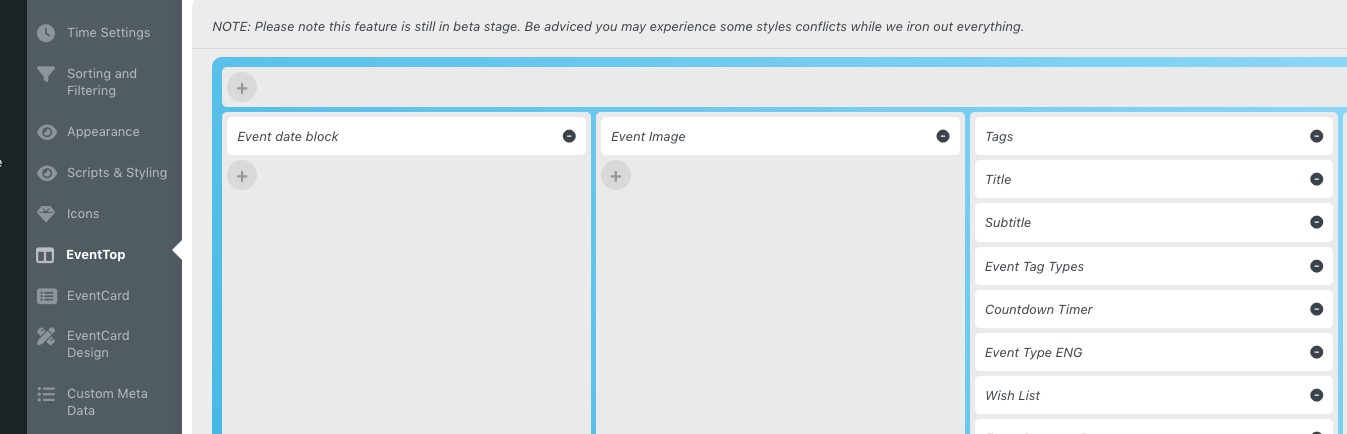
Hello,
Please go to https://pastebin.com/, paste your shortcode there and send us a link.
Hello,
I went to http://canardsbastogne.be/wp-admin/admin.php?page=eventon#evcal_002sc > disabled Load eventON scripts and styles only on eventON pages. It started to work. Then I enabled the option again and it seems to be still working.
I think your cache plugin somehow responsible. Could you check and let me know?