Great! The fix should be available in the next version, so please wait for the update to become available.
Archives: Replies
Replies for tickets on suppota
Reply to: tickets(301857)
Instead of Description, use either Subtitle or Custom Meta field:
https://docs.myeventon.com/documentations/setup-use-custom-meta-fields-events/
You can show them on EventTop.
Please add this CSS code to EventON > Styles (If you don’t see any change, EventON > Scripts & Styling > turn off Write dynamic styles to header > save settings > turn on Write dynamic styles to header):
.eventon_events_list .eventon_list_event .evoet_cx span.evcal_event_subtitle, .evo_pop_body .evoet_cx span.evcal_event_subtitle { text-transform: none !important; }
Reply to: tickets(301851)
Absolutely no positive results, I installed vesrion 0.5 and everything works and loads the calendar fast, with version 0.6 the problem exists!
Please respond quickly with a solution.
Thank you for the valuable support
Reply to: tickets(301349)
https://www.baav.be/wp-admin/admin.php?page=eventon > Set all past events as completed is disabled. Was it enabled before?
Other question: can the ‘learn more’ (“leer meer”) button at the height of the organizer be removed? It doesn’t add any value in our case.
Please add this CSS code to EventON > Styles (If you don’t see any change, EventON > Scripts & Styling > turn off Write dynamic styles to header > save settings > turn on Write dynamic styles to header):
p.evo_card_organizer_more { display: none !important; }
Reply to: tickets(301349)
Hi,
Thanks for the reply, that helped!
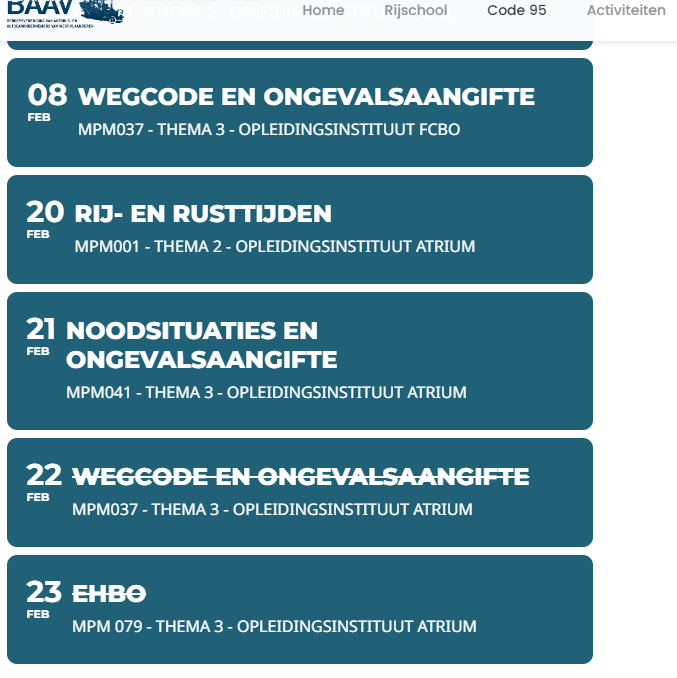
Only… now the event title is striked through for new events (e.g. 22/02/2023 and 23/02/2023) even though the date hasn’t passed yet.
Other question: can the ‘learn more’ (“leer meer”) button at the height of the organizer be removed? It doesn’t add any value in our case.
Thanks!
Reply to: tickets(301857)
Thank you very much, that helped. But there is no element for adding a description of the event? Is there a way to change the subtitles from capital letters to small letters instead?
Reply to: tickets(292468)
Sorry I found a solution for this problem!! Everything ist fine now.
Reply to: tickets(292468)
Thank you very much. I’ll wait for a reply when everything has been adjusted.
I will leave the ticket open until then.
Another question: Have you changed anything else. I have the problem that now since they have worked on mobile and tablet on the slider the photos are no longer displayed. Also my home page image has disappeared. Also, on a subpage, it suddenly showed me only the open calendar and not the actual page (I was able to fix this problem). On the normal computer everything is still as it should be. Only no longer on mobile and tablet.
Reply to: tickets(301857)
see video below
Reply to: tickets(301923)
Thank you for your great suggestion, at the moment it is not supported. However i have changed this ticket into a feature request for people to vote on