So the Organizer name is correctly linked now. thanks
How do I remove the website button and the text that is being imported which says “test,test”?
Replies for tickets on suppota
So the Organizer name is correctly linked now. thanks
How do I remove the website button and the text that is being imported which says “test,test”?
Please disable “Disable Moment script” https://xzib.com/wp-admin/admin.php?page=eventon#evcal_002sc
Try these codes:
p.evo_card_organizer_more { display: none !important; } span.evo_card_organizer_description { display: none !important; }
Also, can you link both the name and the image to the subject organizer page. Currently the name links, but not the image.
Thank you for your great suggestion, at the moment it is not supported. However please create a new ticket and select Feature Request as category so others can vote on your idea and get it moved into development faster.
Comment this part and replace it with the code from this screenshot https://www.myeventon.com/wp-content/uploads/2017/08/Capture-1.png: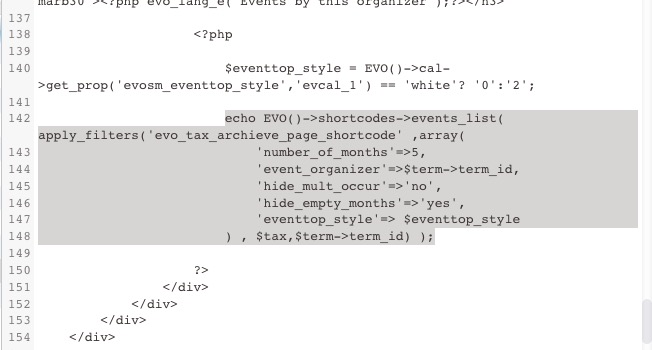 Where you can to replace the shortcode.
Make sure to backup everything.
Hello,
Thank you very much for your suggestions! Please create a new ticket and select Feature Request as category so others can vote on your idea and get it moved into development faster.
For 3 (height of the card). I paste in text mode without HTML tags but nothing change, I try with many values : 199, 100, 10, but no change in the front end. Here’s my shortcode:
[add_eventon_list number_of_months=”9″ event_count=”5″ show_limit=”yes” event_past_future=”future” show_et_ft_img=”yes” eventtop_style=”5″ tiles=”yes” tile_height=”100″ tile_count=”1″ tile_bg_size=”full” hide_month_headers=”yes” hide_empty_months=”yes”]
Thanks Artem !
It’s OK for 1. the corner 🙂
For 2., I would like to center the text in te square, but not center the square in the card.
I have another question please: in the search box, text is too light when typing (but OK when mouse is out of the search box). How to put it in black all the time?
Thanks a lot!
the https://www.myeventon.com/addons/ics-importer/
will alllow you to import ICS file from another source automated HOWEVER only 1 source
however there are events plugins that may help
check out this one https://wordpress.org/plugins/wp-event-aggregator/
and the pro version allows multiple sources and automation https://xylusthemes.com/plugins/wp-event-aggregator/?utm_source=wprepo&utm_campaign=wpaggregator&utm_medium=readme&utm_content=wprepo-readme
generally each of the sites you are importing from would need to add
ics=”yes” to their calendar and you would take that link and paste it into the agregator
in theory…….. I have never tested it
altho i have used the free version (without the automation) and it works with eventon
Thanks for your response. I have spent hours trying to rewrite the code based on the the PAGEs you referenced above. It just threw errors and Im at my wits end with it.
Below, please find my customoized taxonomy-event_organizer.php
Can you please edit it with the “add_eventon_el” in the proper place. And then Ill go back and add the shortcode that I want
_____
<?php
/*
* The template for displaying event categoroes – event organizer
*
* Override this template by coping it to ../yourtheme/eventon/ folder
* @Author: AJDE
* @EventON
* @version: 4.2
*/
evo_get_page_header();
$help = new evo_helper();
$tax = get_query_var( ‘taxonomy’ );
$term = get_query_var( ‘term’ );
$term = get_term_by( ‘slug’, $term, $tax );
do_action(‘eventon_before_main_content’);
//$term_meta = get_option( “taxonomy_”.$term->term_id );
$term_meta = evo_get_term_meta( ‘event_organizer’,$term->term_id );
// organizer image
$img_url = false;
if(!empty($term_meta[‘evo_org_img’])) /*{
$img_url = wp_get_attachment_image_src($term_meta[‘evo_org_img’],’full’);
$img_url = $img_url[0];
}*/
// organizer link
$organizer_link_target = (!empty($term_meta[‘_evocal_org_exlink_target’]) && $term_meta[‘_evocal_org_exlink_target’] == ‘yes’)? ‘_blank’:”;
$organizer_term_link = !empty($term_meta[‘evcal_org_exlink’]) ? evo_format_link($term_meta[‘evcal_org_exlink’]): false;
$organizer_term_name = $organizer_term_link ? ‘<a target=”‘.$organizer_link_target.'” href=”‘. $organizer_term_link .'”>’ . $term->name . ‘</a>’ : $term->name;
?>
<div class=’wrap evotax_term_card evo_organizer_card alignwide’>
<div id=” class=”content-area”>
<div class=’eventon site-main’>
<!– <header class=’page-header’>
<h2 class=”page-title”><?php evo_lang_e(‘Exhibitions by this organizer’);?></h2>
</header>–>
<div class=’entry-content’>
<div class=’evo_term_top_section dfx’>
<?php if($img_url):?>
<div class=”evotax_term_img” style=’background-image:url(<?php echo $img_url;?>)’>
</div>
<?php endif;?>
<div class=’evo_tax_details’>
<center> <h1 class=”tax_term_name organizer_name evo_h2 ttu”><span><?php echo $organizer_term_name;?></span></h1> </center>
<!– <?php
echo category_description();
if(!empty($term_meta[‘evcal_org_contact’])){
echo “<p class=’contactinfo border marb10′>”. $term_meta[‘evcal_org_contact’] .”</p>”;
}
if(!empty($term_meta[‘evcal_org_contact_e’])){
echo “<p class=’contactinfo email border marb10′>”. $term_meta[‘evcal_org_contact_e’] .”</p>”;
}
echo (!empty($term_meta[‘evcal_org_address’]))? ‘<p class=”org_address border marb10″>’.$term_meta[‘evcal_org_address’].'</p>’:null;
// social media links
$social_html = ”;
foreach(apply_filters(‘evo_organizer_archive_page_social’, array(
‘twitter’=>’evcal_org_tw’,
‘facebook’=>’evcal_org_fb’,
‘linkedin’=>’evcal_org_ln’,
‘youtube’=>’evcal_org_yt’
)) as $f=>$k){
if(!isset($term_meta[$k])) continue;
$social_html .= “<a href='”. $term_meta[$k]. “‘><i class=’fa fa-{$f}’></i></a>”;
}
if(!empty($social_html)){
echo “<div class=’evo_tax_social_media marb10′>{$social_html}</div>”;
}
?>
<?php if( $organizer_term_link):?>
<p class=’mar0 pad0′><a class=’evo_btn evcal_btn’ href='<?php echo $organizer_term_link;?>’ target='<?php echo $organizer_link_target;?>’><?php evo_lang_e(‘Learn More’);?></a></p>
<?php endif;?>—>
</div>
</div>
<?php
// location map
if( !empty($term_meta[‘evcal_org_address’]) ):
EVO()->cal->set_cur(‘evcal_1’);
$zoomlevel = EVO()->cal->get_prop(‘evcal_gmap_zoomlevel’);
if(!$zoomlevel) $zoomlevel = 16;
$map_type = EVO()->cal->get_prop(‘evcal_gmap_format’);
if(!$map_type) $map_type = ‘roadmap’;
$location_address = stripslashes($term_meta[‘evcal_org_address’]);
$map_data = array(
‘address’=> $location_address,
‘latlng’=> ”,
‘location_type’=> ‘add’,
‘zoom’=> $zoomlevel,
‘scroll’=> EVO()->cal->check_yn(‘evcal_gmap_scroll’)? ‘no’:’yes’,
‘mty’=>$map_type,
‘delay’=>400
);
?>
<div id=’evo_event_organizer_term_<?php echo $term->term_id;?>’ class=”evo_trigger_map evo_location_map term_location_map” <?php echo $help->array_to_html_data($map_data);?>></div>
<?php endif;?>
<div
class=’evo_term_events’>
<!—-<h3 class=”evotax_term_subtitle organizer_subtitle border marb30″><?php evo_lang_e(‘Exhibitions by this organizer’);?></h3>—>
<?php
$eventtop_style = EVO()->cal->get_prop(‘evosm_eventtop_style’,’evcal_1′) == ‘white’? ‘0’:’2′;
echo EVO()->shortcodes->events_list( apply_filters(‘evo_tax_archieve_page_shortcode’ ,array(
‘number_of_months’=>65,
‘event_organizer’=>$term->term_id,
‘hide_mult_occur=”no”,
number_of_months=”65″ month_incre=”-60″ hide_empty_months=”no” show_et_ft_img=”yes” show_limit=”yes” event_count=”999″ ux_val=”4″ hide_empty_months=”yes” event_order=”asc” tiles=”yes” tile_count=”4″ event_past_future=”all”
eventtop_style’=> $eventtop_style
) , $tax,$term->term_id) );
?>
</div>
</div>
</div>
</div>
<?php evo_get_page_sidebar(); ?>
</div>
<?php do_action(‘eventon_after_main_content’); ?>
<?php evo_get_page_footer(); ?>
I have disabled several plugins including litespeed cache plugin.
Or do you want me to leave the plugin active and only disable the CSS minifiy.
I also have asynchronoous activated.
The problem resolves when I remove one of the input types in the Miami shortcode. And it is also working on the NYC page, which is the exact same shortcode, excpet for the “types” in the variable.
So, this makes me wonder if it is the data/events