time settings are OK
Its possible your cache plugin is holding that week in view which I have seen on other sites (including my own)
Its a bit hard to diagnose at the moment as its towards the end of the week so it looks normal but perhaps next time it happens try clearing the cache- and see if it loads correctly
now of course thats not a solution but it will tell us whats causing the issue- then we can figure out how to get it to work with the cache (if it is in fact the cache)
the other thing you can do is set your settings>>>>general timezone backwards a number of hours so it changes when you need it to
Login Link – https://tfltest.wellbeingontheweb.com/wp-admin/
Username – helpdesk_wow@myeventon.com
Password – ICn&$MoR%DITP3RArDzr#@t0
Direct Link – https://tfltest.wellbeingontheweb.com/calendar-test-page-i-e-f-r/
trying to log in and get this error
Fatal error: Uncaught Net_DNS2_Exception: timeout on read select() in /home/customer/www/randalls-jersey.co.uk/public_html/wp-content/plugins/sg-cachepress1/vendor/pear/net_dns2/Net/DNS2.php:1056 Stack trace: #0 /home/customer/www/randalls-jersey.co.uk/public_html/wp-content/plugins/sg-cachepress1/vendor/pear/net_dns2/Net/DNS2.php(1340): Net_DNS2->generateError(2, ‘8.8.8.8’, 203) #1 /home/customer/www/randalls-jersey.co.uk/public_html/wp-content/plugins/sg-cachepress1/vendor/pear/net_dns2/Net/DNS2.php(942): Net_DNS2->sendUDPRequest(‘8.8.8.8’, ‘x0FxD5x01x00x00x01x00x00x00x00x00x00x0Fra…’) #2 /home/customer/www/randalls-jersey.co.uk/public_html/wp-content/plugins/sg-cachepress1/vendor/pear/net_dns2/Net/DNS2/Resolver.php(172): Net_DNS2->sendPacket(Object(Net_DNS2_Packet_Request), false) #3 /home/customer/www/randalls-jersey.co.uk/public_html/wp-content/plugins/sg-cachepress1/core/Modules/Modules.php(897): Net_DNS2_Resolver->query(‘randalls-jersey…’, ‘A’) #4 /home/customer/www/randalls-jersey.co.uk/public_htm in /home/customer/www/randalls-jersey.co.uk/public_html/wp-content/plugins/sg-cachepress1/vendor/pear/net_dns2/Net/DNS2.php on line 1056
in anycase I suspect you have not added it to the event card
so go to myeventon>>>>>settings>>>>event card design and add it to the card (then you can drag and drop it to where you want it
………………………………………………………….
»the above video link is not working correctly.
Pls see my explanation in this video below:
https://www.loom.com/share/e3cbd49c446f4f6d980a8e2337d98beb
………………………………………………………….
»the above video link is not working correctly.
Pls see my explanation in this video below:
https://www.loom.com/share/1d9b26af3a4e41e291771f0e19c048d3
………………………………………………………….
»the above video link is not working correctly.
Pls see my explanation in this video below:
https://www.loom.com/share/6ce85afe1f464fe181e9199bf325b976
………………………………………………………….
»the above video link is not working correctly.
Pls see my explanation in this video below:
https://www.loom.com/share/966f0e6f0ba444b0bcb793f7c2f2f424
the video in my first text is not working correctly.
Pls refer to this video / explanation below:
https://www.loom.com/share/fe644fa325294309b5e5ba649b087364
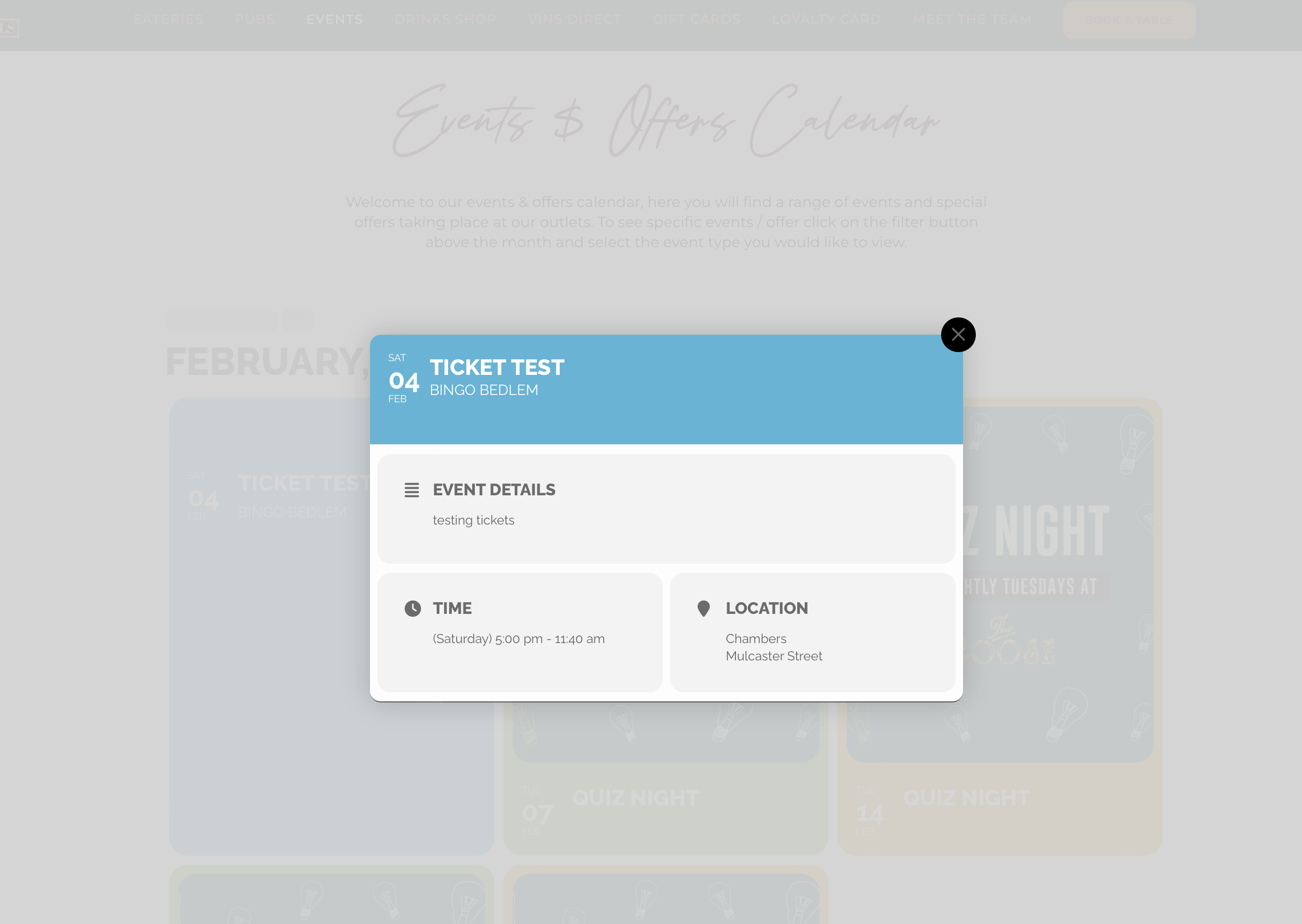
Hi There,
The page loads but there is no options for the tickets? as you can see in my screenshot its the same as yours … no option to add a ticket?
Same on the calendar view > https://randalls-jersey.co.uk/our-events/ the test event is in February, when clicked the box pops open but still no ticket option.
Please can you look again.
We are glad your issue is resolved, if you have any further questions or concerns please create a new ticket.
If you have a moment, we would greatly appreciate if you could kindly leave us a review at codecanyon! from your account > downloads. Cheers!