1. Here’s the screenshot. Currently the corners are rounded, but I would like to know if it is possible to have straight corners?
2. In the same image, you can see Theater in the purple pad. How to center this label?
3. I put the code but nothing changes in the display. Here is the Shortcode:
[add_eventon_list number_of_months=”9″ event_count=”5″ show_limit=”yes” event_past_future=”future” show_et_ft_img=”yes” eventtop_style=”5″ tiles=”yes” tile_count=”1″ tile_bg_size=”full” hide_month_headers=”yes” hide_empty_months=”yes”]
4. Sure, I will do it!
Thanks!
I understand what you are saying, but this feature was working a couple of weeks ago. If I had set the event to open in a new page, it would. But now it does nothing. Something is broken. I also tried to add the shortcode snippit to the search shortcode, but it didn’t work.
It seems you are telling me your plugin has a bug. Any time frame for fixing this?
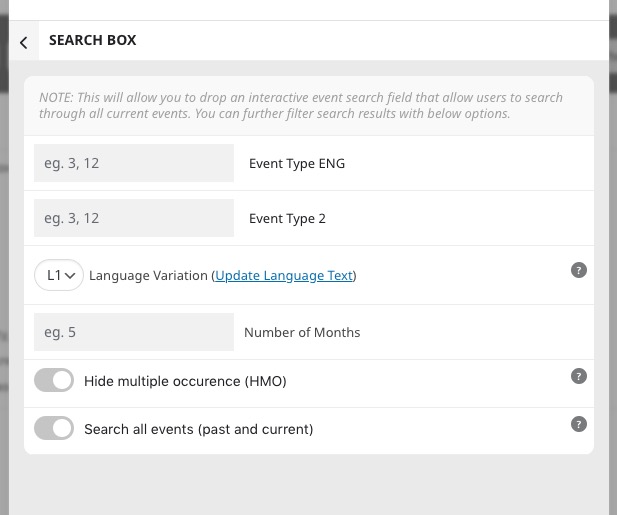
Search Box has limited amount of options and User Interaction isn’t among them:
The only solution is to use a shortcode with added User Interaction and enabled Search functionality.
Please try adding filter_type=”select” to your shortcode.
WooCommerce handles this kind of functionality, so please take a look at this or similar plugin:
https://wordpress.org/plugins/woo-discount-rules/
So, basically, you move all the discounts functionality to Woo’s Cart or Checkout, instead of EventON’s events.
Hello,
The only way is to customize the source code. Unfortunately, we unable to help with customizations, since it’s against CodeCanyon’s Support Policy.
Please remove this option from the shortcode:
Please use the Search for “Christmas Communion”. I have set that event as “open in the page” for your viewing.
The problem occurs mostly when searching for an event.
The event’s User Interaction is set to “Open new Page” but it acts like “do nothing”
Hello,
When I go to Homepage and click on an event, EventON opens it as Open Event Page.
Where can we see the issue in action? Could you send us a link?