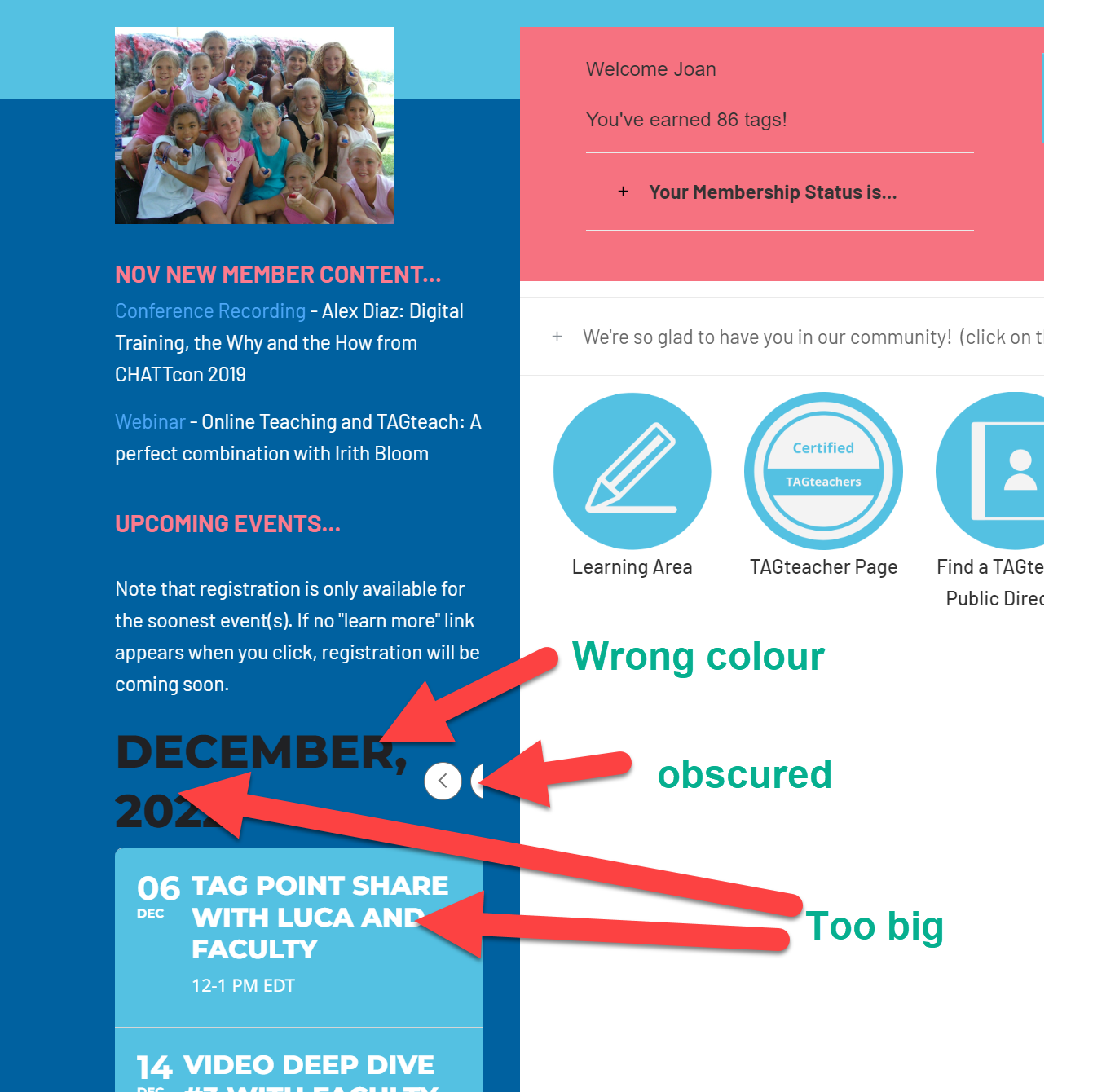
I see the problem. It’s because I have the calendar shortcode in a column and the new sizes of text don’t fit. See screenshot. I made the column a bit wider and now the “next/previous month” arrows show partly. It did used to fit, but the font has got a lot bigger for the month and the font is also a lot bigger on the event titles than it used to be.
Can you please tell me how to make the fonts smaller in the event title and in the name of the month and also how to change the colour of the name of the month? Or is there a shortcode for a version that fits in a sidebar?
Thanks
Hello again.
i bougth the addon. 🙂 i create two areas in a page, one for past, another for the upcoming:
PAST EVENTS:
[add_eventon_el el_title=”EVENTOS1″ el_type=”ue” start_range=”2022/10/01″ end_range=”2023/09/01″ event_type_5=”830,” sep_month=”yes”]
FOLLOWING EVENTS:
[add_eventon_el el_title=”EVENTOS1″ el_type=”pe” start_range=”2022/10/01″ end_range=”2023/09/01″ event_type_5=”830,” ]
The following events only show 2 events from December, and i have more events from 2023, but they dont appear?
Can you help me?
https://www.portugalrunning.com/atrp-2022-2023-2/
thanks
nuno
Hi,
Please use these login details, I have now granted admin access.
www.candlelightguitar.com/wp-admin
Username: support
Password: Elementor2022support
Thank you,
Michael
Hello,
Please send us wp-admin access to your site as a private message for us to further assist your situation.
Ashan,
Video: https://www.loom.com/embed/779d5a3d8b5540c1a22b8f6dd9e95727#?secret=8IFg14PMCA
When an event is All Day, cron job completes it at the start of the day.
Cron Manager:
https://lauderale.co/wp-admin/tools.php?page=advanced-cron-manager
Test event:
https://lauderale.co/wp-admin/post.php?post=38867&action=edit
Thank you for your messages, I am going to assign this ticket to Ashan and he will be able to take it from here and find you a solution. Please allow some time for him to get back to you, we greatly appreciate your patience and thank you for being a eventon customer! Also please disable any IP blocking on your site if there are any.
Instead of using custom code, could you try adding this to your shortcode:
eventtop_style=”3″
This changes EventTop Design Style to Colorful event date bubbles, which should work for you.
I just tried switching to Query only the event posts created this month. The issue is about performance. It stops loading because there is not enough memory.
Could you check /wp-content/debug.log to see how much memory it needs?
Thank you, that worked but my original question was: how to make the title of the events appear on certain calendars and not on others? Where to add "customcal" in the css? Thank you very much for the time you spend helping me.
Shareable Options can be found here: https://northwestchildrensodnhub.nhs.uk/wp-admin/admin.php?page=eventon#eventon_social
Location: https://northwestchildrensodnhub.nhs.uk/wp-admin/admin.php?page=eventon#evcal_005 (add Google maps API Key (Required));
Virtual Details. Please set it up first by following:
https://docs.myeventon.com/documentations/how-to-set-up-virtual-online-events/
Repeating events. Please set them up first:
https://docs.myeventon.com/documentations/setting-up-repeating-events/