4. You are correct! Thank you for your messages, I am going to assign this ticket to Ashan and he will be able to take it from here and find you a solution. Please allow some time for him to get back to you, we greatly appreciate your patience and thank you for being a eventon customer!
Archives: Replies
Replies for tickets on suppota
Reply to: tickets(298828)
Hello,
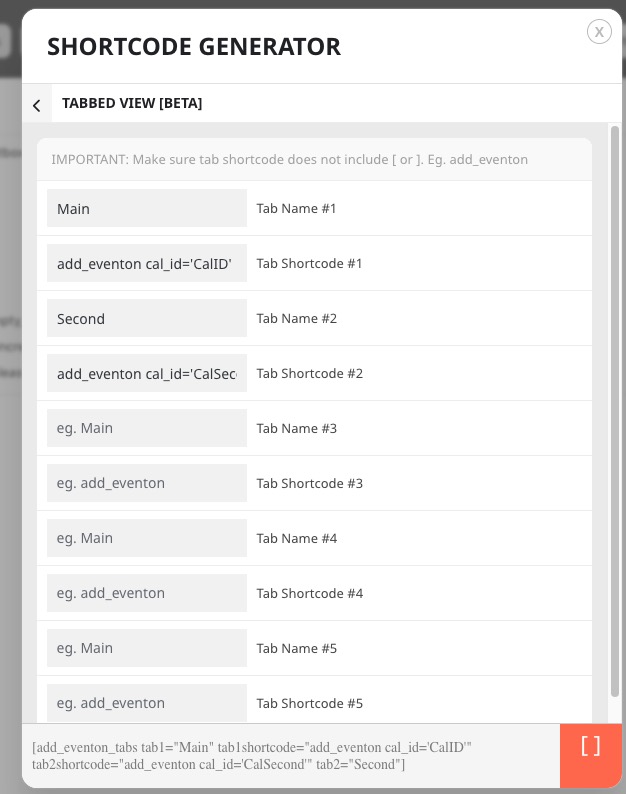
There is no documentation available, because all you need to do is to add a tab name and a tab shortcode similar to:
Reply to: tickets(298706)
If you go to Google Calendar settings > Import & Export, you won’t be able to find how to sync your calendar, except by importing a file.
Reply to: tickets(298516)
In the shortcode you missed one quote:
show_limit=yes”
Could you fix?
Reply to: tickets(298865)
Hello,
There are a lot of fields you need to include:
https://northwestchildrensodnhub.nhs.uk/wp-admin/admin.php?page=eventon#evcal_004b
For Related Events section to show please go to Edit Event > Related Events > add related events.
Reply to: tickets(298763)
Because you need to load your fonts first. Please follow this guide
https://www.wpbeginner.com/wp-themes/how-to-add-custom-fonts-in-wordpress/
Reply to: tickets(297545)
We are glad your issue is resolved, if you have any further questions or concerns please create a new ticket.
If you have a moment, we would greatly appreciate if you could kindly leave us a review at codecanyon! from your account > downloads. Cheers!
Reply to: tickets(296905)
Thank you for your great suggestion, at the moment it is not supported. However please create a new ticket and select Feature Request as category so others can vote on your idea and get it moved into development faster.
Reply to: tickets(298872)
Hello,
We need access to Events, EventON Settings and plugins pages. Could you give us more access?
Reply to: tickets(296905)
Thanks
Is there a way to modify the eventcard design, per shortcode.
For example I want featured image to display on the eventcard on all pages of site, except for 3 shortcodes applications.