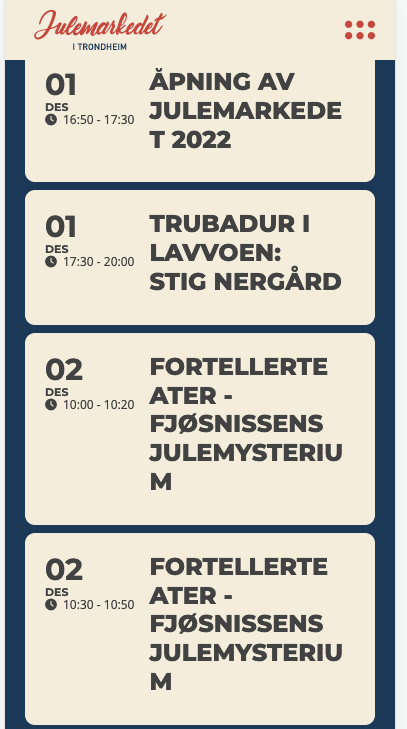
Yes. On mobile it doesn’t look so nice. Here there are issues with only one letter on the last line. See attachment.
Replies for tickets on suppota
Yes. On mobile it doesn’t look so nice. Here there are issues with only one letter on the last line. See attachment.
as of 4.1.2 moment.js to version is 2.29.4
I have themeco on my website running eventon with no issues-I can help if you really want me to but in anycase I have moved you to the top of the list of Ashans to do list. (he’s the guy that does the refunds)
3: what php version are you using? – that can def cause a slow down
I am sorry to say I have disabled both and theres zero effect. it takes a long time to load.
I have gone through the settings on each and nothing seems to effect the speed.
the only things I can think of is
1: Theres some kind of Plugin or theme conflict (i doubt it but worth a look)
Could you please try the instructions mentioned in this documentation to make sure your issue is indeed coming from eventon.
(basically turning off all the plugins- then turn on the cache and see if it loads faster- if it does- turn on each plugin one by one to see which one is causing the slow down)
same thing with the theme- switch themes- clear cache and see if it loads fast
2: its a godaddy server – and its a shared server and its possibly not very strong – which hosting package did you get? you might be sharing the server with 100 others which will slow down websites
i am sorry i don’t have better news
i believe i fixed it- might need to clear your browser cache
i added this css
.evosliderbox.multiSlider.cs_def.ss_imgtop.ajde_evcal_calendar .eventon_events_list .eventon_list_event .desc_trig_outter{height: inherit; !important}
however nothing changed- until I added it to the top of the css and it started working so perhaps there is some css thats been added in
appearance>>>>customize>>>>additionl css that is overiding it- not sure- but it appears to work right now
Hi Fred,
To clear Eventons cache, go to “EventON Settings > Styles & Scripting > Turn off write styles to header” Click save changes – to write the styles css code direct into page header. You can turn this off once the cache is cleared. You can also clear cache on your website via wordpress and/or from server to make sure new style changes are populated into page.
Hi Bradley,
Regarding the colors, go to “EventON Settings > Styles & Scripting > Turn off write styles to header” Click save changes. Check if that fixes the issue.
Regarding the date and title display, add the custom CSS code below to Appearance > Customize > Additional CSS
.ajde_evcal_calendar.boxy.boxstyle1.tbg1 #evcal_list .eventon_list_event .desc_trig .evcal_desc {
width: 50%;
}
Hi Ryan,
To increase the images size/quality that is shown when you attach additional images, add the custom CSS code below to Appearance > Customize > Additional CSS
.evo_event_images span img{opacity:1;}
Regarding your eventon locations not being available for post editor, are you using the events map addon?
Hello,
Please take a look at the tutorial below:
https://docs.myeventon.com/documentations/how-to-use-event-types-to-do-more/
Let us know if that helps.