Hello Kameron Bayne,
Please use Event Lists:
[add_eventon_list number_of_months=”12″ hide_empty_months=”yes” ux_val=”1″]
Replies for tickets on suppota
Hello Kameron Bayne,
Please use Event Lists:
[add_eventon_list number_of_months=”12″ hide_empty_months=”yes” ux_val=”1″]
…Take it or leave it…
Could you tell me which line of my message says that?
From my point of view the current calendar on your website looks exactly like on the screenshot https://helpdeskx.s3.amazonaws.com/wp-content/uploads/2022/11/08223937/4.1.3_install.cqbcc_.de_.png
So I am trying to understand which part still needs fixing.
Hello,
There is a font called “Font Awesome 5 Free” that’s coming from the theme, I think. Will it work for you? If it will please add this CSS code to EventON > Styles (If you don’t see any change, EventON > Scripts & Styling > turn off Write dynamic styles to header > save settings > turn on Write dynamic styles to header):
.evcal_evdata_row .evcal_evdata_icons i, .evcal_evdata_row .evcal_evdata_custometa_icons i, .eventon_list_event .fa, .evo_lightbox .fa { font-family: “Font Awesome 5 Free” !important; }
Please make sure Ashan is aware. His directions were to create a login manually first. Here is what I understand his direction to be:
And then once you get those submissions, you can create them an account and email them with access details and link to submit events after purchasing the submission level they desire.
1. Create a login
2. Person purchases submission level product
2. Email person the access details and link to submit events
Maybe he doesn’t know that I have AUP.
Is there a complete set of documentation for AUP? If so please send or create.
Hello Artem, thank you for your thoughtful answers. I am truly concerned. I cannot have Customers logging into the admin area. It is too complicated for them. The must be able to use the Event Submission form.
I have added autocomplete plugin. The Orders are auto Completing. I decided to not uninstall WooCommerce and EventON. I will try your suggestions.
The Order Complete / Thank you page does not have the EventOn links. This is not automatically created by EventOn.
With changes to the WooCommerce settings a new User is created (Guest User and 2 allow account creation checkboxes). The new User has the Customer role and no EventOn capabilities. I added the EventOn permissions, the login redirected to the home page. I changed the Role to Contributor and I am able to login.
I am now logged into the admin area of WordPress. This is not what I expected. I purchased 1 Event and I added 3.
Yes, Contributor has always been set to allow ** EventON > Action User > User Capabilities > make sure that “Submit New Events From Submission Form” is enabled for the role?**
WooCommerce is creating a Customer account, they still wouldn’t be able to login automatically. ** Users cannot login without an account. Since they need to purchase Paid Submission first, WooCommerce will create an account for them. **
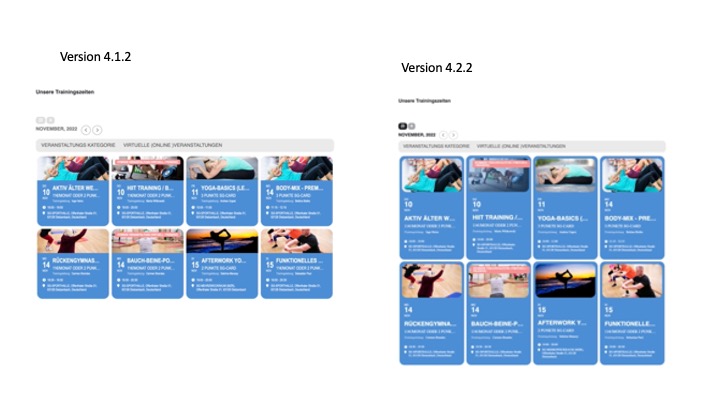
Hi, please use this link for access on the development system: https://www.sg-dietzenbach.de/neu-mit-eventon
Dear support
We are now testing the upgrade from 4.0.2 to 4.2.2 and after the upgrade, page views of events no longer contain any event content, nor do they use the theme from the site. The upgrade is performed by clicking the upgrade option from the plugin list.
The page content issue is now fixed but the open event page function does not work and the user icons when in the WordPress dashboard do not display.
Best Regards
OK. So how you describe it. Take it or leave it. I understand.
So for now, I have to deal with the changes, have additional work and you can close the ticket.
My issue is similar to this.
I’d like to have one list of upcoming events (10 or so) that might span over a couple months, and hide months that don’t have any events (and have the details slide down and expand when clicked). What short code would I use to display that?
I thought I got it to work once, but then it stopped working. I bought the full version, hoping that functionality was available there. Please advise.
Regarding: After the purchase WooCommerce will create a new account for the customer and then allows them to submit events from the order complete page.
Thank you Artem, I will work on this later. I will uninstall again and do same for WooCommerce.
No accounts have been automatically created. Ashan wrote and provided a process that included creating an account manually and then sending the links to the customer. Please confirm how accounts are created and if there is a setting that enables this.