Hi Klaus,
Please use the code below to reduce the top padding:
.page-220 .ajde_evcal_calendar.boxy.boxstyle1.tbg1 #evcal_list .eventon_list_event .desc_trig {
padding-top: 155px !important;
}
Replies for tickets on suppota
Hi Klaus,
Please use the code below to reduce the top padding:
.page-220 .ajde_evcal_calendar.boxy.boxstyle1.tbg1 #evcal_list .eventon_list_event .desc_trig {
padding-top: 155px !important;
}
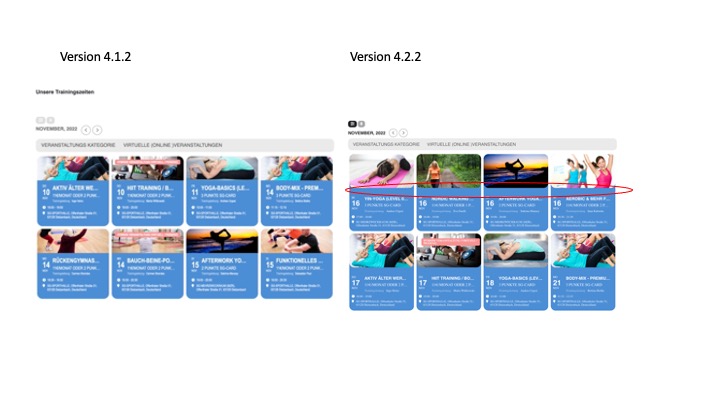
Good morning,
the style works as requested – thanks. Same problem with space line between picture and text – see attachment. Don’t know why the design is changed massive compared to the version before. Is there a need or only design change? Because the new design need much more space, this should be a “feature” that can be switch on or off. Maybe an item for the roadmap….
Klaus
Thank you!
Hi Fernando,
Please ensure that you are using the latest versions of all of our products.
To update eventon to latest version: If you are unable to do autoupdate, you can go to codecanyon your account > download and get the latest eventon version as zip file. Then you can go to your website > make sure “Delete eventon settings & data when EventON is uninstalled” is Deslected from eventon settings, delete old eventon, install new one and activate. This link will further explain the process it.
To update eventon addons: You can download latest eventon addons from myeventon > my account. Then you can go to your website, deactivate old addon and install new one and activate then delete the old addon. This link will further explain the process.
Hello,
Please take a look at the tutorial below
https://docs.myeventon.com/documentations/how-to-set-up-virtual-online-events/
Hi Fred,
Unfortunately, it can only load the set number. As for changing the text color, yes that can be done using custom CSS. Please add the shortcode so that we can take a look and advise you on the correct CSS code to use.
I see that it would then only load the set number at the time. Can it be set to load all on click?
Believe I found it with the following code.
event_count=’1′ show_limit=’yes’
Can I change the color as well as the text to “Show All Events” for example?
Hi Ashan,
I tried installing the plugin you suggested, but I can’t really see what happens – I don’t know much about it. But it’s installed now and you can log in with the credentials I sent when creating this support ticket and try for yourself.
I also recorded a video where you can see what is happening. Please watch it:
https://1drv.ms/v/s!Ana4mvExqNoPk4F26GHramHywltlAQ?e=snWoBy
I have even tried to deactivate the tickets plugin, but it still doesn’t let me save the events.
We really need to find a solution for this. Costumer is talking about switching to The Events Calendar now, and this problem has been happening for at least 2 years now. So waiting for the solution you mention – a solution that we don’t even know will help this problem – is, a bit.. well…
If you could look into it again and hopefully come up with a patch it would be great.
/Morten
Hi, Yes, you can test and deactivate.