hey
I come back to you because I bought an eventon api license.
I added the script provided in the header using the “code snippets” plugin on another of my sites and the following code in a page: https://www.coudekerque-engagements.fr/permanence-des-elus/
<div id=’eventoncontent’ style=”height:100%; width:100%”>
https://www.coudekerque-branche.fr/wp-json/eventon/calendar?event_type_3=577,575&number_of_months=2&show_et_ft_img=yes
</div>
I customized the url but it displays all the events and not those of category 3 nor the images…
do you have an idea ?
Are the links necessarily outgoing from the external site?
Events cannot be opened on an external site?
Thank you
I have added the Feature Request.
Thank you
Where is the Event Repeat Type Setting to be able to change it to Custom?
How would Repeat Customizer help? I don’t see a connection to recurrences, I see that uniques settings for each occurance could be customized.
I understand regarding Subscription model.
But is there any trick with script code that can help us for now? Because we are depending on that a lot and if people won’t find it right away, they’ll leave the page. We really need this feature.
Thank you. It works again after the update from Action User.
Kind regards
Michel
Ok. You posted the same answer a couple of weeks ago. But nothing happened. Can you give me a straight answer if this matter will be solved shortly, please.
You do need to understand that I pay for eventon but cannot use it.
Hi again
Unfortunately, we continue to have this problem. Is there anything more I can do to help you investigate what the problem might be?
Good morning,
again it has been misconfigured when trying to change the color of the location...
Please, could you put the colors #6fc268 for the dates and #000000 for the location of the event?
Thank you very much.
Hi Helen,
Please add the custom CSS code below to Appearance > Customize > Additional CSS to increase the font size
#evcal_widget #evcal_head .evo_j_dates .legend a{font-size: 12px;}
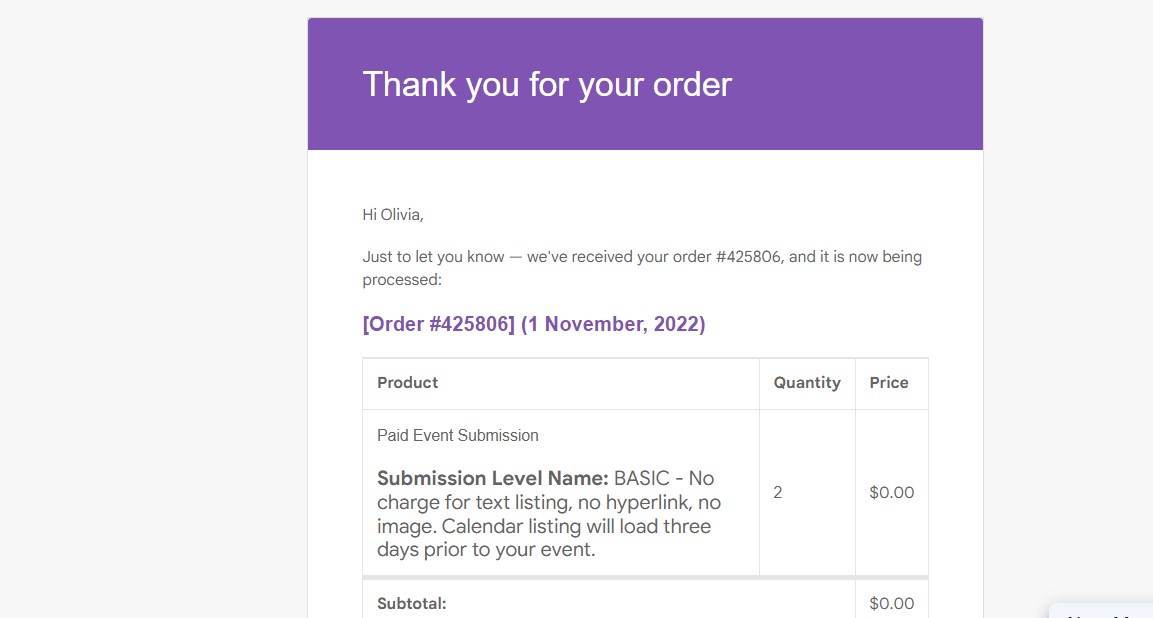
Thank you for your response. I am having a hard time telling AI from humans in responses these days. Your last response was very helpful because that “SUBMIT YOUR EVENTS” button is not showing on the emails that are generated once a sale is made. I put the image below. There is no link or indication to give them that they can now submit their event. It generates three emails – one that your event is received, an invoice and then one saying complete. Unfortunately none say “SUBMIT YOUR EVENTS”. Could you help me figure out how to include this.
Also, thank you for the suggestion for the Terms and Conditions idea, but then we will incur a return payment fee if payment is processed and then we have to reject the event. That was one of the main reasons for asking for the event to be submitted before payment or at least with payment so we could check before processing.
But if you could help us with the “SUBMIT YOUR EVENTS” button on the invoice or whichever email it comes on that would be awesome.