Which version you updated from (EventON, Tickets and so on)?
Archives: Replies
Replies for tickets on suppota
Reply to: tickets(399684)
Ashan,
Please check
Love the plugin, i have created a custom plugin for the action users, to download the RSVP’s in excel, html or pdf, please let me know if you’re interested, woudn’t mind sharing
Reply to: tickets(399684)
Love the plugin, i have created a custom plugin for the action users, to download the RSVP’s in excel, html or pdf, please let me know if you’re interested, woudn’t mind sharing
Thank you for your messages!
I am going to contact the development.
Reply to: tickets(400014)
We only help with issues with EventON, I am afraid.
Did you check the guide above about how to config Apple Pay?
Reply to: tickets(400095)
Hey, thanks for getting back in touch. I have provided an example below of the issue with working links – I hope that helps!
The website admin added this event – https://www.parentfirstaid.ie/wp-admin/post.php?post=30507&action=edit – and in the ’Event Tickets’ section on this page it shows – 12 Tickets (1 cancelled, 11 check-in) – and that is backed up on the View Attendees and downloadable CSV lists.
However, the issue is that this Order – https://www.parentfirstaid.ie/wp-admin/post.php?post=30778&action=edit – was booked onto the Event, and the person turned up to the Event, but they aren’t listed on the View Attendees or on the CSV list.
This seems to have happened to other events too, but this is a prime example. The Order screen shows that you can ’manually’ generate tickets – but why is that not done automatically for all purchases?
Many thanks
Chris
Reply to: tickets(399684)
Hi Artem, this is good news, there was one plugin that needed an update, and this fixed it.
Thank you for your quick reply
Love the plugin, i have created a custom plugin for the action users, to download the RSVP’s in excel, html or pdf, please let me know if you’re interested, woudn’t mind sharing

Reply to: tickets(400014)
Hi Artem. I have gone through the guide and I can’t see what isn’t working. Who can I speak to about this – do you not deal with WooCommerce as I’m using that because EventOn needed it added for the ticketing. I need Apple Pay to work and it’s not making sense why it isn’t. Thank you!
Reply to: tickets(399163)
Thank you! Just so you are aware, the sold out feature is now not working on the variable event tickets. I have already reported this, but if this could also be fixed that would be great.
Reply to: tickets(399764)
Morning Artem,
Had to wait for the client’s approval. Really appreciate your willingness to help.
Let me know if it’s fixable (no problem if not) or you would need more information from my side.
Best,
Alin
new.decunzo.com/wp-adim
andreeamacovei19@yahoo.com
Cat20225!
Reply to: tickets(399483)
Hello April, we can understand where you are coming from. You were used to the previous method and the change is difficult to get used to.
The reason we did it this, is because we have been adding more event settings over the years and that settings page has become very long, breaking them into tabs give users ability to easily see all possible options.
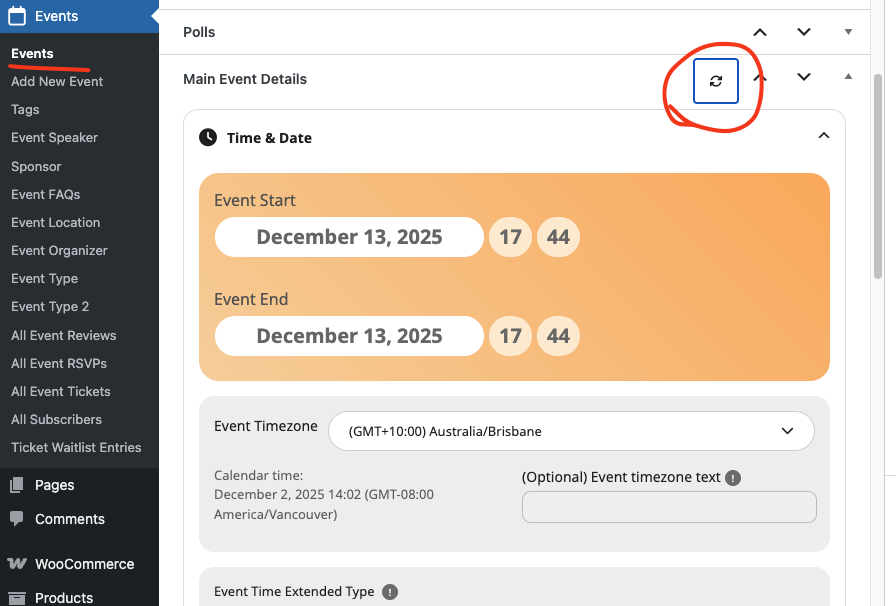
At the moment there is a trick to get the old layout back. Once page loads, click the refresh icon on top right side of Main Event Details, that will load the settings with longer version.
We will check into see if we can add this old method back with easy button to switch between 🙂