It says:
Login not possible.
Could you send us your shortcode, so we can try it on our test server.
Replies for tickets on suppota
It says:
Login not possible.
Could you send us your shortcode, so we can try it on our test server.
My timezone is GMT+1. Need admin access to fix 3 & 4.
Could you remove this custom Single Event Page template:
https://dev.pca-chicago.org/wp-admin/theme-editor.php?file=EventOn%2Fsingle-ajde_events.php&theme=newsup-pro
It seems that there is an issue with it.
You can also follow the instructions in this documentation to activate debug in your site to see any PHP errors recorded that can provide insight on to whats going on. Please reply with a link to debug.log file. If you are not able to do this please send us FTP access to your site so we can do this for you.
Hello,
H1 title is good for SEO.
You can go to EventON > Single Events > Select eventTop style: Immersive Flow.
Or use this code to hide it:
.evo_page_body .evo_sin_page .evosin_event_title { display: none !important; }
Hello Kameron Bayne,
Please use Event Lists:
[add_eventon_list number_of_months=”12″ hide_empty_months=”yes” ux_val=”1″]
…Take it or leave it…
Could you tell me which line of my message says that?
From my point of view the current calendar on your website looks exactly like on the screenshot https://helpdeskx.s3.amazonaws.com/wp-content/uploads/2022/11/08223937/4.1.3_install.cqbcc_.de_.png
So I am trying to understand which part still needs fixing.
Hello,
There is a font called “Font Awesome 5 Free” that’s coming from the theme, I think. Will it work for you? If it will please add this CSS code to EventON > Styles (If you don’t see any change, EventON > Scripts & Styling > turn off Write dynamic styles to header > save settings > turn on Write dynamic styles to header):
.evcal_evdata_row .evcal_evdata_icons i, .evcal_evdata_row .evcal_evdata_custometa_icons i, .eventon_list_event .fa, .evo_lightbox .fa { font-family: “Font Awesome 5 Free” !important; }
Please make sure Ashan is aware. His directions were to create a login manually first. Here is what I understand his direction to be:
And then once you get those submissions, you can create them an account and email them with access details and link to submit events after purchasing the submission level they desire.
1. Create a login
2. Person purchases submission level product
2. Email person the access details and link to submit events
Maybe he doesn’t know that I have AUP.
Is there a complete set of documentation for AUP? If so please send or create.
Hello Artem, thank you for your thoughtful answers. I am truly concerned. I cannot have Customers logging into the admin area. It is too complicated for them. The must be able to use the Event Submission form.
I have added autocomplete plugin. The Orders are auto Completing. I decided to not uninstall WooCommerce and EventON. I will try your suggestions.
The Order Complete / Thank you page does not have the EventOn links. This is not automatically created by EventOn.
With changes to the WooCommerce settings a new User is created (Guest User and 2 allow account creation checkboxes). The new User has the Customer role and no EventOn capabilities. I added the EventOn permissions, the login redirected to the home page. I changed the Role to Contributor and I am able to login.
I am now logged into the admin area of WordPress. This is not what I expected. I purchased 1 Event and I added 3.
Yes, Contributor has always been set to allow ** EventON > Action User > User Capabilities > make sure that “Submit New Events From Submission Form” is enabled for the role?**
WooCommerce is creating a Customer account, they still wouldn’t be able to login automatically. ** Users cannot login without an account. Since they need to purchase Paid Submission first, WooCommerce will create an account for them. **
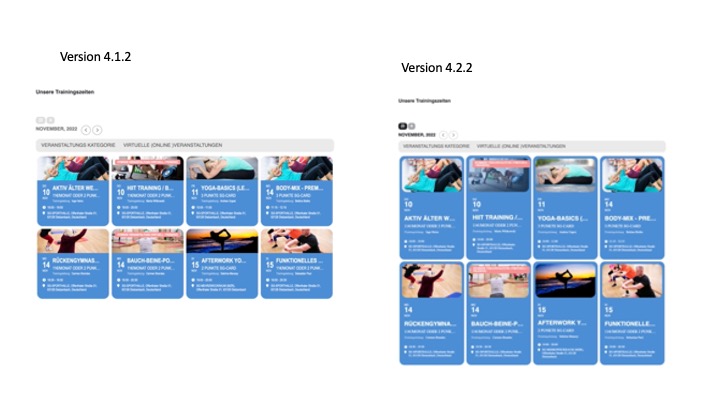
Hi, please use this link for access on the development system: https://www.sg-dietzenbach.de/neu-mit-eventon