Lukasz just released version 4.2.2 which will have this update in it. Cheers!
Archives: Replies
Replies for tickets on suppota
Reply to: tickets(295379)
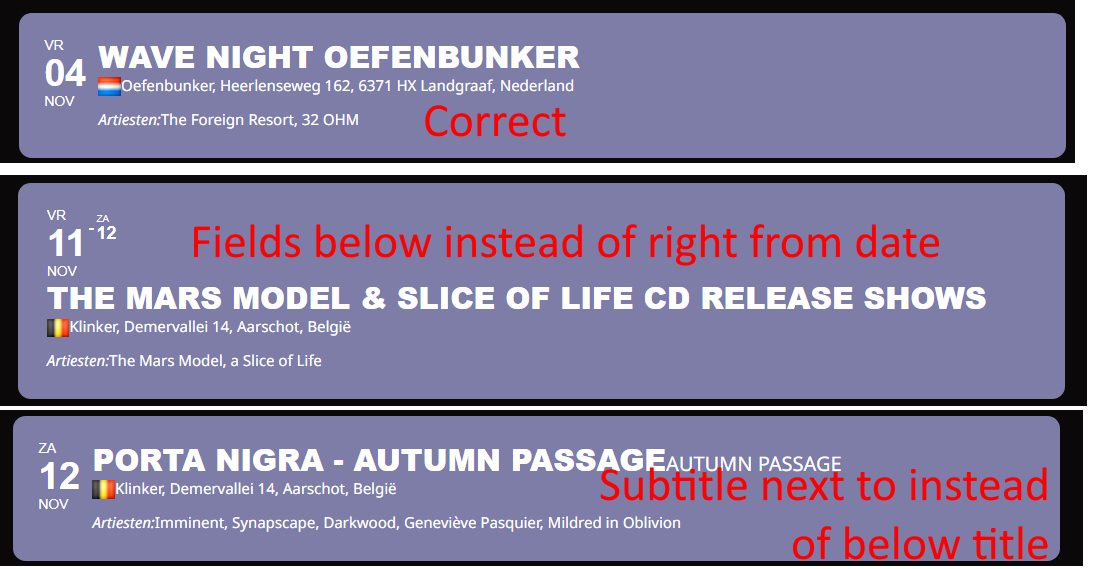
See attached image
First event is how I want it: Date to the left. Then 4 fields right from Date, each field on a new line (in this case there is no value for subtitle):
Second event has all other fields are below instead of right from date
Bottom event has subtitle next to title instead of on next line.
I tried so many combinations of distributing fields over sections or keeping them together in sections, all to no avail. So I would love to go back some versions, but can’t find any downloads of older versions.
Reply to: tickets(294314)
My theme was just updated and i don’t know how case is solved. Thank you !
Reply to: tickets(292219)
hi thank you for your reply.
I understand better now, thank you.
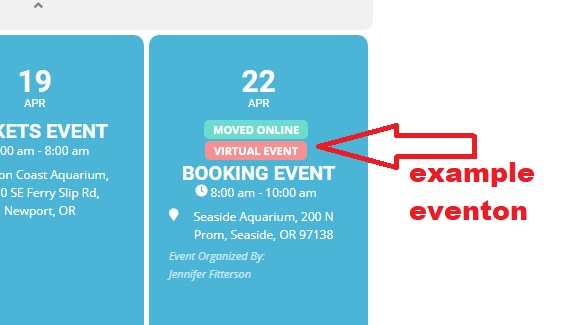
There is a problem with a “facebook live” event category ID:577 that is missing from the list. I can’t get it to appear…
It is an “online” event but the little “virtal event” insert does not appear.
Do you have an idea ?
Thanks
Reply to: tickets(294798)
Thank you!
Reply to: tickets(295357)
Ok I needed to move the build from build3. site since it will be used on Monday for another purpose
So you can use this url to test the issue:
https://build11.grafikbyran.com there is an initial password !abc12345 for entering the site
an event is located here
https://build11.grafikbyran.com/kalendern/extratraning/
The error is present and if you downgrade EventON to 4.0.6 it will work as expected
Reply to: tickets(295357)
Ok – I identified the problem on the stagins site – I worked flawlessly until I updated EventON, so it is caused by the latest update
Reply to: tickets(295357)
Here is a build/staging site where it works as expected:
https://build3.grafikbyran.com/kalendern/extratraning/
Reply to: tickets(291001)
1. Please add this CSS code to EventON > Styles (If you don’t see any change, EventON > Scripts & Styling > turn off Write dynamic styles to header > save settings > turn on Write dynamic styles to header):
.ajde_evcal_calendar.boxy.boxstyle1 .eventon_events_list .eventon_list_event .evcal_desc { flex: 1 0 50%; }
2. .evo_lightboxes .color.eventon_list_event .evoet_cx span, .evo_lightboxes .color.eventon_list_event .evoet_cx span.evcal_event_title { color: black !important; } .evo_lightboxes .color.eventon_list_event .evoet_cx .evo_tz_time > *,.evo_lightboxes .color.eventon_list_event .evoet_cx em { color: black !important; }
Reply to: tickets(295238)
Hello,
1. Please go to EventON > Scripts & Styling > enable Disable google web fonts & Disable font awesome fonts. Now you can load them locally.
2. Please go to EventON > Google Maps API > enable Disable Google Maps API.