Reply to: tickets(295319)

Hello, I would like to get through this last step so I can demo Paid Submission and create a process for folks to submit Events.  I have tested production (not in Payments Test Mode).  Chrome browser that I am not logged into, cleared browsing history, closed Chrome and reopened.
https://mount-shasta-events.com/contributor-add-new-event/

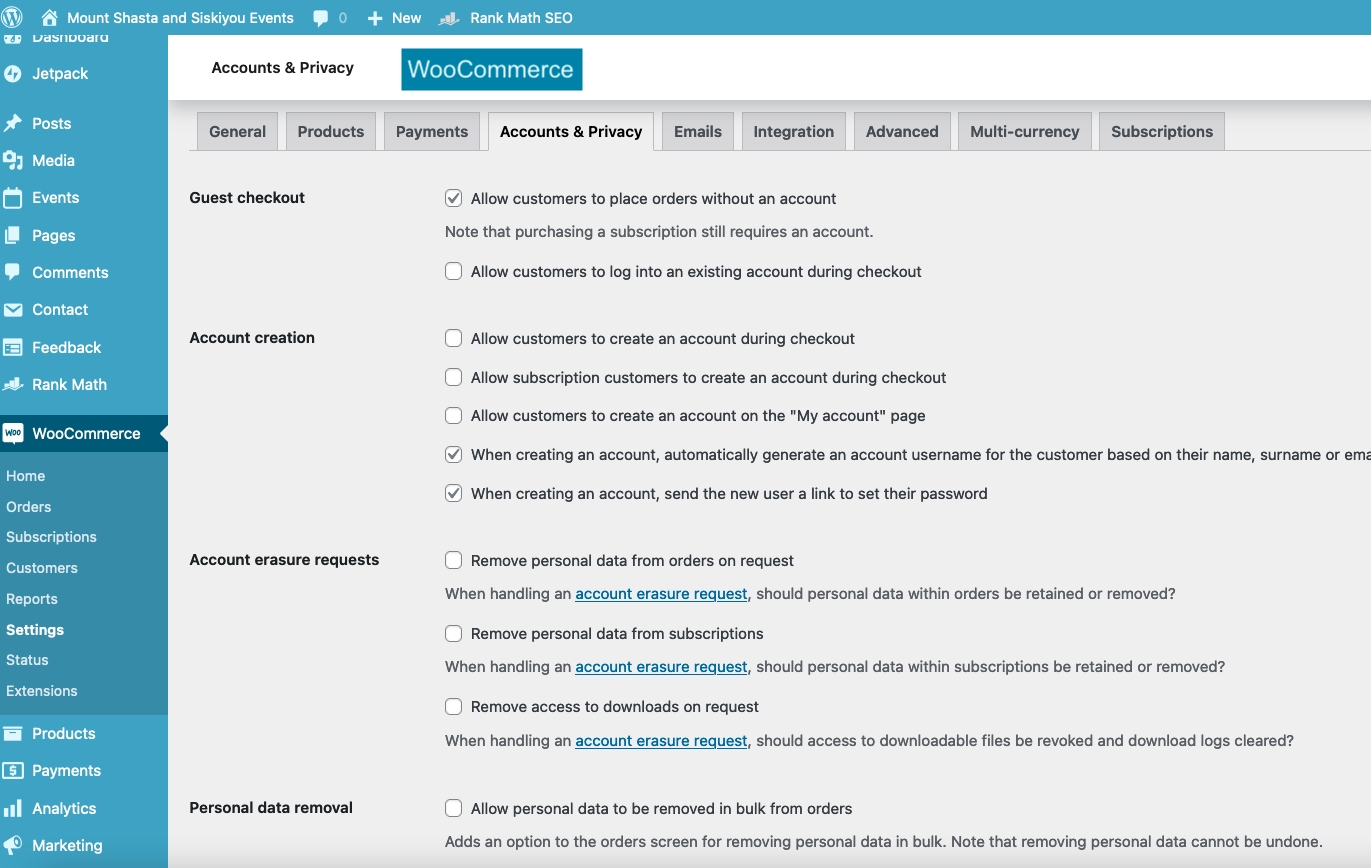
I will attach my WooCommerce Accounts & Privacy settings and EventON settings and User Permissions.

Title of page : Purchase Submissions or Login to use your already purchased submission

The blue button to login is visible.  ** If this were pressed it would take a first time customer or a return customer to WordPress.  I wouldn’t want either to login to WordPress. Although a Contributor has a limited view I definitely only want to give them access to the Add events and Manage events forms.  Should I use ‘Restrict Content’ plugin to do so?  I think in your settings I can hide the button **

Purchased 7 events for $7
Cart and Checkout with credit card worked
Received admin and customer email
Order is in Processing state
Completed the Order in WooCommerce ** this might not happen until the next day unless I find a plugin to set it to auto set to Complete.  Not sure if this is a good practice though **
Received admin and customer email that order is Completed
…
I returned to the Contributor : Add a New Event page after clearing browsing history to emulate a customer who might return the next day or with a different device.
No events available, must purchase or login.

** Checked for new Users and the new Customer is not added as a Contributor User. **

** What is the next step as the product is built.  What is the process flow? **


Reply to: tickets(295319)

I didn’t change them except to set them to Draft as there are duplicates.  I duplicated the original product (Event Paid Submission) to create the actual products.  I now see that it wasn’t ever necessary.  I set them to Draft because I didn’t want to delete them. I probably duplicated the original product to create the duplicates.  The duplicates and the other products can be deleted as I now understand it.

Reply to: tickets(294737)

Thank you for your response.  Yes, true, the products I added also are Hidden visibility. Yet these show in the Store (as does your default Paid Submission product).  

mount-shasta-events.com/mount-shasta-events-tribe-memberships/

The products are also Simple Product and Virtual.  Should I have created the products at all?  I tested adding a new EventON Event Submission Level with no product and I am able to purchase the not-a-product.  The product associated is the ‘Paid Event Submission’ product.  I now can’t see a reason to keep the other products.


Reply to: tickets(295379)

Hello,

EventON 4.1.3: https://helpdeskx.s3.amazonaws.com/wp-content/uploads/2022/10/27053250/eventON-35.zip

Can we also take a look at wp-admin first? Maybe we can fix your issues so you won’t need to downgrade.

Reply to: tickets(293345)

Perfect! Please reply here if you notice something.

If you have a moment, we would greatly appreciate if you could kindly leave us a review at codecanyon! from your account > downloads. Cheers!

Reply to: tickets(295389)

Hello,

Thank you for your messages, I am going to assign this ticket to Ashan and he will be able to take it from here and find you a solution. Please allow some time for him to get back to you, we greatly appreciate your patience and thank you for being a eventon customer!

Reply to: tickets(293345)

Thanks I did so, and so far it seems to be working.  Maybe it was the update.  Ill check it in December and follow up if I have any issues.  Thank you very much for your help