Thank you for your messages, I am going to assign this ticket to Ashan and he will be able to take it from here and find you a solution. Please allow some time for him to get back to you, we greatly appreciate your patience and thank you for being a eventon customer! Also please disable any IP blocking on your site if there are any.
Archives: Replies
Replies for tickets on suppota
Reply to: tickets(293177)
Hi,
I have same problem. Waiting for a solution…
Reply to: tickets(292949)
Hi,
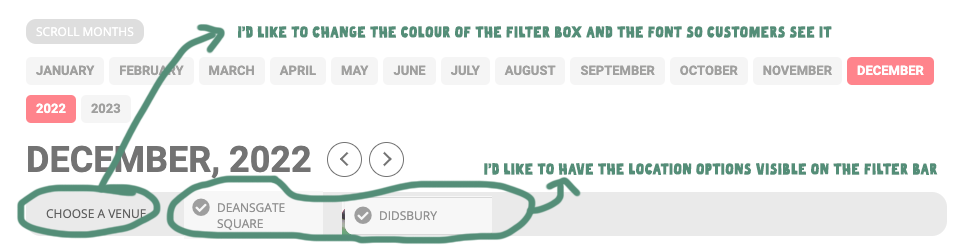
Thanks for the info, this is what I’m trying to achieve on the picture below. I’d like to have the location options showing on the filter bar
It would also be helpful to change the colour of the filter box and change the font so it’s really easy for customers to choose a venue.
Thanks
Helen
Reply to: tickets(293005)
Thanks very much, this have worked
Helen
Reply to: tickets(293177)
Same problem here. Can’t pick the location after the last update.
Reply to: tickets(293177)
This problem occurred AFTER updating to the latest version.
Reply to: tickets(292522)
We are glad your issue is resolved, if you have any further questions or concerns please feel free to create a new ticket.
Reply to: tickets(293177)
Hello,
Please ensure that you are using the latest versions of all our software.
To update eventon to latest version: If you are unable to do autoupdate, you can go to codecanyon your account > download and get the latest eventon version as zip file. Then you can go to your website > make sure “Delete eventon settings & data when EventON is uninstalled” is Deslected from eventon settings, delete old eventon, install new one and activate. This link will further explain the process it.
To update eventon addons: You can download latest eventon addons from myeventon > my account. Then you can go to your website, deactivate old addon and install new one and activate then delete the old addon. This link will further explain the process.
Let us know if this solves your issue
Reply to: tickets(293177)
I am experiencing the same issue. I have cleared the caches and still not working.
Reply to: tickets(293208)
Hello,
Please ensure that the “Tags” element is added to the EventTop designer.
Let us know if that works for you.