Login info stopped working. Could you check?
Since your events are repeating, Start and End Time of the event must be Start and End Time of the first repeat. You don’t need to make it lasts from one repeat until the last one. Could you check if it’s your case?
Hello,
It seems that your theme or a third-party plugin tries to lazy load the image, but fails:
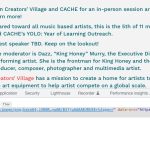
Could you disable Lazy Loading?
Hello,
Please follow the instructions in this documentation to activate debug in your site to see any PHP errors recorded that can provide insight on to whats going on. Please reply with a link to debug.log file. If you are not able to do this please send us FTP access to your site so we can do this for you.
Hello,
Please go to https://orrttacenter.lsidc.net/wp-admin/customize.php?return=%2Fwp-admin%2Fadmin.php%3Fpage%3Deventon%26tab%3Devcal_3 > Additional CSS.
That definitely works. Thank you. Can you please tell me where this CSS was added?
Sorry, I don’t know if I explained very well. I looked at it more, and it seems like my recurring events are above all the other events. It looks like they’re kind of buried. Is there a way to set recurring events to be last, and have all the new events show first?
Is it possible to do customisation projects for a set fee ?
I performed a restore of the database. Events are back as are the settings. I really would like to know how such a thing can happen. Updating the plugin is not very trustworthy this way.
I understand you can’t help with customisations but you can at least point in the right direction right ?
I am not interested in making changes on the frontend, I want to change the e-mail content of the inquiry.
Maybe there are some faulty options in our settings.
Our intention ist_
All (visitors) can see the guest lists
All (visitiors) can see the count of attend. an not attend. (on event card)
Only log in users can RSVP to events in the event and on the event card (one click RSVP)