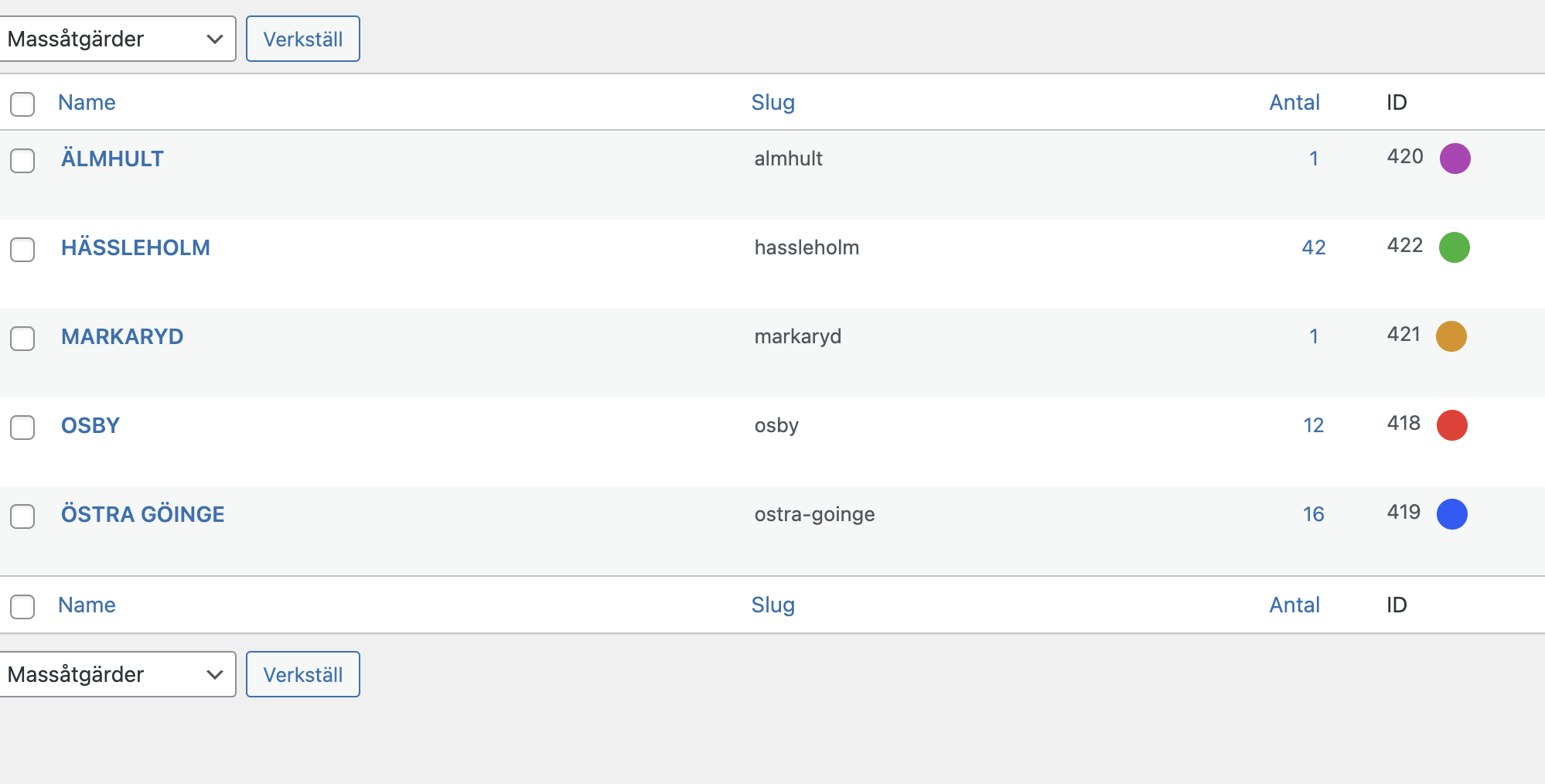
Is it possible to… when you choose colour for an event… to choose a category and use the colour assigned to that specific category automatically as background for the event?
See screenshot
Replies for tickets on suppota
Is it possible to… when you choose colour for an event… to choose a category and use the colour assigned to that specific category automatically as background for the event?
See screenshot
Thank you for your quick response.
Maybe am I downloading and loading a bad json file? I`m not a programmer and I’ve read that I can copy the json code to textedit and change the extension from .rtf to .json. I have made this as it wasn’t able to download the json file directly by clicking right button.
Is there a better way?
Thank you
User: EVENTON
Pass: nssbsfv7221&&&
Could you update EventON to 4.1.3? To update eventon to latest version: If you are unable to do autoupdate, you can go to codecanyon your account > download and get the latest eventon version as zip file. Then you can go to your website > make sure “Delete eventon settings & data when EventON is uninstalled” is Deslected from eventon settings, delete old eventon, install new one and activate. This link will further explain the process it. Also you can follow us on twitter to get real-time announcements on updates!
Please send us FTP access to your site as a private message, so we can perform several tests from our end and resolve your issue fast!
Duplicate the event and change the date. Also go to EventON > enable Set all past events as completed.
I don’t think that Action User Plus + ActionUser Paid Feature Events will work for you.
1. This is not supported.
2. Only manually. Users purchase this from WooCommerce’s Shop (ie “Feature my event for a week/month”) and then your admin goes and features an event from Action User or wp-admin dashboard if they have access.
ActionUser Paid Feature Events allows you to feature an event, nothing more complex.
3. Unfortunately, we don’t.
Ashan,
Can anything be done to fix this?
https://dev2.myeventon.com/wp-admin/post.php?post=31524&action=edit
Thank you for your messages, I am going to assign this ticket to Ashan and he will be able to take it from here and find you a solution. Please allow some time for him to get back to you, we greatly appreciate your patience and thank you for being a eventon customer! Also please disable any IP blocking on your site if there are any.
Styles are available in EventON > Appearance > Event Top. If you don’t see any change, EventON > Scripts & Styling > turn off Write dynamic styles to header > save settings > turn on Write dynamic styles to header.
As for location. Some of your events don’t have Location Address. Could you try adding it?
Hi Kevin,
I have added the custom CSS code below to try to fix the issue.
/*eventon – adjusts month title width*/
@media only screen and (min-width:769px){
p#evcal_cur.evo_month_title{width:40% !important;}}
@media only screen and (max-width:768px){
width:70% !important;}
}
Please let us know if that works for you.