login didn’t work for me
see video below
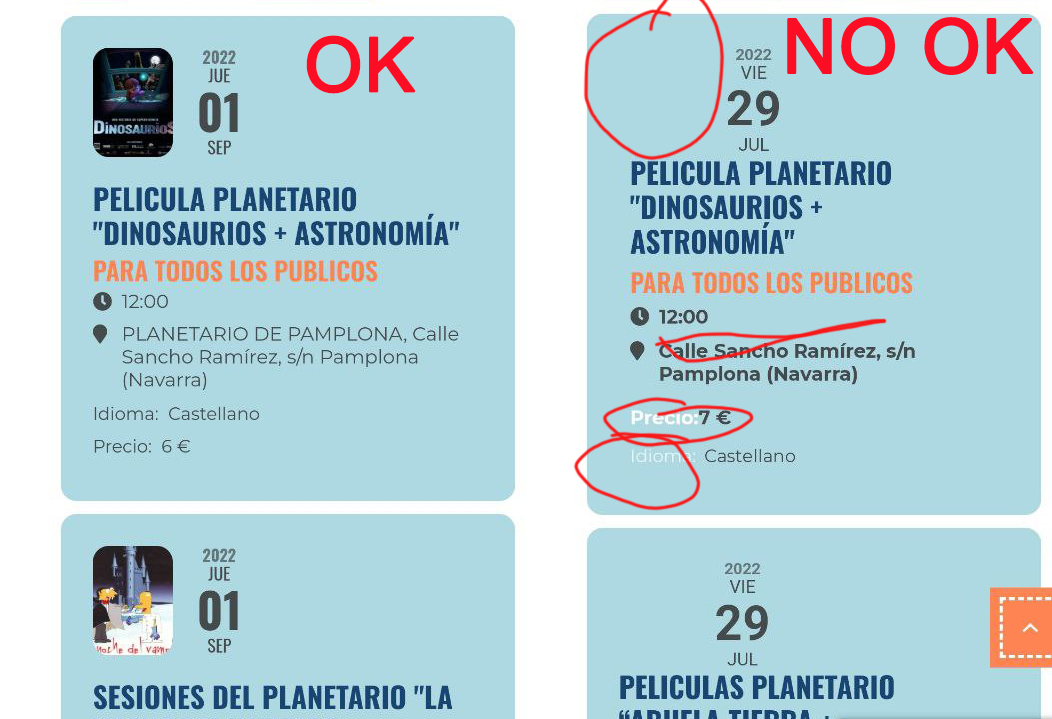
if the event top already has the event image up there- sometimes it just needs that eventon>>>>settings>>>>event top saved
if that fails
Please send us wp-admin access to your site as a private message for us to further assist your situation.
Please go to EventON > Appearance > Event Top > Text under event title (on EventTop. Eg. Time, location etc.).
If you don’t see any change, EventON > Scripts & Styling > turn off Write styles to header > save settings > turn on Write styles to header.
Hello,
You can either apply this patch:
https://docs.myeventon.com/patch-fixes/4-1-in_array-error/
Or go to EventON > EventTop > EventTop Main Day block fields > enable Event Day Name or any other you like.
We are going to include the fix to the next version.
We are glad your issue is resolved, if you have any further questions or concerns please create a new ticket.
If you have a moment, we would greatly appreciate if you could kindly leave us a review at codecanyon! from your account > downloads. Cheers!
actually the opposite you’d have to edit each other event see video
the other alternative is to create a repeating event that runs every day x 365 and therefore you could seperate each lesson and have a list of people for each day
Thank you for your great suggestion, at the moment it is not supported. However please create a new ticket and select Feature Request as category so others can vote on your idea and get it moved into development faster.
however here is a stop gap measure to get it kind of working
although that method has some downsides
Hello,
You can use the custom CSS code below to change the background color
.page-id-2617 .eventon_events_list .eventon_list_event .evcal_list_a{background-color: #4bb5d8 !important;}
Add the code in Appearance > Customize > Additional CSS
tanks and thats ok, but my normal events need tickets to be stopped at the start, is there a way to get just this single event to stop at the end?