Where can I find the code you added?
Archives: Replies
Replies for tickets on suppota
Reply to: tickets(287454)
I was able to import this one event:
https://www.tylerareagays.com/wp-admin/post.php?post=2506&action=edit&classic-editor
Is the issue with multiple events? Could you tell us more about “fails consistently”?
Please also follow the instructions in this documentation to activate debug in your site to see any PHP errors recorded that can provide insight on to whats going on. Please reply with a link to debug.log file. If you are not able to do this please send us FTP access to your site so we can do this for you.
In most cases there is not enough memory available on the server:
https://docs.myeventon.com/documentations/increasing-wordpress-memory-limit/
Reply to: tickets(285360)
There is this fix available:
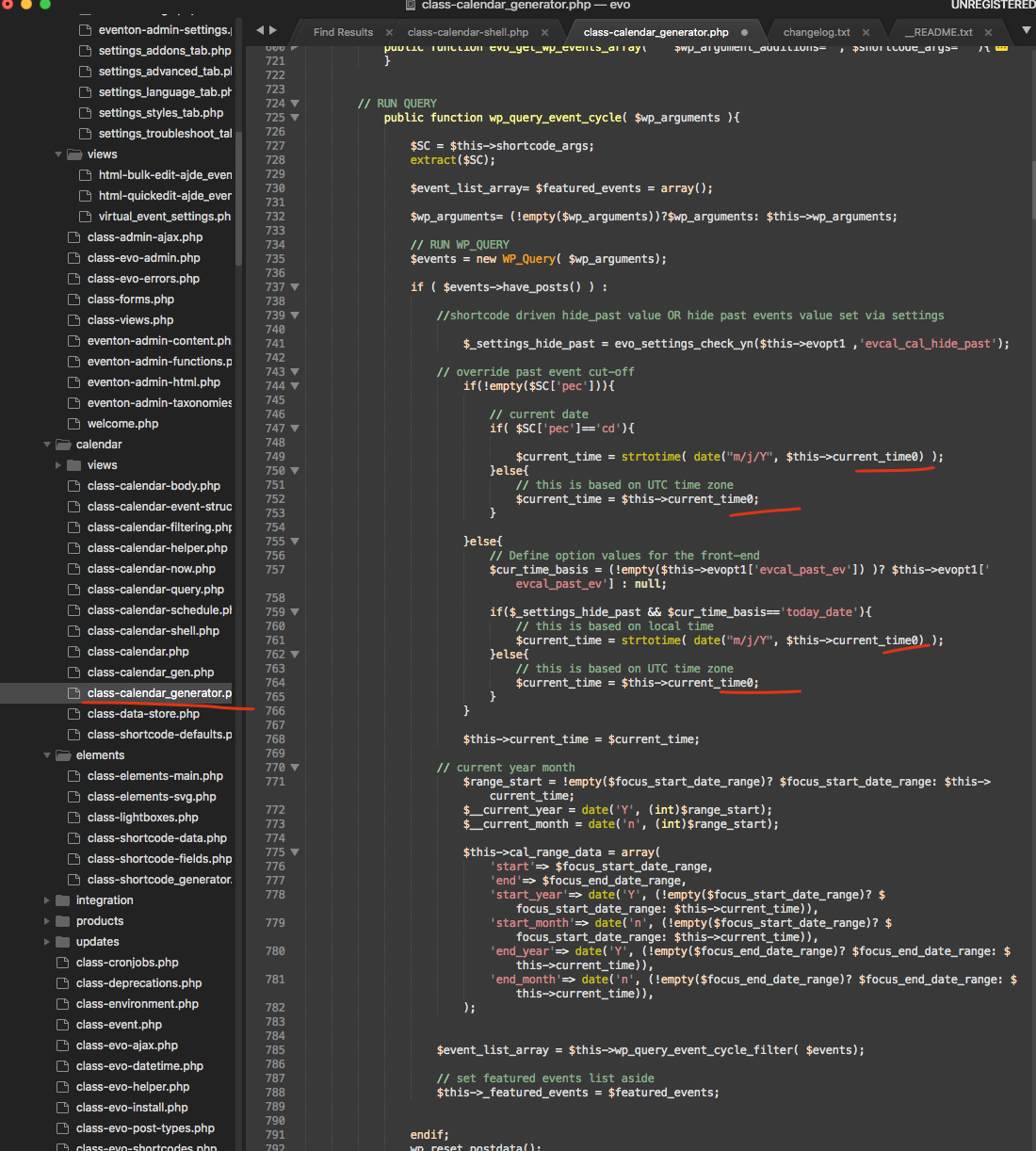
What you need to do is to remove underlined zeros.
Could you try and let us know?
Reply to: tickets(287555)
Hello,
Versions of your add-ons as well as the main plugin are quite old. Could you update?
Please check for latest version of this software from here.
The latest version of RSVP add-on should have updated emails.
To update eventon to latest version: If you are unable to do autoupdate, you can go to codecanyon your account > download and get the latest eventon version as zip file. Then you can go to your website, deactivate old eventon, activate (Do not delete eventon settings & data when EventON is uninstalled) from eventon settings, delete old eventon, install new one and activate. This link will further explain the process it. Also you can follow us on twitter to get real-time announcements on updates!
To update eventon addons: You can download latest eventon addons from myeventon > my account. Then you can go to your website, deactivate old addon and install new one and activate then delete the old addon. This link will further explain the process. Also you can follow us on twitter to get real-time announcements on updates!
Reply to: tickets(283586)
The website works, but I cannot login:
Error: The username eventon is not registered on this site. If you are unsure of your username, try your email address instead.
Could you take a look?
Reply to: tickets(287604)
Hello,
Could you follow:
You can either apply this patch:
https://docs.myeventon.com/patch-fixes/4-1-in_array-error/
Or go to EventON > EventTop > EventTop Main Day block fields > enable Event Day Name or any other you like.
We are going to include the fix to the next version.
Reply to: tickets(287642)
Hello,
This whole ticket is fully private so no one except you and us can see it.
In order to fix your original issue please follow:
You can either apply this patch:
https://docs.myeventon.com/patch-fixes/4-1-in_array-error/
Or go to EventON > EventTop > EventTop Main Day block fields > enable Event Day Name or any other you like.
We are going to include the fix to the next version.
Reply to: tickets(287657)
Hello,
If you want to show different dates, you need to use these options:
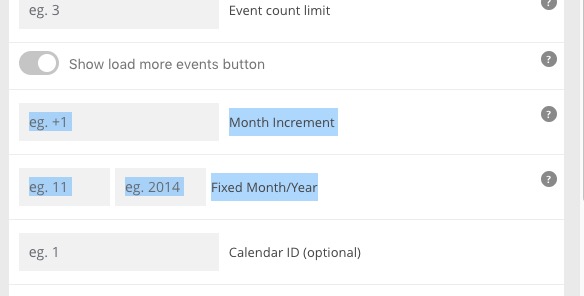
You can also use Event Type to show filtered results:
https://docs.myeventon.com/documentations/confused-event-type-categories/
https://docs.myeventon.com/documentations/how-to-use-event-types-to-do-more/
Could you give us an example of events you want to show in one and other calendar?
Reply to: tickets(287642)
Can you guys close this ticket and remove the pictures? I forgot to send them privately. We are gonna use another plugin.
Reply to: tickets(287642)
theres not alot we can do if we can’t even see the website