Would you mind sharing access to couple of those sites for me to go in and try activating the licenses while I have our software license system open to see what actually happen? – it is fine if you do not feel comfortable sharing those, then we can seek an alternative approach. However trying it out on a real site would be the best option 🙂
Archives: Replies
Replies for tickets on suppota
Reply to: tickets(286641)
Hey there, it past quite some time. Any solution to my problem?
Reply to: tickets(287870)
Fixed the issue should be good to go now my friend 🙂
Reply to: tickets(287974)
Hello,
Date and Time formats don’t seem to be correct. Please make sure that it’s similar to:
event_start_date & event_end_date – Start/End date in format mm/dd/YYYY
event_start_time & event_end_time – Start/End time in format h:mm:AM/PM
Also note that you must add time (7:00:AM) even if you add All Day option.
Reply to: tickets(287916)
Hello,
Make sure to try EventON > Scripts & Styling > turn off Write styles to header > save settings > turn on Write styles to header.
Please also note that you can go to EventON > Appearance > EventTop > set Text under event title (on EventTop. Eg. Time, location etc.) to white. Now go to EventON > Scripts & Styling > turn off Write styles to header > save settings > turn on Write styles to header.
Reply to: tickets(287925)
Hello,
The code is in https://pro-mendig.de/wp-admin/admin.php?page=eventon&tab=evcal_3
Please check and let us know.
Reply to: tickets(286836)
hi, thank you very much, but on EXTERNAL sites, using API-JSON, as you can see here:
https://elcampo.com/cabanaloscorrales
It is still displayed all as UPPERCASE, how can I get it displayed “normally” (as it was written when I created it) ?
Please, let me know, thanks.
And please, explain me how to FIX the DATE problem, based on previous message:
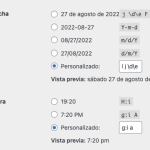
1 & 2: date time problems. I need to refer to one my very first tickets asking on HOW to configure date to display it correctly on the site, and you send me this code for DATE: “l j de F de Y” which I am using since the day I bought the plugin, and TIME as “g:i a” see screenshot.
So what can I do to FIX the problem inside the EventON plugin to get it working as expected?
Reply to: tickets(285785)
not sure if the above posted properly or not — perhaps because I included an image.
it worked, in that an occurring but not completed event was no longer removed. but it didn’t have the progress bar I remember previously having when events were still running. thanks.
Reply to: tickets(285785)
Reply to: tickets(284596)
+ i have one more question.
If we dont have event this month, but next month yes, so my code, doesnt show events of next month. Is possible make shortcode for it? https://www.dymytry.cz/?lang=en
Here we have only preview of Events, 4 pieces.
We have this code there:
[add_eventon_list event_count=”4″ show_limit=”yes” ux_val=”1″ hide_month_headers=”yes” event_past_future=”future” lang=”L2″]
Thank you.
Lukas