I think its literally deleting the events at 5pm PDT. Which shouldn’t mark the end of the day.
I currently have offset UTC off, whereas before I had it on. So seeing if that maybe deleted them at 5pm previously.
Yes do you mean a completely different site? Or a private page for example?
Thank you very much, that was awesome !
I have 3 more questions as I don´t know how to configure them:
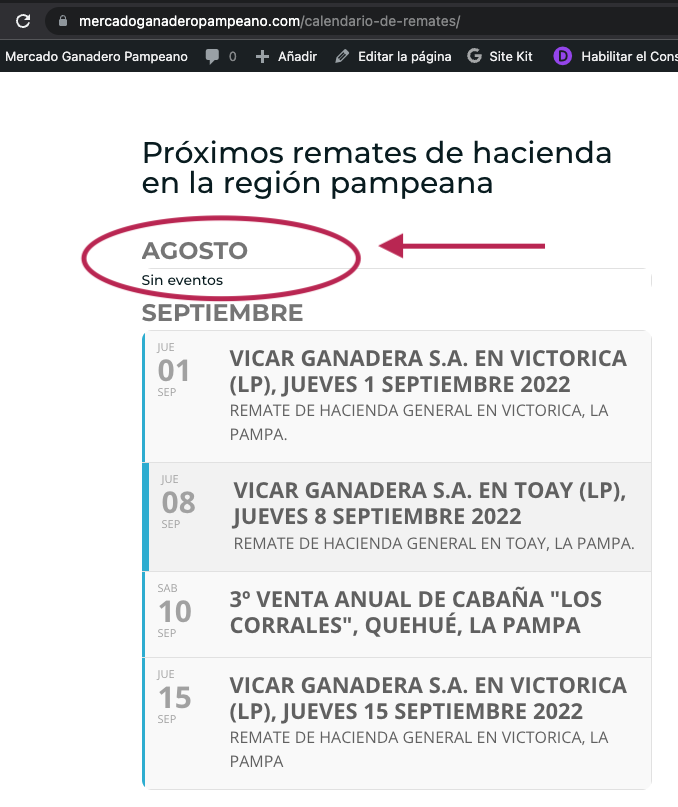
- after updating the code based on your information, event_organizer=NUMBER, I still see ACTUAL month displaying “No events” message, and that is very confusing, as in actual month, that organizer already did: 3 other events, and saying NO events i NOT truth. Is there any way to HIDE the MONTH name and the NO EVENTS message when this week, the same organizer hasn`t any NEW event, as all events will come on next month?
at:
https://www.mercadoganaderopampeano.com/calendario-de-remates/
you can see that appear AUGUST with NO events Message, but that is not truth as the organizer already did 3 events this month -august- and next events will come on next month, september, as you can see here: https://calendario.elcampo.com/vicarganadera/
2. the next question is that I have been testing with the additional parameters, and works perfect, too, BUT what happens in this cases:
2.1. How can I display events organized by more than 1 organizer?
2.2 How can I display events based on the TAGS I used for them -not just the organizer-, so ALL ORGANIZERS but 3 tags only. If not possible to use TAGS, why am I saving tags to events, is it useless? or is there any way to create a TAG CLOUD and list events based on such saved info that I haven`t found any documentation yet?
In order to request a refund, please create a new ticket under Billing & Accounts and be sure to include the order ID for which you need a refund for and the reason for requesting a refund.
Hello,
When I go to https://doitkw.com/events/web/wp-admin/profile.php > Additional Capabilities, it seems that there is no edit_terms. Could you add it?
Hello,
Unfortunately, you cannot add html elements to titles. But you can use Unicode symbols:
https://dev2.myeventon.com/events/test-23/
Go to https://unicode-table.com/en/2661/ > press Copy.
It seems that I misunderstood your request. The issue is that Event Type isn’t visible on Event Top, correct? Could you elaborate?
If the issue is with Event Top, could you go to EventON > Event Top > add Event Type under Title.
There is no other way, I am afraid.
Hello,
You can either apply this patch:
https://docs.myeventon.com/patch-fixes/4-1-in_array-error/
Or go to EventON > EventTop > EventTop Main Day block fields > enable Event Day Name or any other you like.
We are going to include the fix to the next version.
Hello,
Yes, the best and easiest solution is to go through the standard checkout process just like a regular customer.
Hello,
You can either apply this patch:
https://docs.myeventon.com/patch-fixes/4-1-in_array-error/
Or go to EventON > EventTop > EventTop Main Day block fields > enable Event Day Name or any other you like.
We are going to include the fix to the next version.