try ceo@icentertainment.com
Archives: Replies
Replies for tickets on suppota
Reply to: tickets(286819)
SO its important that when testing the ticketing system thatr you don’t purchase a ticket with the same account as the moderator
the link always shows for the moderator- in your case the gert was set to moderator and was also the one to purchase the ticket
see video below see what happens when gert is set to moderator and usewr eventon buys a ticket
sorry it goes on and on
as for your event tickets see this video
Reply to: tickets(286848)
have a look over this help page on increasing memory
https://docs.myeventon.com/documentations/increasing-wordpress-memory-limit/
Reply to: tickets(286832)
Thank you for your messages, I am going to assign this ticket to Ashan and he will be able to take it from here and find you a solution. Please allow some time for him to get back to you, we greatly appreciate your patience and thank you for being a eventon customer!
Reply to: tickets(286836)
Please send us wp-admin access to your site as a private message for us to further assist your situation.
Reply to: tickets(286820)
so with a quick look over your site
the 2 membership types are free member and community member – you also have coach
but the 2 calendars are for free and community.
so that I don’t have to learn all about this membership plugin
can you create a members only page that can show content based on their membership level
so if they go to page 1: that page 1 shows information for free members and seperate info for community members?
normally this is acomplished via shortcodes then I can show you how to make 2 calendars for each type of member
if not are you creating a page for free members and a seperate page for community members ?
in which case I’ll show you the same thing but instead of being seperated on the same page via shortcode you would add the 2 different calendars on there dedicated member pages
Reply to: tickets(286842)
Hi Brad,
Please navigate to Eventon > Settings > Appearance > ActionUser Styles
Reply to: tickets(286832)
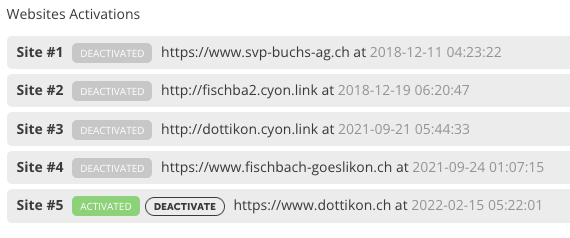
Hi
no not exactly.
You can see what I mean in the screenshot. The plugin is inactive in the websites that are no longer used. As soon as I activate the plugin in a new website and enter the licence, the active one from dottikon.ch, for example, becomes inactive.
I suspect this is because all 5 are listed, although 4 are inactive.
This is exactly the same for all the licences I described in the first ticket.
Kind Regards
René
Reply to: tickets(286689)
Hello,
It seems that you are not using the latest version of our plugin. Please update and check if that fixes your issue. I would advise that you create a staging site and update the plugin there first before updating in your live site, just to make sure everything is working as it should
To update eventon to latest version: If you are unable to do autoupdate, you can go to codecanyon your account > download and get the latest eventon version as zip file. Then you can go to your website, deactivate old eventon, activate (Do not delete eventon settings & data when EventON is uninstalled) from eventon settings, delete old eventon, install new one and activate. This link will further explain the process it.
Reply to: tickets(286845)
Hello,
Thanks for reaching out.
Which tags are you referring to, please send a screenshot showing them, it will really help.
Also, the user you have included in the ticket does not have admin rights. Kindly grant the rights so that we can troubleshoot the issue.