Thanks – I did that — No change
Archives: Replies
Replies for tickets on suppota
Reply to: tickets(284580)
Hello,
Event Map 1.4.8 fixes this issue. Please update.
To update eventon addons: You can download latest eventon addons from myeventon > my account. Then you can go to your website, deactivate old addon and install new one and activate then delete the old addon. This link will further explain the process. Also you can follow us on twitter to get real-time announcements on updates!
Reply to: tickets(284582)
Hello,
You can either apply this patch:
https://docs.myeventon.com/patch-fixes/4-1-in_array-error/
Or go to EventON > EventTop > EventTop Main Day block fields > enable Event Day Name or any other you like.
We are going to include the fix to the next version.
Reply to: tickets(284583)
Hello,
You don’t need any add-ons. Just use
[add_eventon eventtop_style=”2″]
Also make sure that EventON > EventTop looks similar to:
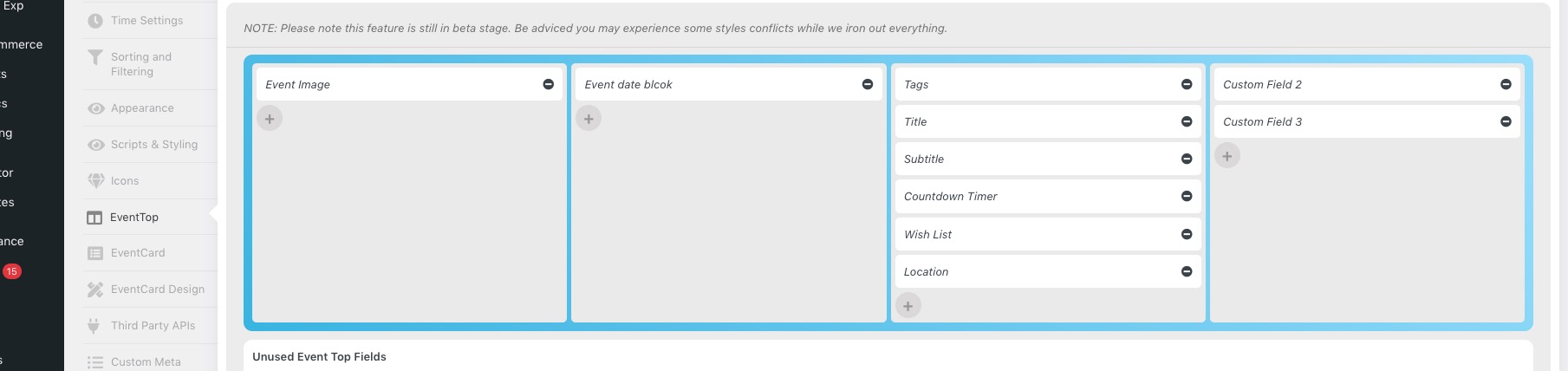
Reply to: tickets(284490)
Thanks you it’s working
Reply to: tickets(284549)
Regarding making the checkbox for the Learn More link in the front end form default to “checked”, can you confirm this is the area that needs to be modified and what I need to change so I don’t mess up anything else?
Found in the file eventon-action-user>includes>form>class-form.php
break;
case ‘learnmore’:
$default_val = str_replace(“‘”, ‘”‘, $default_val);
echo “<div class=’row learnmove’>
<p class=’label’><label for='”.$__field_id.”‘>”.$__field_name.$__req.”</label></p>
<p class=’input_field’><input type=’text’ class=’fullwidth{$__req_}’ name='”.$__field_id.”‘ “.$_placeholder.” value='{$default_val}’ data-role=’none’/></p>
<p class=’checkbox_field’>
<input type=’checkbox’ “.($default_val?’checked’:”).” name='”.$__field_id.”_target’ value=’yes’ data-role=’none’/>
<label>”.eventon_get_custom_language($opt_2, ‘evoAUL_lm1’, ‘Open in new window’, $lang).”</label></p>
</div>”;
Thanks!
Reply to: tickets(283988)
So, we’ve never had that option turned on… by default it comes set off and we’ve never changed it. To be completely certain I went in and turned it on then off again and saved the settings, but it appears we are still getting the same notifications from Google.
Reply to: tickets(284549)
Sorry – ipBlocking is turned off now.
I know how to turn the custom meta fields into a link on the front end, I was just hoping you could tell me which document I need to edit – the one that tells your plugin to show the custom meta field on the front end in the single event view where this appears in the page HTML:
<div class=”evo_custom_content evo_data_val”><p>(305) 667-1651</p></div>
So I can insert the href tag to make it a clickable field on the front end.
Also, I know you can force the new window option to default to yes because I did it once before, and I think it was in the Active User form where I modified the code to just make it active and remove it from displaying in the form as an option.
This is the current field in the form:
<p class=”checkbox_field”>
<input type=”checkbox” name=”evcal_lmlink_target” value=”yes” data-role=”none”>
<label>Open in New Browser Window *</label></p>
So, like the other item I need help with, if you can just tell me where to find the file that controls this field then I can make the edits. I realize I might have to do it every time the plugin is updated, but that’s okay for now.
Thanks!
Reply to: tickets(282691)
Hi, Any update on information on this ticket? We have not received a reply in over two weeks. Thanks
Reply to: tickets(284538)
Hi Bruce,
You can apply the CSS code and then add this code to change the color to white again.
#evcal_list .eventon_list_event .evoet_cx em{color:#ffffff !important;}
Let us know if that works for you.