Hello Jay, I understand your need to have this issue resolved quickly and you feel frustrated when it is taking a long time.
Kindly check the calendar now. I have resolved the issue of event times resaving incrementing the time.
Replies for tickets on suppota
Hello Jay, I understand your need to have this issue resolved quickly and you feel frustrated when it is taking a long time.
Kindly check the calendar now. I have resolved the issue of event times resaving incrementing the time.
I was able to resolve the date block being on new line.
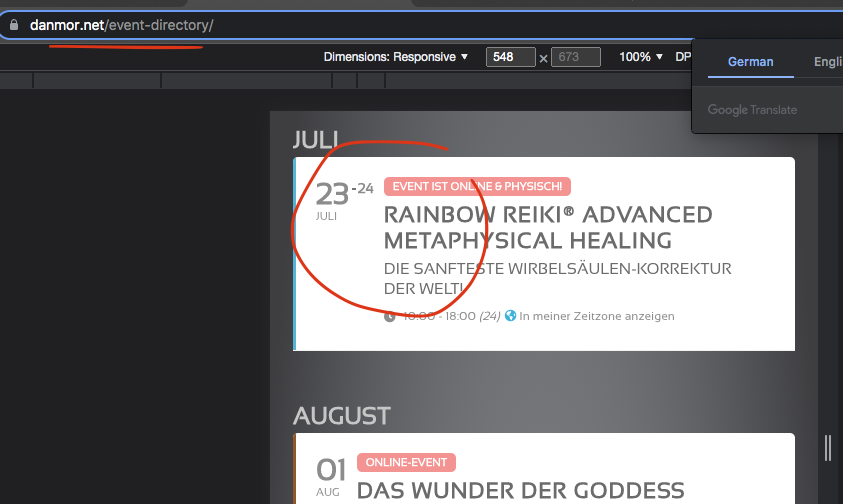
So there is no way that my old addon will work again? I already bought it and it’s not cheap to restore just one functionality I need…
Hello,
Please send us wp-admin access to your site as a private message for us to further assist your situation.
Could you also make sure that your version of Event Lists is the latest one?
Hello,
Can we take a look at Plugins settings page?
Hello,
EventON 4.0.6: https://helpdeskx.s3.amazonaws.com/wp-content/uploads/2022/07/12041321/eventON-32.zip
In order to fix the issue you can either apply this patch:
https://docs.myeventon.com/patch-fixes/4-1-in_array-error/
Or go to EventON > EventTop > EventTop Main Day block fields > enable Event Day Name or any other you like.
We are going to include the fix to the next version.
We are glad your issue is resolved, if you have any further questions or concerns please create a new ticket.
If you have a moment, we would greatly appreciate if you could kindly leave us a review at codecanyon! from your account > downloads. Cheers!
Hi there! Sorry for the huge delay in getting back to you. I have confirmed that the option to allow logged in users only is disabled. The RSVP form will still only show itself if I am logged in even though the “logged in users only” option is disabled. I have updated my RSVP addon as well as the EventON plugin to the latest versions. Can you help?
Our license key is 86d65b15-ab66-421a-9463-7346184ee47f
Thank you for your help. Adding the custom CSS finally got the fonts to display correctly. The spacing is still incorrect in Firefox for some reason, but we can live with that for now. Chrome looks fine. Again thank you.