We are glad your issue is resolved, if you have any further questions or concerns please create a new ticket.
Archives: Replies
Replies for tickets on suppota
Reply to: tickets(281077)
Hello,
Thank you for your reply. Have a nice day !
Malgo Pytel
Reply to: tickets(281053)
Please feel free to create a new ticket if you need help with anything else.
Reply to: tickets(281053)
Great!
Reply to: tickets(281111)
Disappointed to hear that been paying for a whole year without the license being in use should be happy to a client like me paying for something that is not in use, hoped we could find a solution since it has only been few days since the renewal was issued. Btw there was no reminder email sent, maybe check that automation email settings of yours.
Reply to: tickets(281111)
Hello,
Please take a look at https://docs.myeventon.com/documentations/terms-and-conditions-and-refund-policy/ > 7. Subscriptions & Automatic Renewal > 7.4 Subscription Refunds.
I am sorry but a renewal reminder mail was sent before the charge was made. We had given you the opportunity to cancel. Please go ahead and cancel the renewal so that you are not charged again.
Here is a tutorial on how to do that
https://docs.myeventon.com/documentations/how-to-cancel-addon-subscription-before-auto-renew/
Reply to: tickets(281096)
Hi Artem,
saving permalinks did not fix the issue.
WP-admin: https://feuerwehr-angelbachtal.de/wp-admin
user: t.dummy
pw: V9Jmz$6rL@gMC6LfK(SvFDOs
Reply to: tickets(280699)
typically offering up to three months of dates to choose from.
Can you create a new event for 3 months instead of 2 years then?
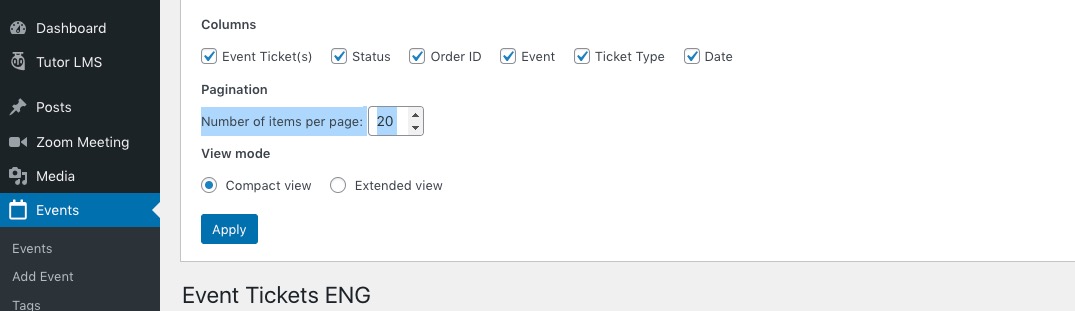
At the moment, it looks like I can only delete 20 events at a time
Increase this number:
Reply to: tickets(281096)
Hello,
Could you try going to wp-admin > Settings > Permalinks > save?
Please send us wp-admin access to your site as a private message for us to further assist your situation.
Reply to: tickets(280975)
Hello,
Please update EventON to 4.0.6.
To update eventon to latest version: If you are unable to do autoupdate, you can go to codecanyon your account > download and get the latest eventon version as zip file. Then you can go to your website, deactivate old eventon, activate (Do not delete eventon settings & data when EventON is uninstalled) from eventon settings, delete old eventon, install new one and activate. This link will further explain the process it. Also you can follow us on twitter to get real-time announcements on updates!
PS If you want to keep the old design go to EventON Settings > Event Top > Select Default Calendar EventTop Style: Clear with left border colors and gaps.